Published Updated  Azaz Vepari22 Mins read
7 Best Roofing CRM Software Platforms in 2026
Seven roofing CRMs compared on the handoffs that actually lose money — lead to customer record, measurement into estimate, signature to material order, crew to job cost. With every published price verified and the gap each one has.
Source-based assessment. Read our evidence standard.
In this article14 sections
The best CRM software for a roofing business depends on which handoff is currently costing you money:
- AccuLynx is the strongest all-round roofing CRM for an established roofing-only company, because measurement ordering, supplier ordering, supplements and production all sit on one job file. Its entry plan is the one published price in the roofing-specific tier.
- JobNimbus is the best fit when you want to shape the pipeline yourself, using boards that mirror your own stages rather than a vendor’s idea of a roofing process.
- FieldCamp is the best fit for a company running roofing alongside siding, gutters, repairs or maintenance.
- Roofr is the fastest path from satellite measurement to a signed proposal, and it is the only platform here with a genuinely free starting tier.
- QuoteIQ is the cheapest credible entry point, with satellite measurement and job costing included at a price the rest of this list does not approach.
- Exterio — formerly Roof Chief — is aimed at small and mid-sized retail exterior contractors who want flat published pricing and hands-on support.
- Jobber is the simplest option for a small repair-led roofer, though it carries no roofing-specific record for measurements, claims or supplier orders.
There is no single winner, and any page that gives you one is selling something. A storm-restoration company and a repair-led two-crew shop are buying different products, and the fastest way to waste a year is to buy the one with the longest feature list.
Best roofing CRM software at a glance
| # | Roofing CRM | Best for | Orders roof measurements natively | Live supplier ordering | Published pricing |
|---|---|---|---|---|---|
| 1 | AccuLynx | Established roofing-only companies | Yes — EagleView integration | ABC Supply, SRS, QXO | None — quote only since 18 Aug 2026 |
| 2 | JobNimbus | Contractors who want to shape their own pipeline | Yes — per its integrations page | ABC Supply, SRS, QXO | None we could read (see below) |
| 3 | FieldCamp | Roofing plus other exterior or service work | No — stores figures or the file | Purchase orders, not a catalog | Quote on request |
| 4 | Roofr | Retail residential sales speed | Yes — its own report service | Supplier integrations | Free; $109 / $249 / $349 |
| 5 | QuoteIQ | Lowest cost, measurement from $74.99 | Yes — MapMeasure Pro | Not documented | $29.99 to $699 |
| 6 | Exterio | Small-to-mid retail exterior contractors | Yes — EagleView, GAF QuickMeasure | Material ordering | From $199/mo |
| 7 | Jobber | Small repair-led roofers | No | No | Core from $49/mo, 1 user |
Pricing checked: August 17, 2026 — every figure above is the vendor’s own published number, read from the vendor’s own site on that date. Entry prices are not final costs, so confirm the tier, seat count, measurement report fees, payment processing rates and add-ons in writing before you sign.
What a roofing CRM actually has to do
A roofing CRM is not a contact list with reminders. It has to carry one job through the lead, the property, the measurement, the estimate, the signature, the deposit, the material order, the crew, the photos, the actual costs and the final invoice.
Roofing margin does not usually disappear inside any one of those steps. It disappears in the handoffs between them, every time somebody retypes a number that already existed somewhere else.
That is the test this comparison applies. The best roofing CRM for you is the one that moves your job through those handoffs with the fewest workarounds, not the one with the most features on a pricing page.
The four handoffs that break
- Lead to customer record. Does an inbound call, form or door-knock become a record with the property attached, or does someone rebuild it later?
- Measurement into estimate. Do the squares, pitch and linear feet become priced line items, or does a technician read a PDF and type quantities into a spreadsheet?
- Signature to material order. Does an approved proposal produce a supplier order against your negotiated pricing, or does it produce a phone call?
- Crew to job cost. Do labour, materials and change orders land against the job so you learn the real margin, or do you find out at month end?
How we compared these seven
This comparison is documentation-led, not a hands-on test of every platform. Every feature and pricing claim below comes from the vendor’s own current public documentation or pricing page, and where a vendor’s own docs contradict a common marketing claim, the docs win.
We chose these seven because they are the platforms Google’s own answer set returns for roofing CRM queries, plus the two named in our video comparison. That matters more than a longer list, because it is the set a roofing owner will actually be shown.
One deliberate exclusion is worth naming. ServiceTitan is a serious platform for a roofing division inside a larger multi-trade company, but it is not a roofing-specific CRM, and we cover it in our 5 best roofing software platforms comparison instead.
On JobNimbus pricing, we have to be precise. jobnimbus.com returns HTTP 403 to our network, so we could not read its pricing page — that is a failure to access it, not evidence that no published price exists.
Third-party figures circulating for JobNimbus openly contradict each other, so treat every JobNimbus number you find online as unverified until a written quote says otherwise. Its documented features below come from its public help centre, which we could read.
1. AccuLynx — best all-round roofing CRM
AccuLynx is the only platform on this list that does nothing except roofing, and after comparing the seven, that focus is still the most defensible reason to buy it. Its own title tag calls it the best roofing CRM software, and for a roofing-only company the claim mostly survives contact with the documentation.
Key roofing CRM features
- Sales and CRM, production, finance and operations modules on one digital job file
- EagleView measurement integration, with quantities populating estimates
- Direct supplier ordering and catalogue access with ABC Supply, SRS Distribution and QXO
- Insurance restoration workflow covering supplements, permits, mortgage checks and adjuster documents
- Document automation, text messaging, a customer portal and crew management
- CompanyCam and QuickBooks integrations
- Custom reporting, with DataMart analytics at the enterprise tier
The supplement workflow is where that roofing focus shows most clearly. A supplement is built from the line items already on the claim, so the original claim amount, the requested figure and the new claim amount sit in one table instead of in a spreadsheet somebody maintains separately.
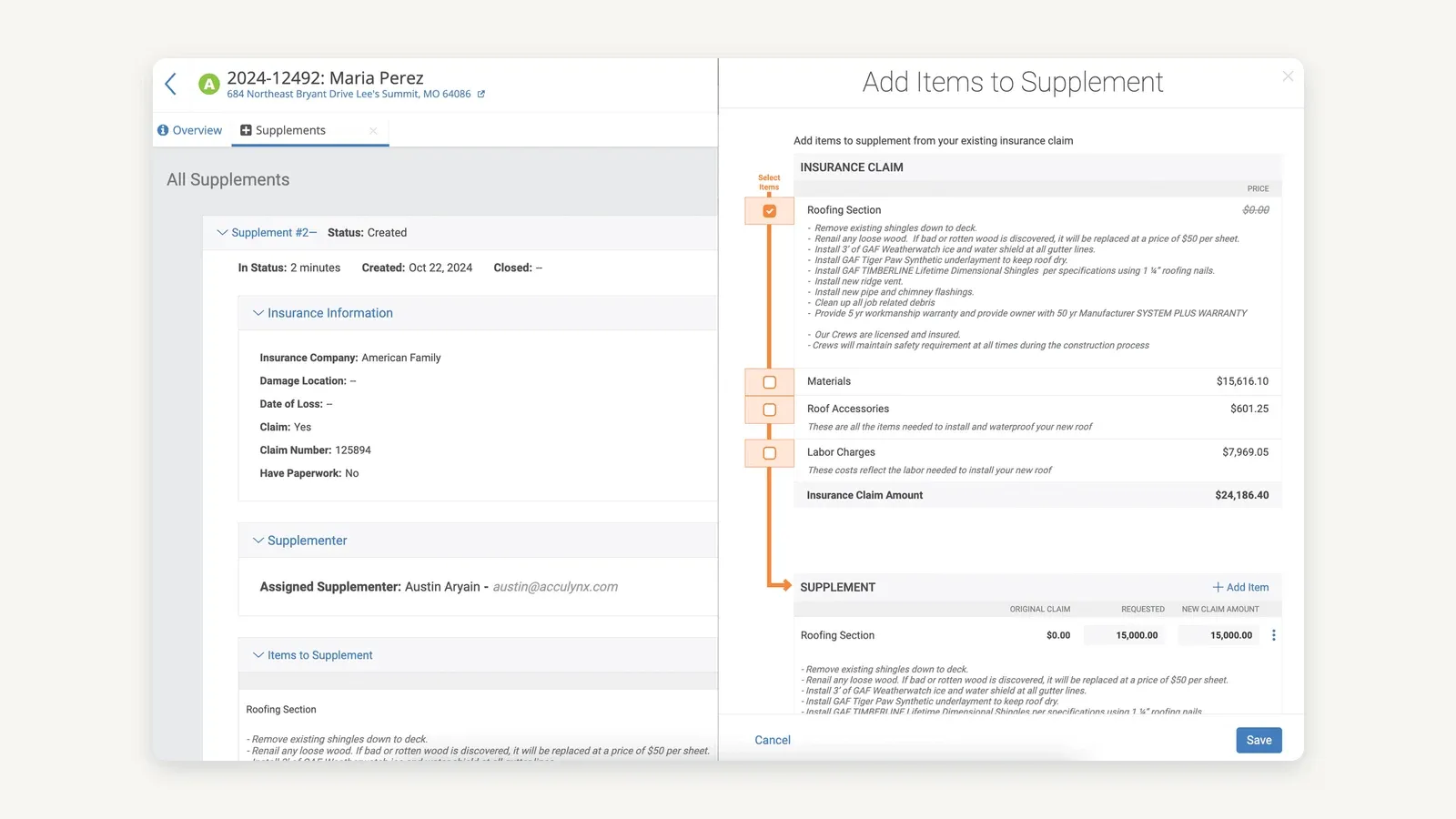
Building a supplement from the claim’s existing line items, with the original, requested and new claim amounts in one table. The orange arrow and “Select Items” label were drawn onto this image by AccuLynx and are not part of the product interface — it is vendor-supplied marketing material, from which we cropped a decorative device bezel. Source: AccuLynx.
AccuLynx pricing
AccuLynx publishes no pricing as of 19 August 2026 — its plan options page describes two plans, Pro and Elite, and directs you to a custom quote. Until 18 August 2026 it published an Essential plan at $250 a month, and it does not publish user limits for any tier.
Best for
An established roofing company doing retail, insurance or both, where roofing is the only trade and the pre-built roofing path is worth more than configurability.
Limitations
Two-thirds of the range is quote-only, so you cannot compare Pro or Elite against anything else on price without going through sales. The roofing-only focus also cuts the other way — if you add siding, gutters or a maintenance division, you are extending a product built around one trade.
AccuLynx also publishes outcome claims of nine hours saved per user per week and 32% more job profit after year one. Treat those as vendor marketing rather than verified findings, because the methodology behind them is not published alongside them.
2. JobNimbus — best for shaping your own pipeline
JobNimbus is the flexible one. Its help centre documents jobs, contacts and boards as the core model, and the boards are the reason roofers choose it.
You define the stages — new lead, inspection booked, estimate sent, approved, waiting on materials, crew scheduled, invoiced, paid — instead of accepting a vendor’s fixed roofing pipeline. For a company whose process is already working, that is the difference between adopting software and fighting it.
The builder also lets you run more than one workflow at once, which is how a company doing both retail and insurance keeps two processes apart without two systems. Separate retail and insurance workflows can each carry their own statuses and feed their own boards.
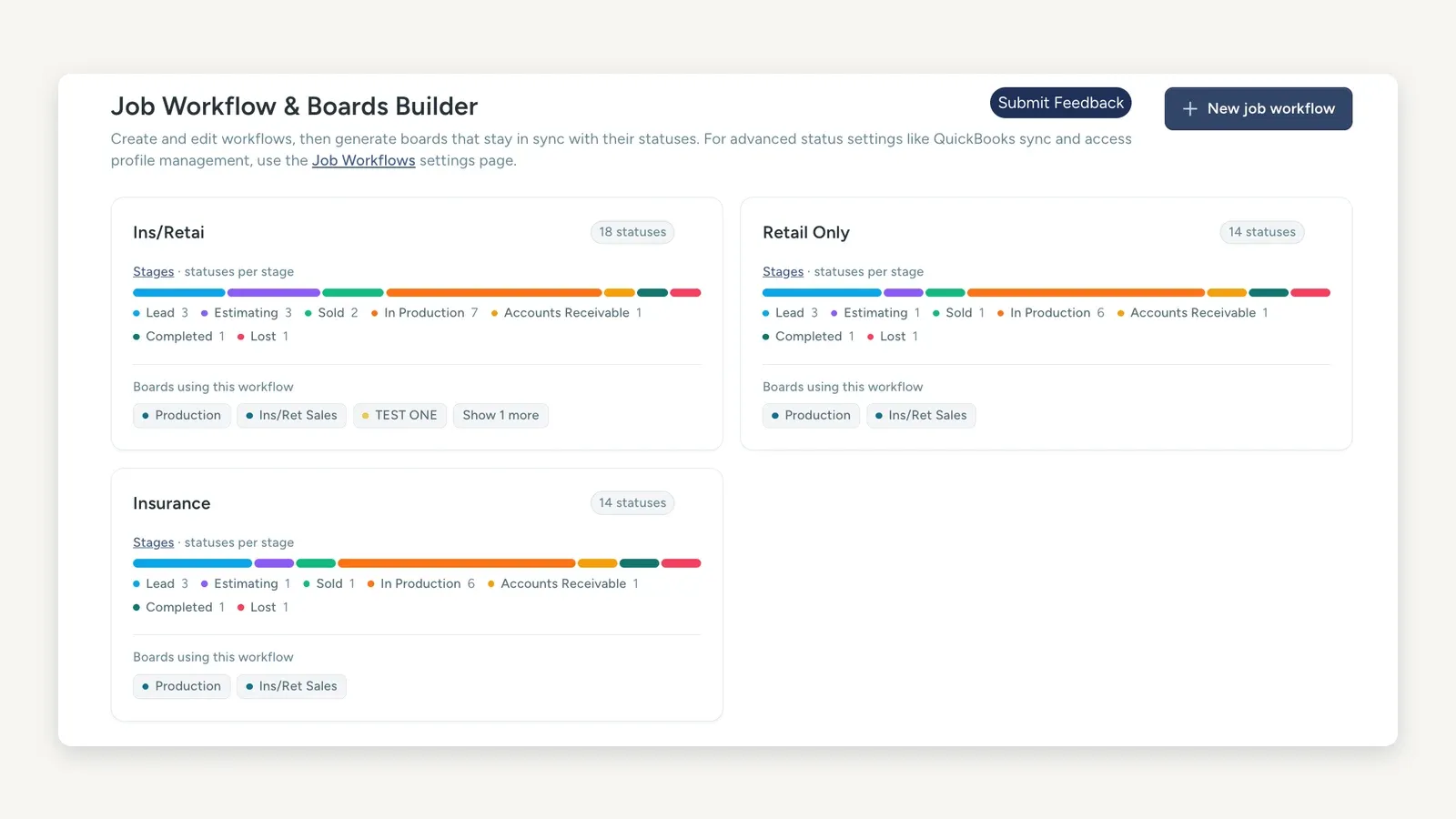
Three job workflows with their own status counts, and the boards generated from each — a combined workflow at 18 statuses alongside separate Retail Only and Insurance workflows at 14 each. This is a demonstration account, not a production configuration: one of the boards is named TEST ONE, and the first workflow label is truncated to “Ins/Retai” by the product itself. Source: JobNimbus official knowledge base.
Key roofing CRM features
- Jobs, contacts and boards, with stages you define yourself
- Automations that create tasks and send email as jobs move between stages
- Engage for customer text messaging
- Financials covering estimates, invoices and payment tracking
- JobNimbus Payments for card and eCheck collection
- A suppliers section, plus supplier ordering and measurement provider connections documented on its integrations page
- QuickBooks Online and QuickBooks Desktop support
- Custom and built-in reporting
QuickBooks Desktop support deserves a specific mention, because it still decides the software question for a lot of established roofing companies whose accountant is not moving.
One provenance note, because it affects how much weight to give the supplier claim. The boards, automations, texting, financials, payments and QuickBooks items above are from JobNimbus’s own help centre, which we could read today.
Its named supplier ordering and its measurement provider ordering come from jobnimbus.com/integrations, recorded in our roofing software comparison when that page was readable. We could not re-verify either today, for the same 403 reason as the pricing.
One supplier name to watch while you compare. The three big roofing distributors here are ABC Supply, SRS Distribution and QXO — and QXO is what Beacon Building Products became, after QXO completed its acquisition and renamed it in April 2025.
Older integration pages and comparison articles still say Beacon, so a platform listing “Beacon” and one listing “QXO” are naming the same distributor. Do not treat that as a difference in supplier coverage.
JobNimbus pricing
We could not verify a JobNimbus price. Its site returns 403 to us, and the third-party figures in circulation contradict one another badly enough that repeating any of them would be inventing a fact.
Best for
A roofer running both retail and insurance work who wants supplier ordering plus a production board shaped to their own process, and who is willing to go through sales to get a number.
Limitations
You cannot line JobNimbus up against AccuLynx or Roofr on price without a written quote first. Its flexibility is also real work — a board you design yourself is a board you have to maintain, and that is a cost that does not appear on any pricing page.
3. FieldCamp — best for roofing plus other exterior work
FieldCamp is the platform whose documentation is worth reading closely, because it is unusually specific and because it corrects one thing people assume about it.
What it does well is publish an explicit roofing data model rather than a marketing page. Five custom objects carry the trade: Roofing Project, Insurance Claim, Roof Measurement, Material Order and Warranty.
Read one thing carefully before you treat that as a feature list. None of those five objects ships prebuilt — FieldCamp’s documentation states that “everything above is assembled from the same engine every FieldCamp account has”, and describes each one as a custom object built on its customisation engine.
So the roofing data model is a reference implementation you configure, not a roofing template you switch on. That is a genuine strength if you want the model to match how your shop runs, and a genuine setup cost if you expected to be selling on day three.
The documented roofing data model — which you build yourself
- Roofing Project — the production spine, carrying work type, roof system, contract value, signed date, production dates and permit number, and relating to the customer, building, claim, measurement, estimate, invoice, job, material orders, warranties and team members
- Insurance Claim — claim number, carrier, policy number, loss date and cause, adjuster details, replacement cost, actual cash value, depreciation, deductible, supplement total and a calculated net contractor amount
- Roof Measurement — report source, total squares, predominant pitch, facet count, ridge, hip, valley, eave and rake linear feet, waste factor, steep and low-slope areas and the adjusted squares figure
- Material Order — order number, vendor, price book line items, requested delivery date, delivery type, confirmation number and a loadout sheet
- Warranty — type, manufacturer, coverage term, start and expiry dates, registration number and a compliance countdown
Around that sit AI job scheduling, an AI dispatcher, route optimisation, and job cost tracking through job logs. Scheduling can propose a qualified person and time from skills, availability, travel and workload while a human confirms the plan.
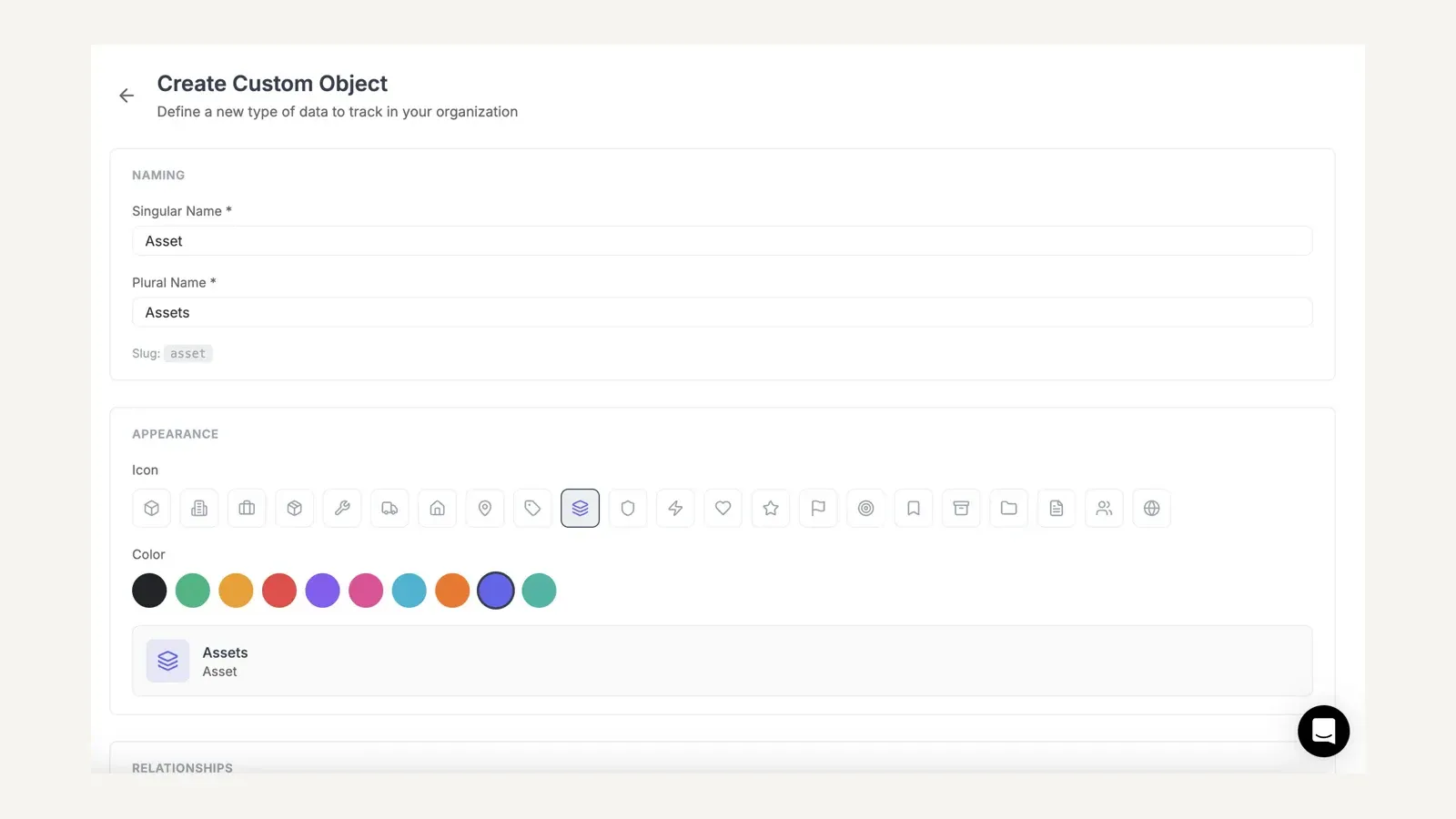
This is the mechanism behind every roofing object listed above — the builder where you define a new object type, here creating one called Asset. No roofing-specific object ships out of the box; the roofing project, claim, measurement, material order and warranty are all built here. Source: FieldCamp official documentation.
FieldCamp pricing
FieldCamp pricing is quoted per business. Book a demo with FieldCamp to get a quote for your team.
Best for
A growing company where roofing is one of several work types, and where custom records, published pricing and one configurable operating model matter more than a pre-built roofing path.
Limitations — and one claim to correct
FieldCamp does not order or import roof measurements. Its own documentation states that it “stores the numbers from an aerial report and lets you attach the report file” but “does not order or auto-import the report from the measurement provider.”
EagleView, QuickMeasure and Hover appear on the Roof Measurement record as report-source options, which labels where the numbers came from rather than fetching them. Automating that handoff is a custom integration you commission against its API, so ask for the scope and the cost in writing before you treat the measurement step as solved.
The purchasing side needs the same care. FieldCamp documents vendors and purchase orders, which is an internal ordering record — we found no live supplier catalogue or direct ordering integration of the kind AccuLynx and JobNimbus publish with ABC Supply, SRS Distribution and QXO.
So the honest position is narrower than the usual pitch. FieldCamp wins on configurability, mixed work types and scheduling, and it loses the measurement-ordering and supplier-ordering handoffs to the roofing specialists.
It also asks you to build the roofing model yourself, which the specialists ship ready-made. Price that configuration work into the comparison rather than treating the documented data model as something you receive.
4. Roofr — best for retail residential sales speed
Roofr is built around one motion done faster than anyone else: satellite measurement to a signed proposal. Its own positioning is a roofing CRM with the measurement service attached, and for retail residential sales that ordering is the right way round.
Key roofing CRM features
- Interactive job pipeline and customisable job boards
- Its own measurement report service, rather than a third-party integration
- Instant Estimator for homeowner-facing quotes, sold as an add-on
- Proposals with unlimited e-signatures, plus a PDF signer
- Material ordering and supplier integrations
- Invoicing, card and ACH payments, and job costing
- Analytics dashboard, automated actions and QuickBooks integration on higher tiers
The reason this is the fastest path to a signed proposal is that the measurement is a saved record you pick from a list, not a PDF somebody reads. Choosing a report calculates the quantities, and the priced line items follow from it.
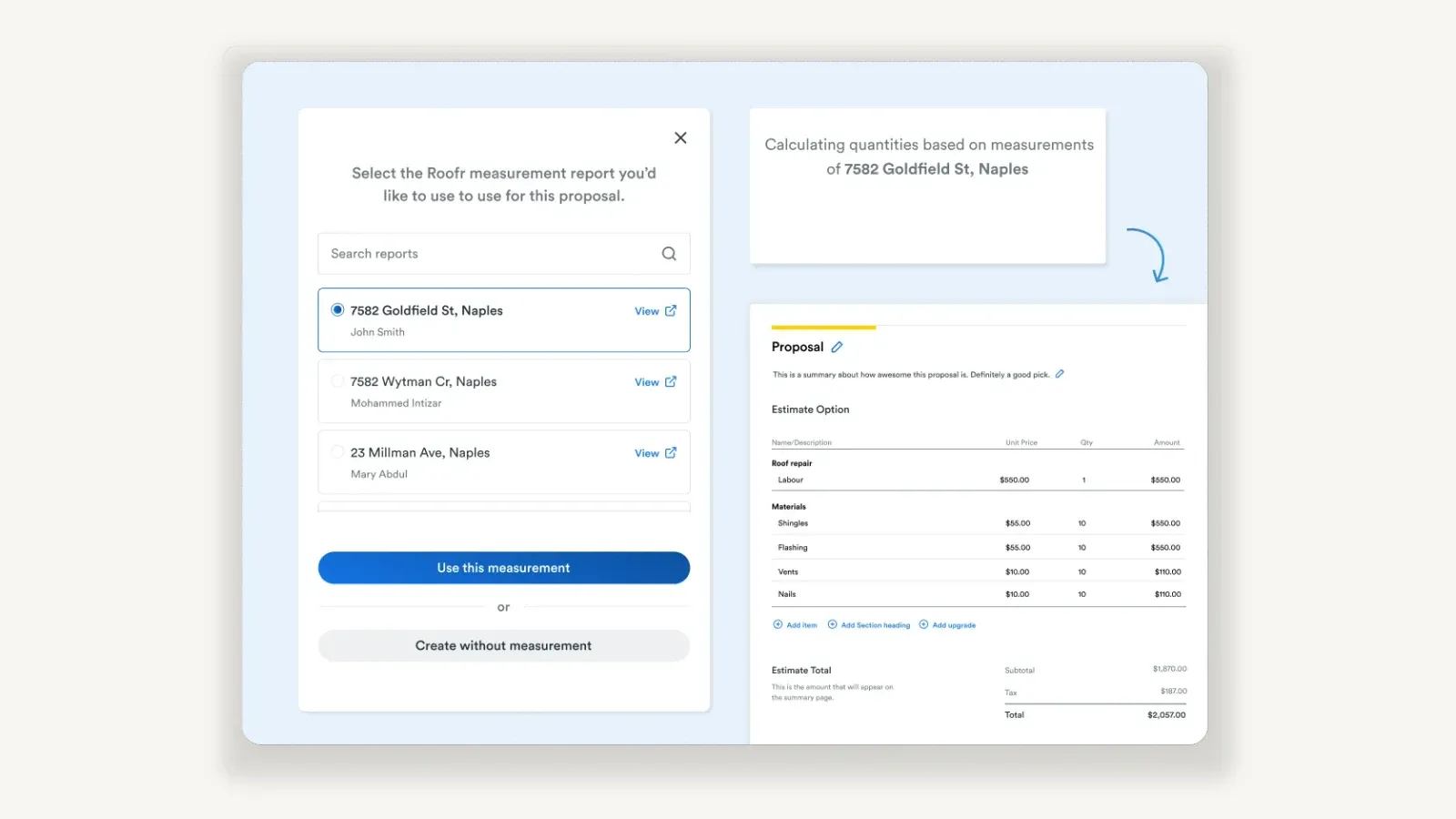
Picking a saved measurement report, and the priced proposal calculated from it. This is one estimate option, not a good/better/best set — do not read tiered proposals into it. Roofr’s own figures do not reconcile either, so no claim here rests on them: the vents and nails rows both print $110.00 against a $10.00 unit price at a quantity of ten, and the $1,870.00 subtotal and $187.00 tax follow the printed column rather than the unit prices, which give $1,850.00 and $185.00. The pale blue ground, the two-panel arrangement and the curved arrow are Roofr’s own marketing composition rather than product chrome, a fourth saved report is cut off below the three shown, and the doubled “to use to use” in the dialog heading is the vendor’s typo. Source: Roofr.
Roofr pricing
Roofr is the only platform here with a real free tier. Starter is $0 with one basic job board, 10 trial proposals, invoices and work orders, and measurement reports at $19 each.
Paid plans are Measure+ at $109 a month, Essentials at $249 and Scale at $349, with measurement reports dropping to $13. Every plan includes unlimited users, which is unusual in this category and matters for a sales-heavy roofing team.
Best for
A retail residential roofer whose bottleneck is time-to-proposal, or a small company that needs to start at zero and grow into paid tiers.
Limitations
Measurement reports are charged per report rather than included, so a high-volume estimating operation should model that cost before comparing headline prices. Insurance restoration is also not its strength — if supplements and mortgage checks are your core process, AccuLynx is the first product to demo.
5. QuoteIQ — cheapest credible entry point
QuoteIQ is the outlier on price, and it is the reason this list has seven entries rather than six. It publishes a full plan range starting at $29.99 a month, with satellite measurement and job costing sold inside the plan rather than as add-ons — though neither is on the entry tier.
Key roofing CRM features
- MapMeasure Pro for satellite roof measurement, from the Beginner plan up
- An AI estimator that produces estimates from photos
- QuoteIQ Cam for photo documentation
- Job costing for per-roof profitability, from the Pro plan up
- AI Autopilot for automated follow-up, and an AI call-answering service
- Route optimisation from the Elite plan, and unlimited seats on Max
- Automated review requests and QuickBooks integration, from the Pro plan up
MapMeasure Pro is the feature that justifies the price comparison, because measurement is normally the thing you buy separately. You trace the roof on satellite imagery and the area and perimeter come back against the traced outline.
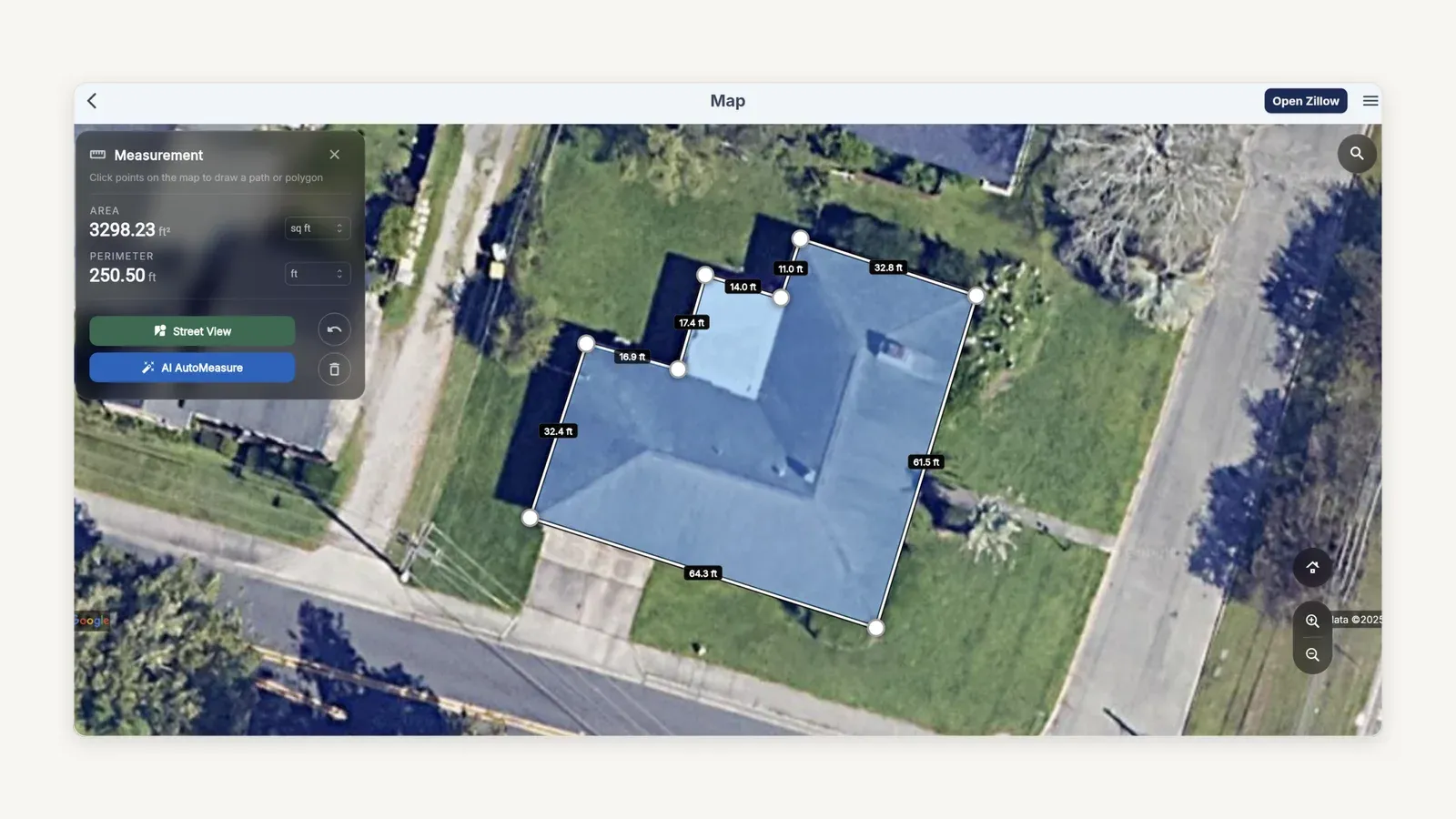
Tracing a roof outline and reading area and perimeter back from it. This evidences that measurement exists in the product, not which plan includes it — for that, see the tier breakdown below, where MapMeasure Pro starts on Beginner. We cropped the browser chrome away; the soft dark smudge over the Measurement panel and the Google attribution truncated by the zoom controls are both in QuoteIQ’s own file. The eight labelled sides sum to 250.3 ft against the panel’s 250.50 ft. Source: QuoteIQ.
QuoteIQ pricing
Essentials is $29.99 a month for one user, Beginner $74.99 for two, Pro $149.99 for four, Elite $299 for ten and Max $699 with unlimited users. Its own marketing leans hard on that gap, running direct cost comparisons against Jobber and Housecall Pro.
QuoteIQ contradicts itself on its own site, and you should know which page you are reading. Its roofing landing page states Elite at $249.99 and Max at $399.99. Its pricing page — the one carrying the live plan comparison — states Elite at $299 and Max at $699.
The figures above are the pricing page’s, because that is the canonical source and the higher pair. If a salesperson quotes you the lower numbers from the roofing page, get them in writing.
Best for
A small or newly growing roofing company that wants measurement, estimating and job costing in one product without a four-figure monthly commitment.
Limitations
We found no documented live supplier ordering with ABC Supply, SRS Distribution or QXO, so material ordering is not the same capability the roofing specialists publish. Insurance restoration depth is also not comparable to AccuLynx.
QuoteIQ also publishes app-store ratings and review counts as proof. Those are real signals about an app, but they are not evidence about how the platform handles a supplement or a mortgage check, so weigh them accordingly.
6. Exterio — formerly Roof Chief
Note the name change before you research this one. Roof Chief is now Exterio, and its own site says so directly — search results and older comparison articles still carry the previous name, which makes independent research confusing.
Exterio positions itself as roofing CRM and estimating software for exterior contractors, with flat published pricing and support as its stated differentiators.
Key roofing CRM features
- Lead and contact management with text and email campaigns, call tracking and 1:1 texting
- Workflow automations and a customer portal
- An estimating workspace with Good, Better, Best options
- EagleView and GAF QuickMeasure integrations
- PDF and webpage proposals with eSignature
- Material ordering, project management and calendar integration
- Invoicing, payment processing and Wisetack financing
- QuickBooks integration, a mobile app and reporting
The Good/Better/Best workspace is the part worth seeing, because tiered estimating is where a retail exterior contractor raises average job value. Each package is a tab with its own cost breakdown, materials list and live margin against a target range.
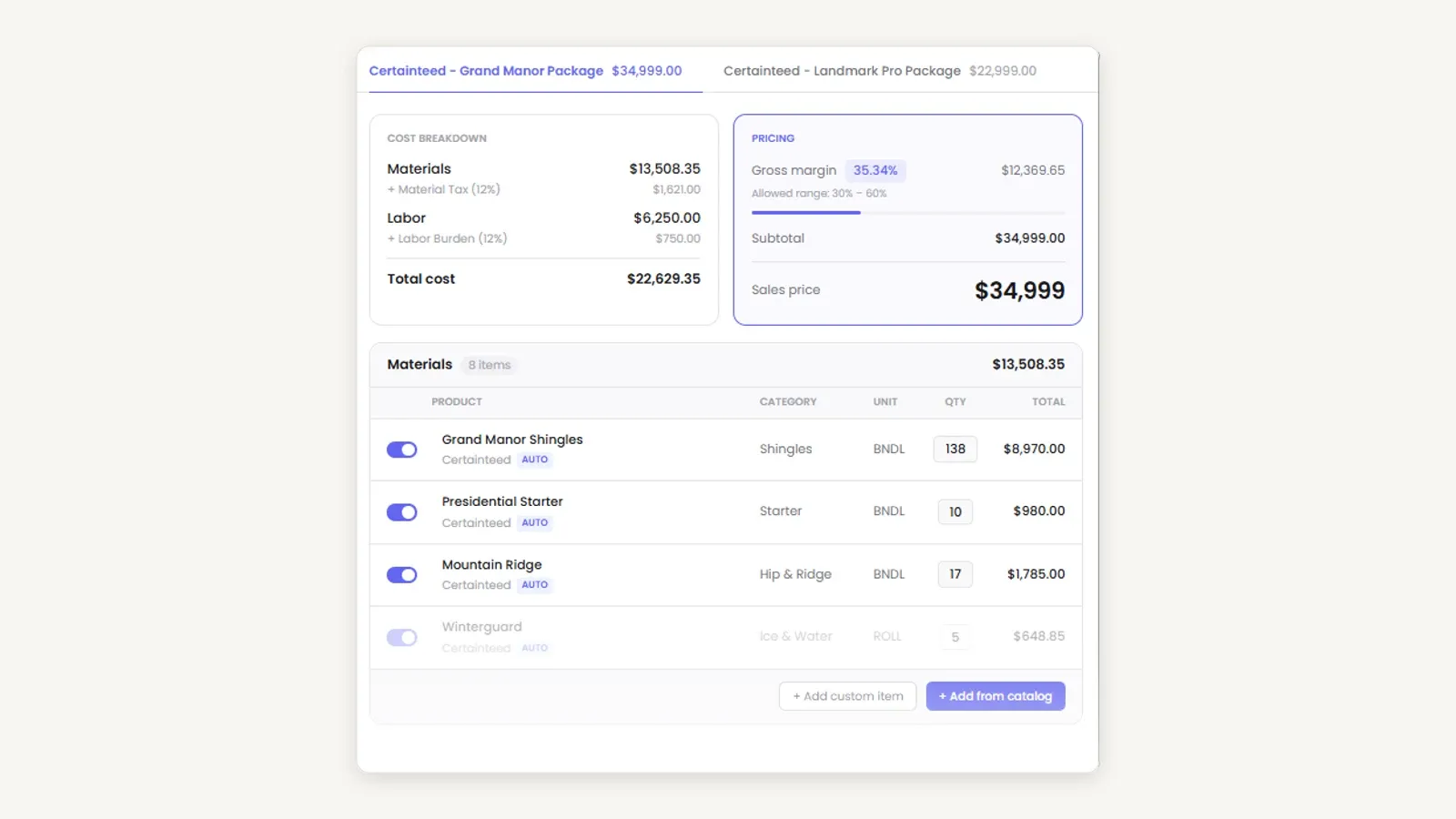
Two priced packages on tabs, with margin checked against a target range as you build. Exterio’s own arithmetic does not add up here, so build nothing on these totals: the four cost lines sum to $22,129.35, and the screen states $22,629.35 — a $500 gap in the vendor’s own figure, which its 35.34% margin is then calculated from. It is not one of the four materials rows hidden below the fold: both tax lines compute exactly, and the $13,508.35 materials figure is identical in the breakdown and the table header, so all eight rows are already inside it. This is the vendor’s homepage marketing image with a tablet bezel, dot pattern and headshot cropped away; the crop also took the product’s own “Edit Estimates” heading and its Save All Changes and Create Proposal buttons, and at 900x900 native this is the largest file Exterio publishes. Source: Exterio.
Exterio pricing
Exterio publishes pricing from $199 a month. It does not break named tiers out on its main page, so confirm what that entry figure includes before comparing it to Roofr’s $249 Essentials.
Best for
A small-to-mid retail roofing or exterior contractor where consistent follow-up and quoting speed are the growth bottleneck, and where flat pricing plus responsive support outweigh feature depth.
Limitations
The rebrand itself is a practical risk to check. Ask directly what changed in the platform versus the name, and whether anything you rely on moved during the transition.
Insurance restoration is also not its published strength. Two of the four handoffs it does document — measurement and material ordering — are worth testing on your own account rather than taking from the feature list.
7. Jobber — simplest option for a small repair-led roofer
Jobber earns its place because Google’s answer set keeps returning it for roofing CRM queries, and because it is genuinely the easiest way for a very small operation to stop running on paper.
It is also the platform where the roofing-specific gap is widest. There is no roof measurement record, no supplier catalogue ordering and no insurance claim object, so a storm-restoration company should not shortlist it at all.
What it does give you is a clean week of work, filterable by type and team, with untimed items separated from timed visits. For a two-person repair operation that is most of the problem solved.
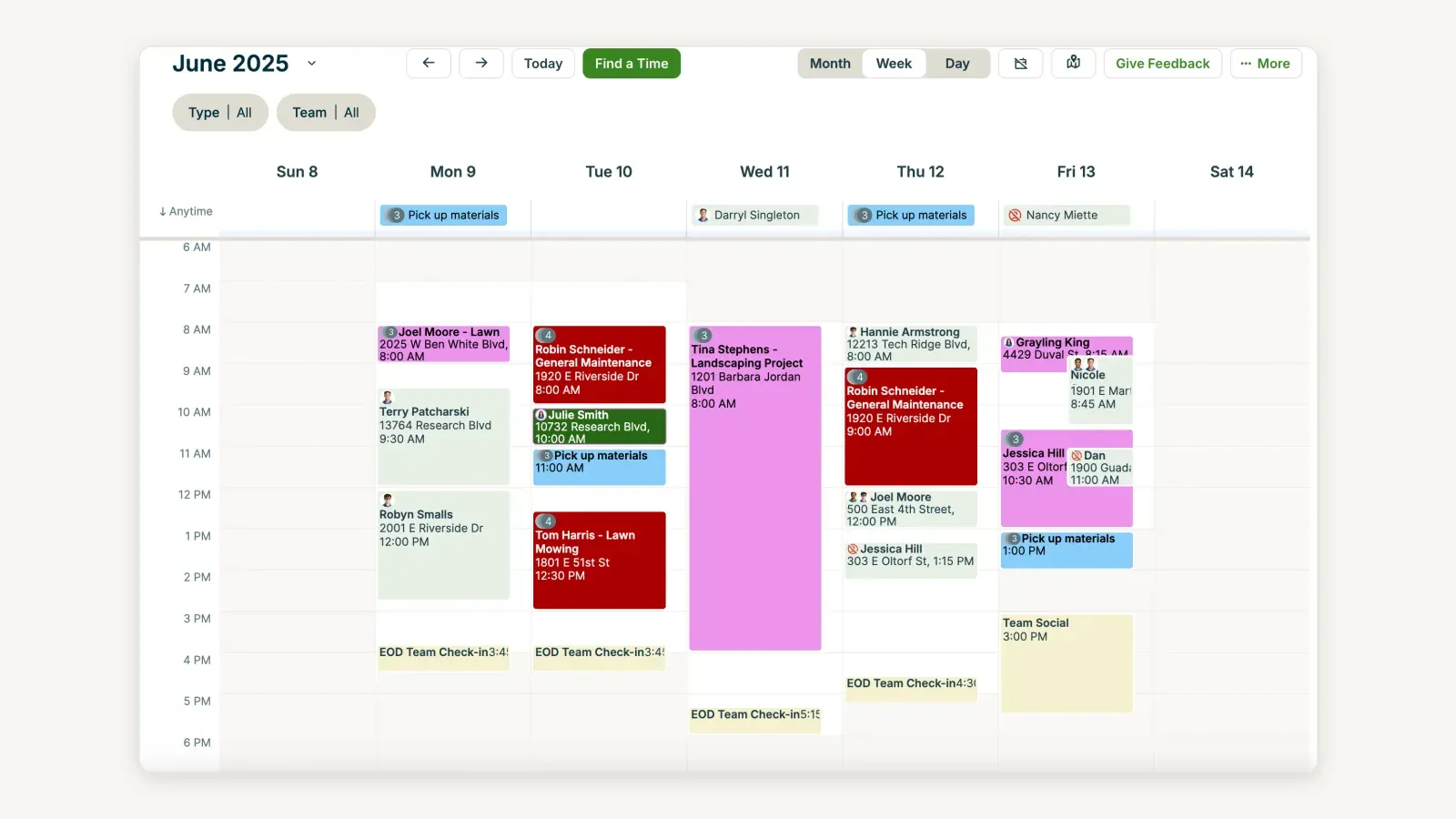
A week of visits with untimed work in the Anytime row above the timed grid. This is Jobber’s own demonstration data, not our account, and the sample jobs are lawn, general maintenance and landscaping — not one roof. Read that as a signal about where the product’s centre of gravity sits, not as evidence of what it cannot store: the gaps named above come from its documented record types, not from this screenshot. Source: Jobber’s official help documentation.
Jobber pricing
Core is $49 a month with no commitment and includes one user. Annual prepaid brings that to $29 a month after an introductory period, and additional users are $29 a month each on every plan.
That single included user is the number to watch. Jobber’s headline price looks like the cheapest on this list until you add a five-person crew to it.
Best for
A one-to-three-person repair and maintenance roofer who needs scheduling, quoting, invoicing and payments, and who does not need measurement or supplier integration.
Limitations
Everything roofing-specific. Measurements, supplements, claims and supplier orders all live outside the system, which means the handoffs this comparison tests are handled by you rather than by the software.
Best roofing CRM by business type
Insurance restoration and storm work
AccuLynx, and it is not close. Supplement tracking, mortgage check tracking, permits and adjuster documents all sit on the same job file, and no other platform here publishes that workflow in comparable detail.
Demo JobNimbus as the alternative, because boards and automations can model a restoration process well. Run your exact supplement, adjuster document, mortgage check and material order sequence through both.
Retail residential replacement
Roofr if speed from measurement to signature is the bottleneck, JobNimbus if you want the board shaped to your own stages. Both are defensible, and the deciding factor is usually whether your process is already stable.
Roofing plus siding, gutters or maintenance
FieldCamp, on the strength of custom objects and one operating model across work types. Budget for the measurement integration as a scoped project rather than assuming it.
Lowest budget, still needs measurement
QuoteIQ. Satellite measurement starts on its $74.99 Beginner plan, which is the cheapest measurement-inclusive tier on this list. Job costing waits until Pro at $149.99, so price the tier against the feature you actually need rather than the headline $29.99.
Small repair-led operation
Jobber for simplicity, or Roofr’s free Starter tier if you want room to grow into a roofing-specific product without paying on day one.
Roofing inside a multi-trade company
Neither a roofing CRM nor this comparison — see 5 best roofing software platforms, where ServiceTitan is assessed for exactly that case.
How much does a roofing CRM cost in 2026?
Published entry prices for a roofing CRM run from $0 to $249 a month, and the useful figures sit between $149 and $349. Anything cheaper is usually missing measurement or supplier ordering, and anything quote-only is missing a number you need to compare.
The category has a transparency problem worth naming. AccuLynx withdrew its only published plan on 18 August 2026, JobNimbus publishes nothing we could read, and FieldCamp, Roofr, QuoteIQ and Exterio publish real figures.
The costs that are not on the pricing page
- Measurement reports. Roofr charges $13 to $19 per report; platforms that integrate with EagleView, Hover or GAF QuickMeasure send you to those vendors’ pricing separately.
- Seats. Jobber includes one user and charges $29 for each additional; FieldCamp includes 3, 10 or 20 by plan; Roofr and QuoteIQ Max include unlimited users.
- Payment processing. Card and ACH rates are a real line item once you collect deposits through the platform.
- Add-ons. Instant Estimator, websites, financing and advanced analytics are separately priced on several of these platforms.
- Implementation and data migration. Rarely published anywhere, and always a question to ask in writing.
The two-demo test
The fastest way to decide this is not more reading. It is two demos, run on your own numbers, in every system you are seriously considering.
Run one retail roof and one insurance roof. Use the same measurement, the same proposal, the same supplier, the same crew, the same costs and the same invoice in each product.
Then watch for the handoffs rather than the features. The product that completes those handoffs with the fewest workarounds is the one that belongs in your business, and the demo is where a pre-built roofing path either earns its price or does not.
Ask each vendor to place a real supplier order against your negotiated pricing during the demo, and check whether the confirmation and delivery date come back into the job. That single step separates the platforms that own the material handoff from the ones that describe it.
Frequently asked questions
What is the best CRM software for a roofing business in 2026?
For an established roofing-only company, AccuLynx — it is the only platform here that pairs native measurement ordering, direct supplier ordering and a published insurance restoration workflow on one job file. For roofing alongside other exterior work, FieldCamp; for retail sales speed, Roofr; for the lowest cost with measurement included, QuoteIQ.
How much does a roofing CRM cost?
Published entry prices range from free to $249 a month, with most serious roofing CRMs landing between $149 and $349. Roofr publishes $249, Exterio from $199 and QuoteIQ from $29.99. FieldCamp quotes per business, and AccuLynx withdrew its $250 Essential plan on 18 August 2026 and now quotes every tier.
What is the difference between a roofing CRM and roofing software?
A roofing CRM manages the customer side — leads, contacts, pipeline stages, follow-up and proposals. Roofing software usually means the wider operation as well, adding measurement, supplier ordering, production scheduling, job costing and invoicing.
The distinction matters less than it used to, because most platforms on this list now do both. What still differs is where each one is strongest, which is what our roofing software comparison and roofing estimating comparison test in more detail.
Which roofing CRM is best for insurance restoration?
AccuLynx. It publishes a roofing-specific workflow covering measurements, estimates, permits, supplements, mortgage checks, supplier orders, production, labour and financial tracking, and supplement tracking gives every supplement a filterable status.
Does FieldCamp integrate with EagleView, Hover or GAF QuickMeasure?
Not out of the box. FieldCamp’s own roofing documentation states it “stores the numbers from an aerial report and lets you attach the report file” but “does not order or auto-import the report from the measurement provider.”
Those three appear as report-source options on its Roof Measurement record, which labels where the numbers came from rather than fetching them. Automating the handoff is a custom integration against its API, so get the scope and cost in writing.
Which roofing CRM has a free plan?
Roofr. Its Starter plan is $0 and includes one basic job board plus 10 trial proposals, invoices and work orders, with measurement reports charged at $19 each.
Why can’t I find JobNimbus pricing?
jobnimbus.com returns HTTP 403 to our network, so we could not read its pricing page and will not repeat third-party figures that contradict each other. Ask for a written quote, and confirm the plan, the user band and what each seat costs.
Is Roof Chief the same as Exterio?
Yes. Roof Chief has rebranded to Exterio, and its own site states the change directly, so older reviews and comparison pages naming Roof Chief are describing the same company.
Is Beacon the same as QXO?
Yes. QXO completed its acquisition of Beacon Building Products and renamed it QXO Building Products in April 2025, and becn.com now redirects to qxo.com.
That matters when comparing supplier integrations, because a platform whose integration page still says Beacon and one that says QXO are naming the same distributor.
Which roofing CRM works with QuickBooks Desktop?
JobNimbus documents both QuickBooks Online and QuickBooks Desktop. That still settles the decision for established roofing companies whose accounting has not moved to the cloud.
Do I need a roofing-specific CRM at all?
If you order aerial measurements, place supplier orders or handle insurance supplements, yes — a general CRM leaves all three handoffs to a person. If you run small repair and maintenance work with none of those steps, a general platform like Jobber will cost less and do the job.
What is a roofing CRM?
A roofing CRM holds the customer, the property, the measurement, the estimate and the job stage in one place, from first door-knock to final invoice.
It differs from a general CRM by carrying roofing-specific records: measurement reports, supplier orders, insurance claim detail and production scheduling.
Sponsored
Ready to upgrade your dispatch?
FieldCamp uses AI to optimize routes, auto-assign jobs, and eliminate scheduling chaos — so you can run more jobs with fewer headaches.

Written by
Azaz Vepari
Editor, Modern Field Service
Listen to this review
The same comparison as a podcast episode, for the drive between jobs.
Tool profiles
Pricing, best fit and limitations for each tool in this review, one page each.