Azaz Vepari22 Mins read
8 Best HVAC Dispatch Software Platforms in 2026
Compare HVAC dispatch software for residential and commercial contractors, including scheduling, technician matching, routing, pricing, and buyer fit.

In this article10 sections
The best HVAC dispatch software depends on the type and complexity of the work you dispatch:
- Housecall Pro is the best general fit for many small-to-midsize residential HVAC companies that want scheduling, homeowner communication, service plans, and the rest of the job workflow in one approachable system.
- FieldCamp is the best fit for HVAC operations that want configurable, AI-assisted technician matching with explicit controls for skills, travel, capacity, overtime, workload, priority, and human review.
- ServiceTitan is the best fit for larger residential or mixed operations where dispatch is a department and capacity planning, call booking, reporting, and a broader operational platform justify a heavier system.
- ServiceTrade is the strongest commercial-service option for companies dispatching planned and reactive work across customer sites, equipment, agreements, and a large backlog.
- BuildOps is a strong commercial alternative when service dispatch and project operations need to remain connected.
- FieldEdge is worth shortlisting for an established, multi-truck HVAC company centered on QuickBooks and an HVAC-specific operating workflow.
- Jobber is the easiest starting point for a small team that needs a clean calendar, routing, customer reminders, and a simple job-to-invoice flow.
- Workiz is a strong option for a communications-heavy home-service operation that wants calls, messages, scheduling, dispatch, and job updates closely connected.
There is no honest universal winner. A two-technician residential shop does not need the same dispatch controls as a forty-technician call center, and neither operates like a commercial HVAC contractor coordinating planned maintenance across hundreds of assets.
The right choice is the product that handles your actual dispatch constraints without forcing the office to rebuild the schedule in texts and spreadsheets.
Best HVAC dispatch software at a glance
| HVAC dispatch software | Best for | Dispatch strengths | Published pricing basis | Important limitation |
|---|---|---|---|---|
| Housecall Pro | Small-to-midsize residential HVAC | Drag-and-drop schedule, arrival windows, open-time suggestions, customer notifications, service-plan visits | Basic from $59/month billed annually; confirm monthly and HVAC package | No first-class crew role; features and integrations can be plan-specific |
| FieldCamp | Configurable, AI-assisted dispatch | Skills, location, availability, workload, priority, capacity, overtime, bulk dispatch, queue or immediate modes | Quote on request; AI usage uses a balance/credits | Requires configuration and a human-review policy; standalone and in-suite products differ |
| ServiceTitan | Larger residential and mixed operations | Skills scheduling, capacity planning, drag-and-drop board, GPS, customer notifications, commercial scheduling | Quote only; priced per technician | No public dollar price; implementation and package scope require a written proposal |
| ServiceTrade | Commercial planned and reactive service | Backlog and work-order queue, draft schedules, real-time technician progress, site service context | Quote only; office users free and pricing tied mainly to technicians | Commercial-first platform; more system than a simple residential shop needs |
| BuildOps | Commercial service plus projects | Skills, certifications, distance, conflicts, templates, AI-ranked technician suggestions | Custom pricing per field and office user | Public documentation is less detailed than some peers; require a sample-data workflow demo |
| FieldEdge | Established HVAC teams using QuickBooks | Centralized multi-truck dispatch, call booking, basic or advanced dispatch by plan | Quote only | Advanced dispatch and mobile-license counts are plan boundaries; no free trial |
| Jobber | Small teams and first-time software buyers | Flexible calendar, Find a Time, daily/weekly routing, team notifications, online booking | Core regular monthly price shown at $49 for 1 user; annual and promotional prices vary | Simpler commercial, agreement, and asset context |
| Workiz | Communications-heavy residential service | Drag-and-drop calendar, expertise filters, real-time changes, GPS context, reminders and on-my-way messages | Free Lite is limited; Kickstart listed at $225 monthly or $187 monthly billed annually for 3 users | AI and advanced features require plan verification; vendor outcome claims are not independent evidence |
Pricing checked: July 30, 2026. Pricing pages change quickly.
Ask each vendor to quote the users, modules, implementation, integrations, messaging, payments, AI usage, and support you actually require.
The table is a buyer-fit summary, not a measured universal score. The detailed sections below explain what each product documents, where it fits, and what to verify before buying.
What is HVAC dispatch software?
HVAC dispatch software helps the office decide who should perform each job, when they should perform it, and how to keep the schedule accurate as the day changes. A useful system connects five parts of the workflow:
- Demand: incoming calls, online bookings, maintenance visits, warranty work, urgent no-cooling calls, and unscheduled backlog.
- Constraints: technician skills, certifications, zones, availability, workload, working hours, travel, parts, customer preferences, job priority, and promised arrival windows.
- Assignment: choosing the technician or crew, reserving time, resolving conflicts, and communicating the work.
- Execution: giving the field team customer, location, equipment, history, task, form, photo, and pricing context on a mobile device.
- Completion: updating status, documenting work, creating follow-up, generating an invoice, and preserving the record for the next visit.
Dispatch software should not be judged only by how attractive the calendar looks. The real test is whether the system can absorb an urgent call at 2 p.m., identify a qualified technician, show the operational cost of moving work, update the customer and technician, and leave the rest of the day coherent.
Scheduling vs dispatching vs routing
The terms overlap, but they are not identical:
- Scheduling decides when work should occur and reserves the necessary time.
- Dispatching assigns and coordinates the technician or crew and manages real-time exceptions.
- Routing determines the travel sequence between jobs after the stops and service windows are known.
- Field service management connects scheduling and dispatch to customers, work orders, mobile execution, estimates, invoices, payments, accounting, and service history.
If that broader platform layer matters more to you than dispatch alone, our HVAC CRM comparison reviews most of these same vendors from the customer-record side.
A route optimizer can be useful without being a full HVAC operating system. It may sequence stops well but still leave the office to manage customer history, equipment, technician skills, invoices, and follow-up elsewhere.
That is why routing-only products are not ranked as direct equivalents in this guide.
How we evaluated HVAC dispatch software
This is a documentation-led comparison. We checked current vendor product pages, help centers, and pricing pages against the dispatch workflow an HVAC company needs.
We did not run eight full customer implementations, so vendor-documented capabilities are described as documented capabilities—not as our hands-on test results.
The comparison focuses on:
- Calendar, dispatch board, unassigned work, and backlog visibility
- Technician skills, certifications, zones, and service-area matching
- Availability, working hours, workload, capacity, overtime, and conflicts
- Travel-time context, maps, route sequencing, and live location
- Emergency calls and same-day reassignment
- Customer confirmations, reminders, arrival windows, and on-my-way updates
- Mobile access to job and customer context
- Recurring maintenance and agreement work
- Commercial site, equipment, service-history, and backlog context
- AI suggestion, automated assignment, queue, approval, override, and audit boundaries
- Pricing structure, included users, plan gates, usage charges, and quote-only boundaries
- Accounting and the downstream dispatch-to-invoice workflow
Every platform receives a best-fit case and a limitation. Vendor testimonials, claimed revenue gains, time-saved statistics, and vendor-authored rankings are not treated as independent proof.
The 8 best HVAC dispatch software platforms
1. Housecall Pro — best for residential HVAC dispatch
Housecall Pro is the strongest general fit for many small-to-midsize residential HVAC companies. It connects online booking, the schedule, dispatch, customer communication, estimates, invoices, payments, service plans, and equipment details in a home-service-oriented workflow.
The official scheduling documentation shows that an office user can schedule from job creation, an existing job, or the full calendar. Jobs can be dragged to a date and time, assigned to one or more team members, left unassigned, given an arrival window, and paired with customer notifications.
The Find a Time view surfaces open availability with drive context from the surrounding jobs.
That combination works well for a residential HVAC office that needs to make a promise to a homeowner, choose a technician, and keep both parties updated without moving between separate tools.
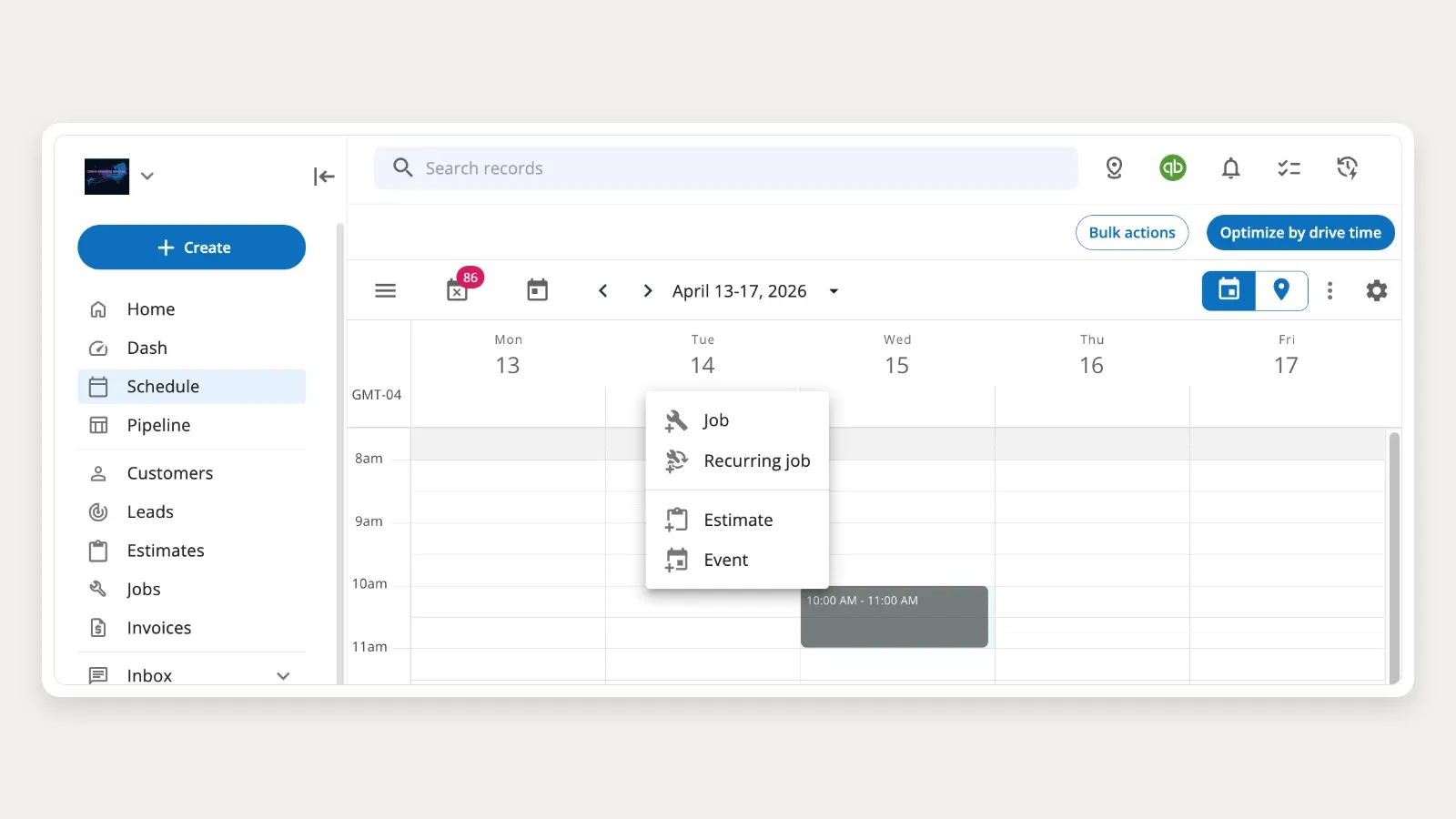
Housecall Pro’s official help-center schedule view shows its weekly calendar, job menu, map toggle, and drive-time optimization control. Courtesy of Housecall Pro; observed July 30, 2026; vendor-supplied rather than a hands-on test.
Housecall Pro dispatch features
- Drag-and-drop calendar and dispatch views
- Assigned and unassigned jobs
- Multiple employees on one job
- Arrival windows separate from the internal job time
- Open-time suggestions with travel context
- Routes and drive-time optimization tools
- Online booking with manual or automatic scheduling options
- Email and SMS scheduling communication
- On-my-way and job-status messages
- Recurring jobs and service-plan visit scheduling
- Mobile job, customer, equipment, estimate, invoice, and payment context
The calendar FAQ also documents a useful limitation: Housecall Pro does not currently provide a formal lead-technician or crew object. Multiple employees can be assigned to a job, and the first person listed is treated as the lead in relevant schedule views and communications.
Housecall Pro pricing
The official pricing page shows Basic from $59 per month billed annually. Higher tiers, additional users, HVAC packages, and add-ons change the final cost.
Ask for a written quote covering:
- Number of office and field users
- Route and fleet tools
- Service plans
- Required customer-communication volume
- QuickBooks
- Sales proposal and pricebook tools
- Payments and financing
- Any HVAC or mechanical package
Best for
- Residential service and replacement companies
- Owner-led businesses adding dispatch structure
- Small and midsize multi-truck teams
- Companies that prioritize homeowner communication
- Teams selling recurring service plans
Limitations
- No first-class crew role
- Important features and integrations can be plan-specific
- Standard and HVAC package pricing may differ
- Commercial contractors should separately test multi-site backlog, asset, agreement, deficiency, and project workflows
Do not buy Housecall Pro solely because the residential workflow is easy to understand. First verify the plan that contains every dispatch, communication, accounting, and service-plan capability your team intends to use.
2. FieldCamp — best configurable, AI-assisted HVAC dispatch
FieldCamp is the strongest fit here for an HVAC company that wants dispatch logic to reflect its own skills, service areas, priorities, workload rules, and human-review policy.
The official AI Dispatcher documentation describes job-to-technician matching based on:
- Required skills
- Technician location and travel time
- Availability and existing bookings
- Workload
- Job priority
- Preferred technician
- Business hours and days off
- Per-technician job capacity
- Maximum drive time
- Overtime policy
Suggestions can show the recommended technician, a confidence score, and the reason for the recommendation. Dispatchers can accept, reject, or modify the result.
FieldCamp also documents immediate and queue modes, which means the buyer must choose whether a type of work can be assigned directly or should be held for review.
That distinction matters. “AI dispatch” should not mean every job is handed to software without guardrails.
A useful implementation defines which constraints are hard, which are preferences, which emergencies can override normal rules, and which assignments require a person to approve them.
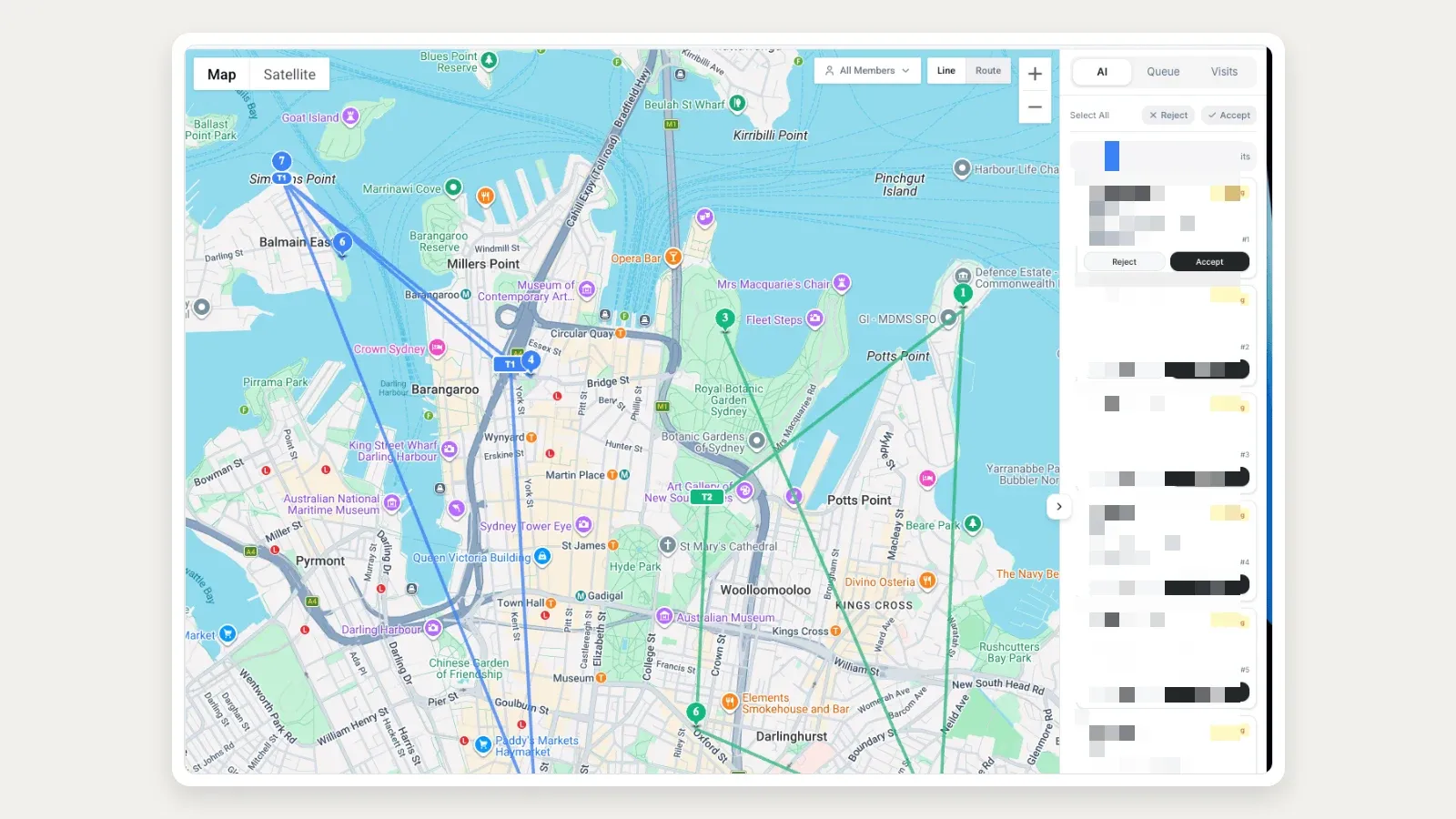
FieldCamp’s official documentation shows AI-proposed visits beside the live dispatch map with human Reject and Accept controls. Courtesy of FieldCamp; observed July 30, 2026; vendor documentation rather than an authenticated tenant test.
FieldCamp dispatch features
- Calendar, resource, map, and timeline views
- Unassigned job tray and bulk dispatch
- Skills, location, availability, workload, and priority matching
- Max drive time, overtime, capacity, and per-technician controls
- Queue and immediate dispatch modes
- Confidence and reasoning attached to recommendations
- Human accept, reject, and modify controls
- Route optimization for already scheduled work
- Customer, job, visit, invoice, and field-service workflow
- Configurable fields, workflows, roles, and eligible-plan custom objects
- QuickBooks, Xero, and other documented connections
Route optimization and technician assignment are separate operations in FieldCamp. Dispatch chooses who should perform the job and when; route optimization sequences a technician’s scheduled stops.
Keeping those decisions separate can make the logic easier to review.
FieldCamp also offers a standalone AI Dispatcher with a dedicated live dispatch workspace and dispatch assistants. That product should not be assumed to be identical to the add-on inside the full FieldCamp suite.
Ask the vendor to scope the exact product, connectors, controls, and data flow you intend to use.
FieldCamp pricing
FieldCamp pricing is quoted per business. Book a demo with FieldCamp to get a quote for your team.
AI activity is tracked against a dollar-denominated balance, and feature availability depends on the plan and required add-on.
Include expected suggestion volume, automation scope, users, configuration, and onboarding in the cost model.
Best for
- HVAC companies with explicit skill and service-area rules
- Teams that need configurable capacity, workload, overtime, and review controls
- Businesses that want AI recommendations with visible reasoning
- Companies that want to customize the operational record and workflow
- Buyers who want published plan and additional-user pricing before sales
Limitations
- Independent implementation and review evidence is thinner than for longer-established vendors
- Effective dispatch depends on clean technician, skill, location, duration, and availability data
- AI usage can add variable cost
- The in-suite and standalone products have different interfaces and scope
- AI recommendations still require monitoring, exception handling, and a defined human-review policy
- Buyers should validate mobile, accounting, migration, and every configured workflow with sample data
Do not buy FieldCamp because “AI” sounds advanced. Buy it only if you can define the dispatch constraints the system should apply and the decisions a human must retain.
3. ServiceTitan — best for larger residential and mixed operations
ServiceTitan is the broadest fit in this comparison for a larger residential or mixed HVAC operation with dedicated call-taking, dispatch, service, sales, and management roles.
Its official HVAC dispatch page documents drag-and-drop scheduling, real-time board updates, technician GPS, customer notifications, skills scheduling, and capacity planning. Available time slots can account for job types, technician capacity, skills, and operating priorities before the CSR books the job.
For commercial scheduling, ServiceTitan describes recommendations based on skills, shifts, zones, and non-job events. The larger value is that dispatch sits inside a platform that also covers call booking, equipment and customer history, memberships or service agreements, pricebook, estimates, invoices, job costing, reporting, payments, and accounting integrations.
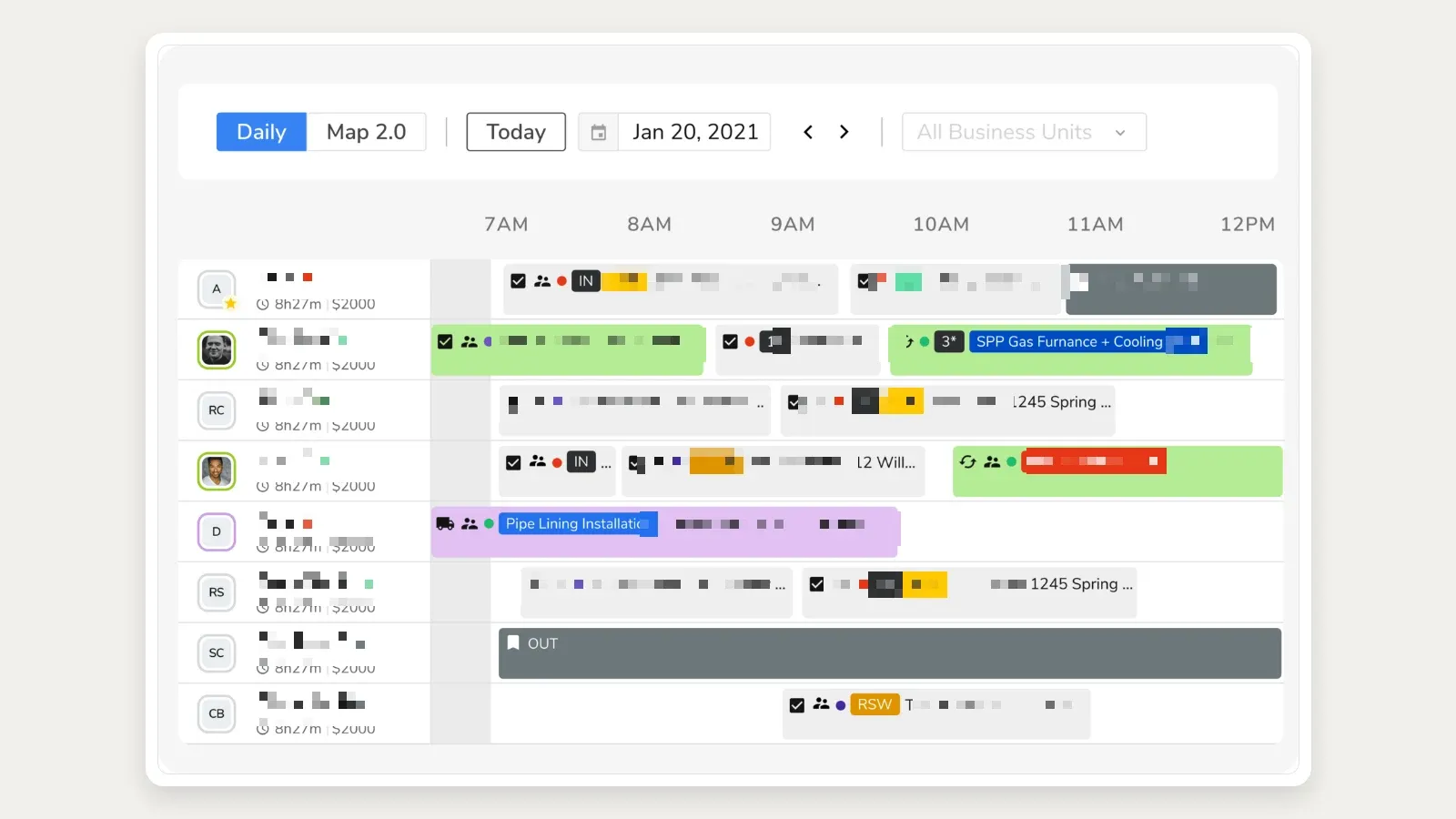
ServiceTitan’s official dispatching page supplies this daily board with technician rows, job blocks, status markers, and time-based capacity. Courtesy of ServiceTitan; observed July 30, 2026; vendor-supplied rather than a hands-on test.
ServiceTitan dispatch features
- Drag-and-drop dispatch board
- Skills-based technician scheduling
- Capacity planning by job type and operating rules
- Real-time job, arrival-window, customer, and technician updates
- GPS and en-route customer communication
- Call booking connected to the schedule
- Commercial skills, shift, and zone context
- Customer, location, equipment, membership, and agreement records
- Mobile field workflow
- Reporting and operational controls
- QuickBooks Online and supported Desktop integrations
ServiceTitan pricing
ServiceTitan does not publish dollar prices. Its official pricing page says pricing is per technician and lists dispatching, scheduling, call booking, invoicing, and pricebook across Starter, Essentials, and The Works.
Do not use third-party per-technician estimates as if they were official prices. Request a written proposal that separates:
- Technician and office access
- Package
- Implementation and migration
- Required Pro products
- Phones, messaging, and customer experience
- Reporting and data access
- Accounting integration
- Payments and financing
- Commercial or construction scope
Best for
- Larger residential service and replacement companies
- Mixed residential-commercial operations
- Organizations with a dispatch department
- Teams requiring capacity, call-booking, reporting, and broad operational depth
- Multi-location or standardized operations prepared for implementation
Limitations
- No public dollar pricing
- A larger implementation and administrative footprint than small-team tools
- Total scope can include separate products and package decisions
- A polished demo does not prove migration, reporting, or daily dispatcher usability
- Buyers should test data access, exports, exception handling, and change management before signing
ServiceTitan is a strong candidate when the organization is large enough to use its breadth. It can be excessive when the actual need is a clean calendar, simple assignment, and customer reminders for a small crew.
4. ServiceTrade — best for commercial HVAC service dispatch
ServiceTrade is the strongest commercial-service fit in this comparison. Its dispatch model is built around customer sites, service history, planned and reactive work, a large backlog, and field technicians moving between commercial locations.
The official HVAC dispatch page documents:
- Access to the customer service record while creating an appointment
- Real-time technician progress and location context
- A work-order queue that prioritizes unscheduled work
- Draft schedules that can be reviewed before release
- Backlog filtering
- Route and schedule decisions
- Mobile updates that reach technicians as the schedule changes
That context matters in commercial HVAC. The dispatcher may need to know not only who is nearby, but who knows the site, which equipment is covered, what planned work is already committed, which deficiency created the repair call, and what other work can be completed during the visit.
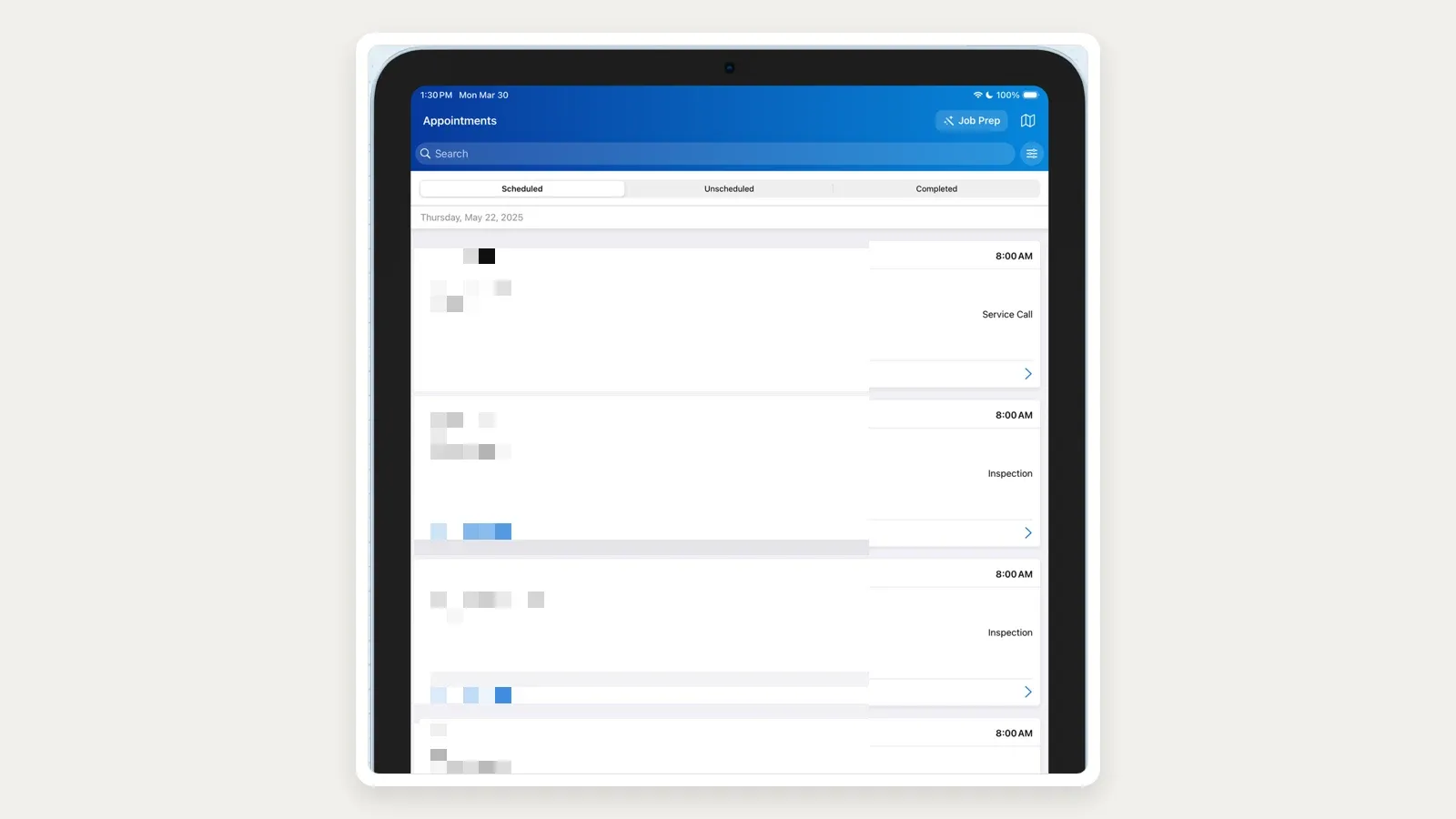
ServiceTrade’s current official App Store listing shows scheduled, unscheduled, and completed appointment states with service-call timing and work type. Courtesy of ServiceTrade; observed July 30, 2026; vendor-supplied rather than a hands-on test.
ServiceTrade dispatch features
- Commercial HVAC customer and site context
- Planned and reactive service scheduling
- Work-order queue and backlog filters
- Draft scheduling before technician release
- Real-time technician progress
- Proximity and availability context
- Technician mobile updates
- Equipment, agreement, inspection, deficiency, and repair workflow
- Customer portal and commercial documentation
- Parts, inspections, quoting, and integrations within the broader platform
ServiceTrade pricing
ServiceTrade requires a quote. Its pricing page says office users are free and subscription pricing is aligned primarily to technicians.
Ask the proposal to separate:
- Technician count and mobile access
- Core platform
- Inspections
- Parts
- Sales and proposal products
- AI products
- ERP or accounting integrations
- Implementation and data migration
- Customer portal and communication
Best for
- Commercial HVAC service contractors
- Companies running planned maintenance agreements
- Operations with many customer sites and equipment records
- Dispatch teams balancing contracted visits and reactive calls
- Businesses that need deficiencies and repair follow-up connected to service
Limitations
- Quote-only pricing
- More commercial system than a small residential shop normally needs
- Product scope extends beyond simple dispatch and must be priced carefully
- Buyers should demonstrate agreement generation, backlog rules, equipment context, repair conversion, and customer reporting with their own data
For a commercial contractor, ServiceTrade should be tested with an agreement, several sites, covered equipment, planned visits, an urgent call, an open deficiency, and a repair quote—not with a generic residential service call.
5. BuildOps — best for commercial service and project coordination
BuildOps is a strong commercial alternative when an HVAC contractor needs service dispatch and project work to remain in the same operating system.
Its official scheduling and dispatch page documents technician selection based on skills, certifications, availability, and distance. The board surfaces conflicts, supports job and visit templates, and connects scheduled work to quotes, invoices, job costing, and the broader commercial record.
BuildOps also describes AI-ranked technician suggestions and schedule assistance. These are useful decision aids, but the buyer should still verify the factors, override path, audit record, and product tier that apply to the specific implementation.
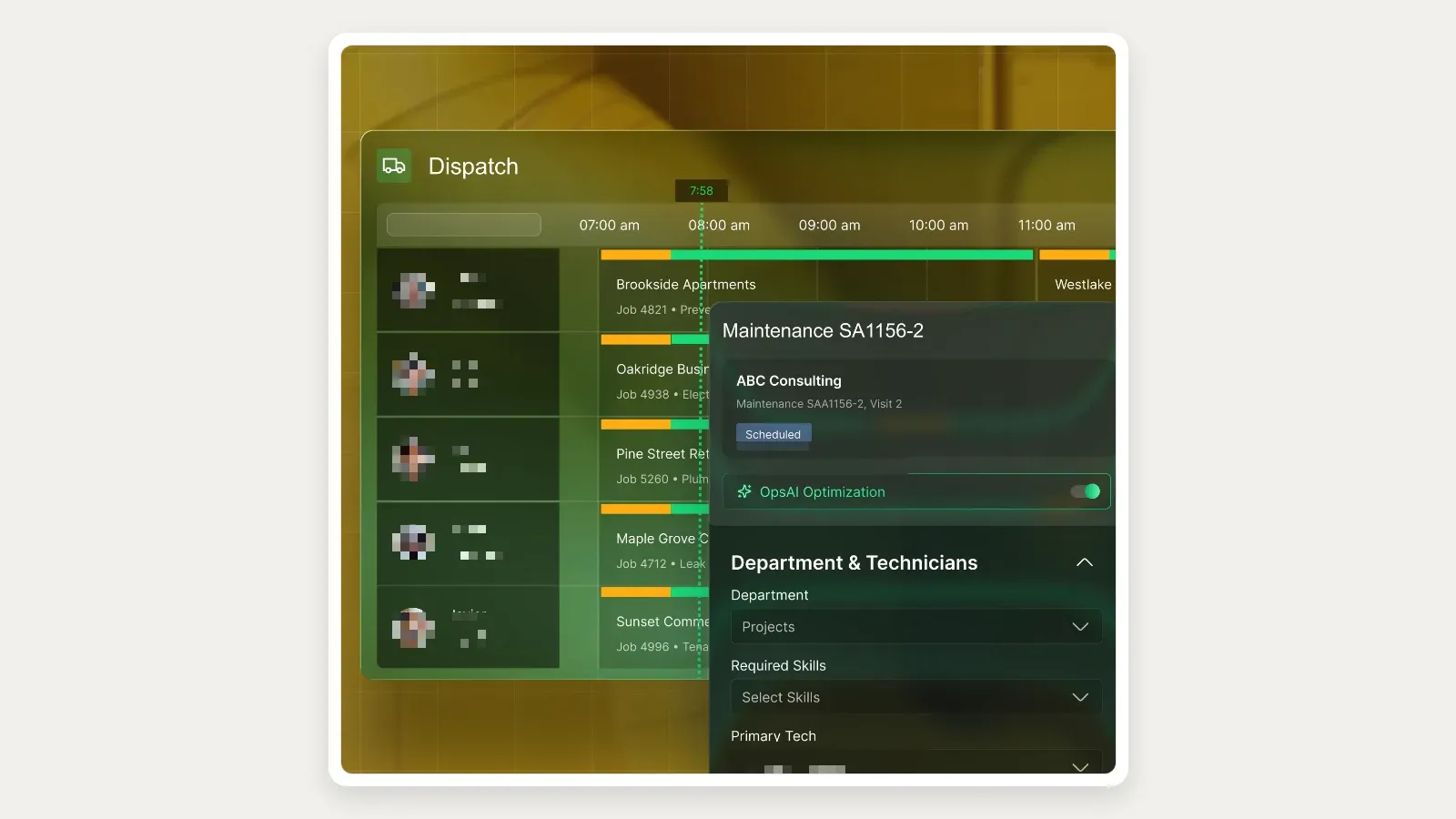
BuildOps supplies this Schedule Assistant product-page composite showing a dispatch board, required skills, technician selection, and an optimization control. Courtesy of BuildOps; observed July 30, 2026; vendor marketing imagery rather than a hands-on test.
BuildOps dispatch features
- Commercial service dispatch board
- Skills, certifications, availability, and distance context
- Conflict visibility and schedule changes
- Job and visit templates
- Technician recommendations
- Preventive-maintenance scheduling
- Commercial customer, location, and asset context
- Mobile work and closeout
- Service quoting and invoicing
- Connected project management and job costing
BuildOps pricing
The official BuildOps pricing page says pricing is custom and based on field and office users. Core plans include dispatching, scheduling, quoting, invoicing, reporting, and mobile access.
Service-only and service-plus-project scope differs.
Request a written breakdown for:
- Field users
- Office users
- Service management
- Project management
- Implementation and migration
- Accounting or ERP
- Reporting and data access
- Optional products
Best for
- Commercial HVAC contractors
- Companies combining service, maintenance, repair, installation, and projects
- Multi-department operations
- Contractors that need field, office, and financial continuity
Limitations
- No public dollar pricing
- Public product documentation is not as deep as some vendor help centers
- Service and project scope affects the proposal
- Buyers should require a live demonstration of asset history, agreements, dispatch, closeout, invoicing, job costing, accounting, and export
BuildOps is not automatically better than ServiceTrade. ServiceTrade is a stronger starting point for equipment-centered commercial service and planned maintenance; BuildOps becomes more compelling when project work is equally important.
6. FieldEdge — best for established HVAC teams using QuickBooks
FieldEdge is an HVAC-specific option for established residential and light-commercial companies that want dispatch, customer history, agreements, pricebook, and QuickBooks-centered operations in one system.
The official HVAC page describes a centralized dispatch board for multiple trucks, technicians, business units, and locations. The pricing page provides an important plan boundary:
- Select includes basic dispatch and 2 mobile-app licenses.
- Premier includes advanced dispatch and 4 mobile-app licenses.
- Elite includes advanced dispatch and 6 mobile-app licenses.
That means “FieldEdge includes dispatch” is not specific enough for a buying decision. The buyer must identify which advanced capabilities are required and price the correct mobile-license count.
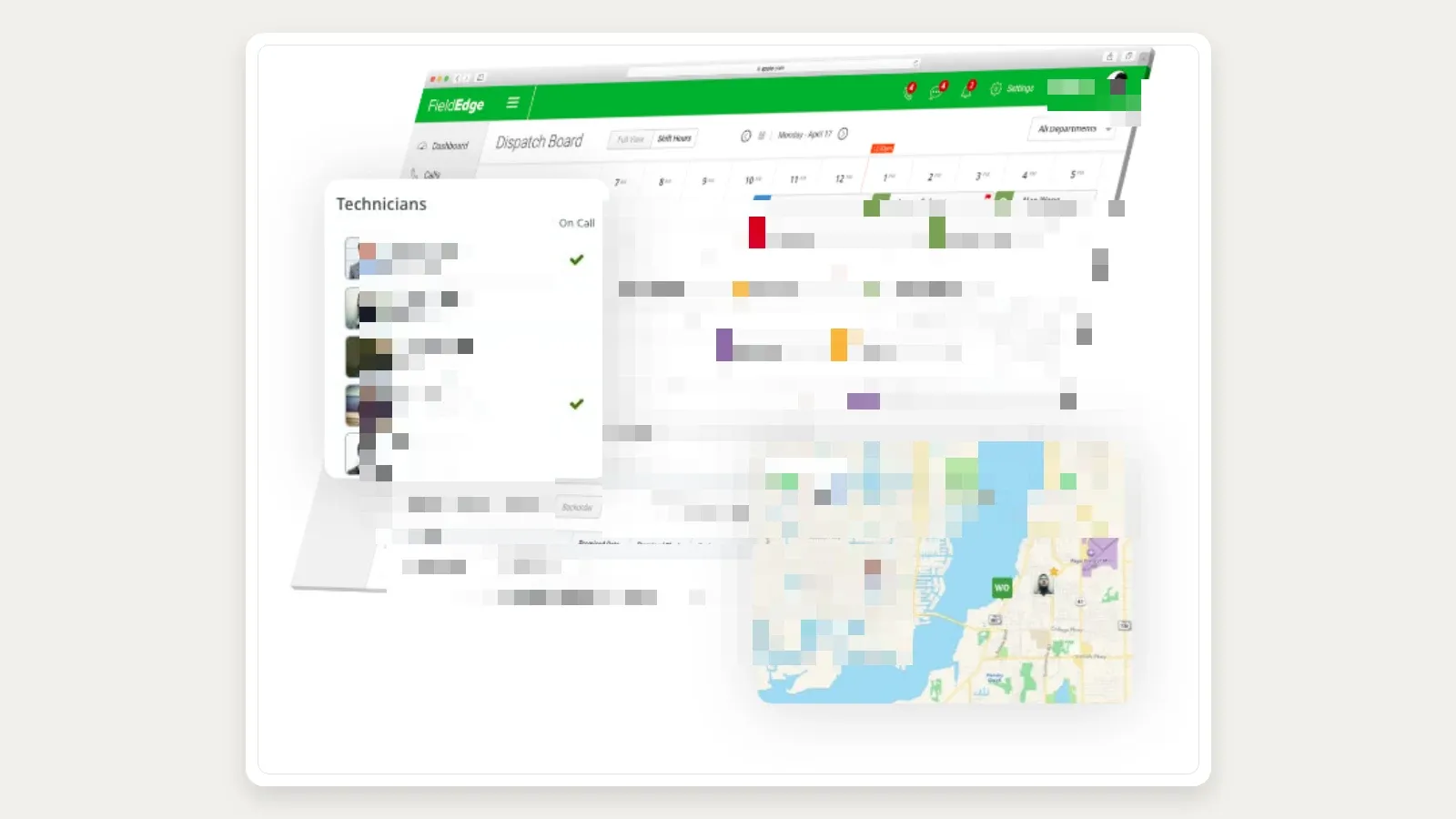
FieldEdge’s official HVAC page uses this multi-truck dispatch image with technician availability, scheduled work, unassigned jobs, and a map. Courtesy of FieldEdge; observed July 30, 2026; the vendor still serves this asset from a 2020 upload path, so treat it as indicative rather than current UI.
FieldEdge dispatch features
- HVAC-focused call booking and scheduling
- Centralized multi-truck dispatch board
- Basic or advanced dispatch by plan
- Customer, equipment, agreement, work-order, and service-history context
- Technician mobile app
- QuickBooks Online and Desktop orientation
- Pricebook, quoting, invoicing, and payments
- Reporting and performance tools
FieldEdge pricing
FieldEdge requires a quote. Select, Premier, and Elite differ by dispatch depth, mobile licenses, agreements, reporting, communications, inventory, and support.
FieldEdge says it does not offer a free trial because onboarding and training are part of implementation. Ask the proposal to state:
- Plan
- Included and additional mobile licenses
- Dispatch capability
- Agreement capability
- QuickBooks integration
- Onboarding and migration
- Add-ons
- Contract and downgrade terms
Best for
- Established multi-truck HVAC businesses
- QuickBooks-centered accounting operations
- Teams that want HVAC-specific records and workflows
- Buyers prepared for guided onboarding
Limitations
- No public dollar pricing
- Mobile-user counts and advanced dispatch are plan boundaries
- No free trial
- Buyers should verify accounting direction and timing
- Commercial asset portfolios, projects, and deficiency workflows require a separate demonstration
FieldEdge is a safer fit when the buyer wants a conventional HVAC operating system tied closely to QuickBooks. It is less suitable when the priority is a lightweight first tool or a highly configurable AI dispatch layer.
7. Jobber — best simple dispatch software for a small HVAC business
Jobber is the easiest starting point here for an owner-operator or small residential HVAC team moving from paper, a shared calendar, or a spreadsheet.
Its official scheduling page documents:
- Day, week, and month calendar views
- Drag-and-drop rescheduling
- Availability, gap, conflict, and overlap visibility
- Find a Time recommendations based on availability and drive time
- Map and route generation for a day or week
- Team notifications after schedule changes
- Online booking
- Customer reminders
- GPS and fleet-partner options
Jobber’s strength is the clarity of the workflow: request, quote, job, visit, invoice, and payment. A small team can adopt the core schedule without first designing a complicated operating model.
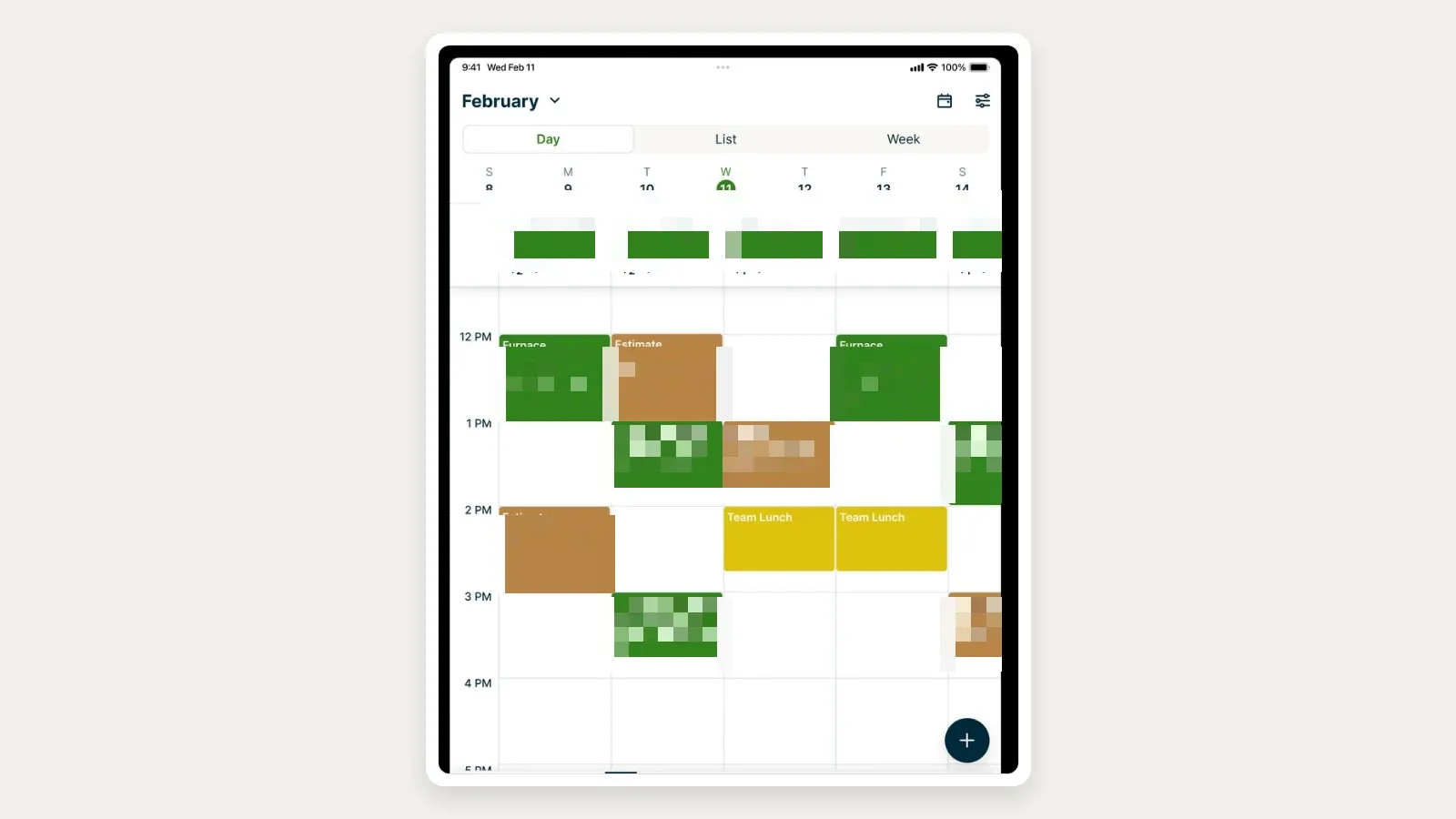
Jobber’s current official App Store listing shows a week calendar organized by technician with color-coded service and estimate blocks. Courtesy of Jobber; observed July 30, 2026; vendor-supplied rather than a hands-on test.
Jobber dispatch features
- Flexible calendar and job assignment
- Find a Time scheduling recommendations
- Map and routing
- Team push notifications
- Online booking
- Automated customer reminders
- On-my-way texts
- Recurring jobs
- Mobile job details, notes, photos, and checklists
- Quotes, invoices, payments, and QuickBooks Online on eligible plans
Jobber pricing
The official Jobber pricing page shows Core’s regular month-to-month price at $49 per month for one user. It also shows annual-commitment, annual-prepaid, and limited first-year promotional prices that change by team size and date.
Do not compare a temporary first-year promotion with another vendor’s regular price. Price the second year and include the number of users, routing, notifications, automations, QuickBooks, and support you require.
Best for
- Owner-operators
- One-to-five-person residential HVAC teams
- First-time field service software buyers
- Companies prioritizing a simple schedule-to-invoice flow
- Businesses that need route and customer communication without enterprise administration
Limitations
- Less equipment-, agreement-, and commercial-site depth than specialized platforms
- Advanced dispatch constraints may require manual judgment
- Plan and user count materially affect price
- Commercial buyers should test multiple units per site, agreement coverage, backlog, deficiencies, and project billing
Jobber is often the most sensible first system. It is not automatically the best long-term system for a company whose dispatch process depends on complex certifications, equipment, contracts, and multiple departments.
8. Workiz — best for communications-heavy home-service dispatch
Workiz is a strong residential service option for an HVAC company that wants phone, messaging, scheduling, dispatch, field updates, invoicing, and payment to remain closely connected.
The official dispatch page documents a drag-and-drop calendar, filtering by technician expertise or team, real-time job changes, customer appointment reminders, on-my-way messages, and technician location. The job-scheduling page describes schedule suggestions based on existing work and team availability, plus the ability to react to last-minute emergency calls from the calendar.
Workiz also promotes AI features, call handling, and scheduling automation. Those capabilities should be evaluated by exact plan and workflow.
The vendor page includes performance statistics, but this article does not use them as independent evidence.
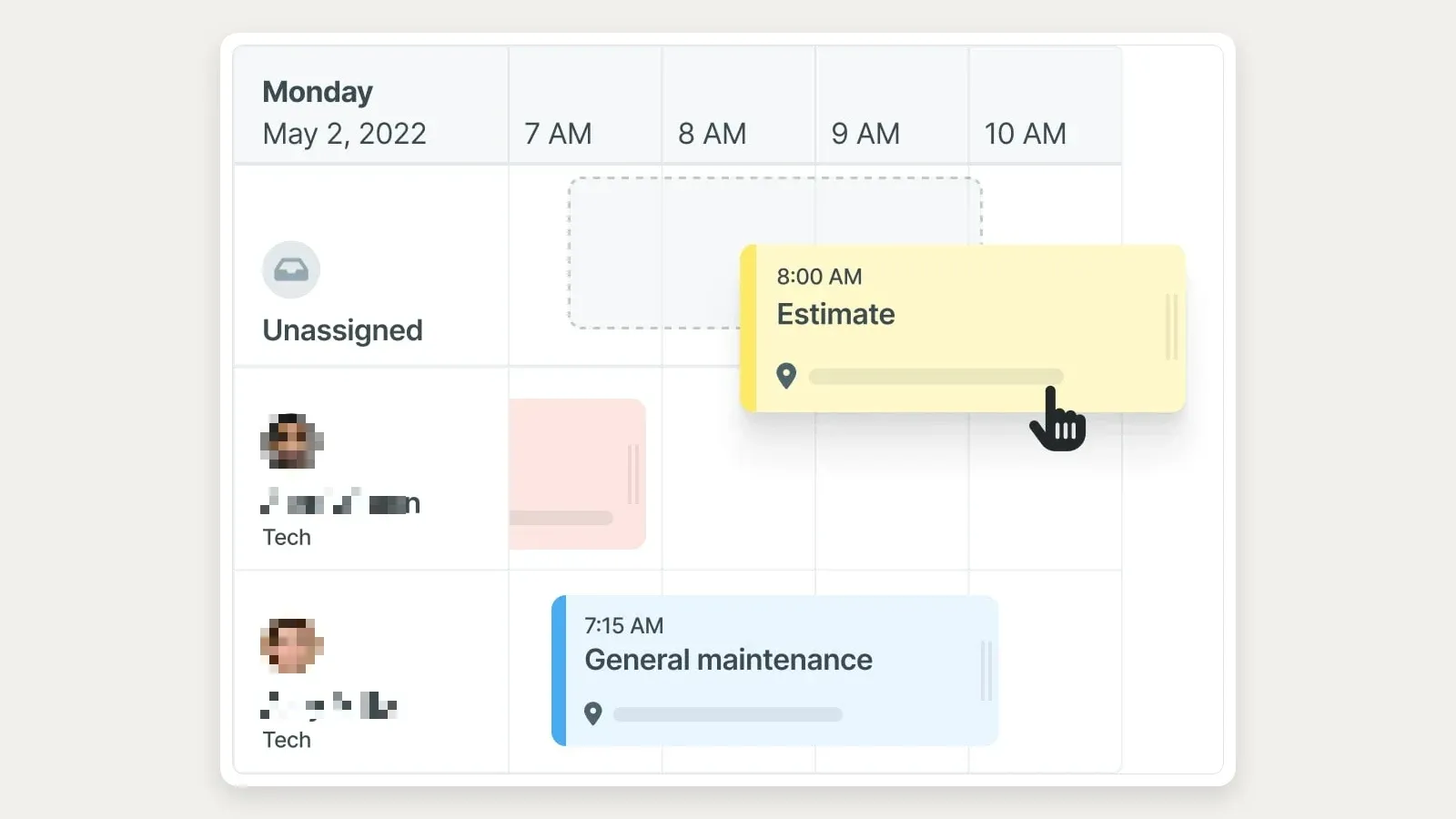
Workiz’s official dispatching page shows an estimate being moved from the unassigned row onto a technician calendar. Courtesy of Workiz; observed July 30, 2026; vendor-supplied rather than a hands-on test.
Workiz dispatch features
- Drag-and-drop calendar
- Technician expertise and team filters
- Real-time job and schedule changes
- Technician location context
- Scheduling suggestions
- Customer reminders and on-my-way messages
- Phone and messaging tools
- Online booking
- Mobile field updates
- Estimates, invoices, payments, and QuickBooks integration
Workiz pricing
The official Workiz pricing page lists:
- Lite: free for up to 2 members, limited to 20 invoices, jobs, and estimates
- Kickstart: $225 monthly or $187 per month billed annually for the first 3 users at the captured pricing state
Higher plans and AI products change the final cost. Recheck the page immediately before release because pricing, promotions, and feature packaging are volatile.
Best for
- Residential home-service operations
- Teams handling a high volume of calls and customer messages
- Companies that want dispatch and communications in one product
- Buyers that want a limited free starting option before a paid rollout
Limitations
- The free plan is heavily limited
- AI and advanced automation require exact plan verification
- Vendor-reported outcome statistics are not independent proof
- Commercial asset, agreement, project, and deficiency depth should be tested separately
- Pricing and packaging should be refreshed immediately before purchase
Workiz is most compelling when call intake and customer communication are part of the dispatch problem. A buyer focused mainly on commercial equipment and planned service should start with ServiceTrade or BuildOps instead.
Best HVAC dispatch software by business type
Best for an owner-operator or very small team
Start with Jobber, Housecall Pro, and Workiz.
- Choose Jobber for the clearest basic job, calendar, route, and invoice flow.
- Choose Housecall Pro when residential equipment context, service plans, homeowner booking, and communication are more important.
- Choose Workiz when calls, messages, and dispatch need to stay tightly connected.
The free or lowest advertised tier is not automatically the least expensive usable option. Compare the users, customer reminders, routing, online booking, QuickBooks, and payment tools required for the real workflow.
Best for a growing residential HVAC company
Start with Housecall Pro, FieldCamp, FieldEdge, and ServiceTitan.
- Housecall Pro offers a balanced home-service workflow.
- FieldCamp is relevant when dispatch constraints and automation need more configuration.
- FieldEdge is relevant for an established HVAC company tied closely to QuickBooks.
- ServiceTitan becomes a stronger candidate as call booking, capacity, reporting, and dispatcher specialization grow.
Use the same urgent-call scenario in every demo. A vendor should not win because its presentation used an easier workflow.
Best for a large residential or mixed operation
Start with ServiceTitan and FieldCamp, then include FieldEdge if the business remains heavily HVAC- and QuickBooks-centered.
ServiceTitan offers broader documented operational depth. FieldCamp offers a more configurable dispatch model with published pricing and explicit AI controls.
The tradeoff should be evaluated with real team data, not feature counts.
Best for commercial HVAC service
Start with ServiceTrade and BuildOps. Add ServiceTitan for a large mixed residential-commercial company.
- ServiceTrade is strongest when planned maintenance, equipment, backlog, deficiencies, and reactive calls drive the operation.
- BuildOps is stronger when service and project work must coexist.
- ServiceTitan is relevant when the organization needs a broad platform across residential and commercial divisions.
Commercial demos should include sites, equipment, agreement commitments, planned visits, repair backlog, and customer-facing documentation.
Best for AI-assisted dispatch
Evaluate FieldCamp, then compare the documented suggestion and automation scope in ServiceTitan, ServiceTrade, BuildOps, and Workiz.
The buying question is not “does it have AI?” Ask:
- Which factors are actually used?
- Which constraints are mandatory?
- Can a dispatcher see the reason?
- Can the result be modified or rejected?
- Can jobs be held in a review queue?
- What can assign automatically?
- What is logged?
- What happens when source data is missing?
- How is usage priced?
An opaque recommendation with no exception policy is not a complete dispatch system.
What to look for in HVAC dispatch software
1. An unassigned-work and backlog view
The office needs one place to see what has not been scheduled, what has been promised, what is urgent, and what can wait. Commercial teams also need to distinguish agreement commitments, deficiencies, quoted repairs, and reactive calls.
2. Skills and certification matching
“Available” does not mean qualified. Define the skills that matter, such as:
- Residential service
- Commercial service
- Refrigeration
- Controls
- Boilers
- Chillers
- Installation
- Startup and commissioning
- Senior diagnostics
- Sales or replacement estimates
- Required certifications
Then test whether the system prevents an invalid assignment or only shows the information for a dispatcher to interpret.
3. Duration, capacity, and arrival windows
An HVAC schedule needs more than start times. Test:
- Expected duration by job type
- Customer arrival window
- Technician shift and time off
- Maximum daily workload
- Travel between jobs
- Overtime policy
- Emergency capacity
- Multi-day work
- Multiple technicians or crews
4. Real-time exception handling
Ask the vendor to simulate:
- A technician running ninety minutes late
- A no-cooling emergency
- A customer cancellation
- A part not available
- A senior technician needed for escalation
- A job that turns into replacement sales
Watch what changes for the dispatcher, technician, customer, and downstream records.
5. Mobile context
The technician should receive more than an address. Test customer history, equipment, service agreement, job description, notes, photos, forms, estimates, pricebook, signature, payment, and closeout.
6. Customer communication
Confirm:
- Booking confirmation
- Appointment reminder
- Arrival window
- Technician assignment
- On-my-way message
- Reschedule or cancellation
- Completion and follow-up
Ask which messages are automatic, which are manual, which are customizable, and which require paid communication products.
7. Commercial site and equipment context
Commercial HVAC dispatch should show the correct site and unit—not only a customer name. Test multiple locations, multiple assets, agreement coverage, site contacts, access instructions, prior work, open deficiencies, and planned maintenance.
8. Human control, auditability, and failure behavior
For every automated or AI-assisted function, ask:
- What data produced the recommendation?
- Which rule won when constraints conflicted?
- Can a person override it?
- Is the previous assignment retained?
- Who changed the schedule?
- What happens when maps, messaging, or the recommendation service is unavailable?
9. Dispatch-to-invoice continuity
Follow one job to completion. The office should know what status, time, form, photo, material, recommendation, estimate, invoice, payment, and accounting records are created.
A fast dispatch board that leaves incomplete billing data can simply move the bottleneck downstream.
Use this HVAC dispatch demo script
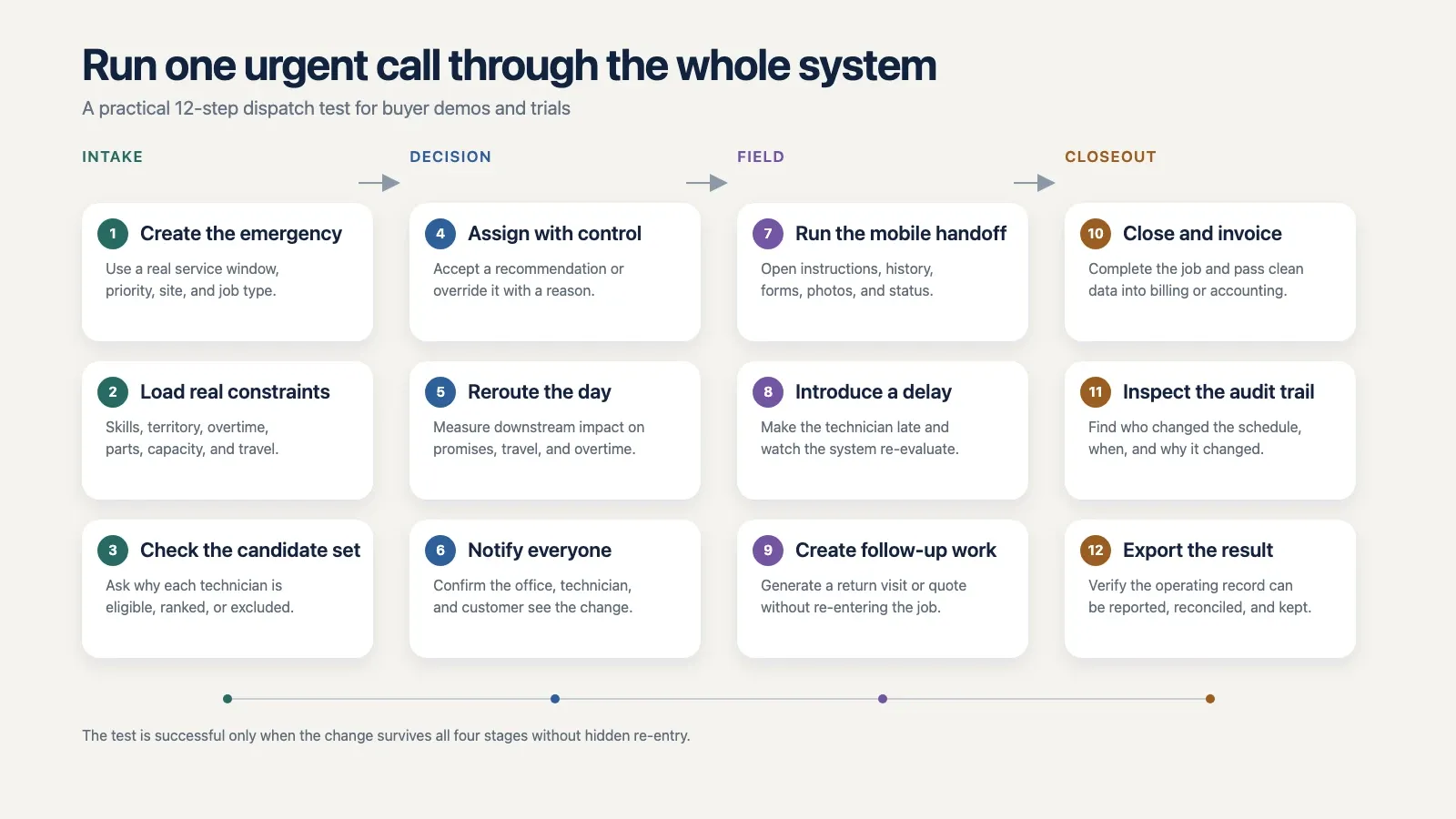
This editorial workflow turns one urgent call into a twelve-step dispatch test across intake, decision, field execution, and closeout. It is a buying exercise, not a measure of vendor performance.
Give every vendor the same sample data:
- 12 technicians
- 3 service areas
- 8 technician skill groups
- 2 technicians unavailable
- 1 technician already near overtime
- 18 scheduled jobs
- 6 unscheduled maintenance visits
- 1 commercial agreement call
- 1 no-cooling emergency
- 1 customer requesting a preferred technician
- 1 job requiring a senior diagnostic skill
Then ask the vendor to perform this sequence:
- Create the emergency call with a two-hour arrival promise.
- Show which technicians are eligible and why.
- Explain the effect of moving each candidate.
- Assign or recommend the technician.
- Reroute the affected schedule.
- Notify the new customer, moved customer, dispatcher, and technicians.
- Show the mobile job context.
- Mark the technician late and re-evaluate.
- Convert a diagnostic finding into follow-up work.
- Complete the visit and show what reaches the invoice and accounting system.
- Show the audit history and override path.
- Export the dispatch and job records.
Score what you observe, not what the salesperson says is possible after a future configuration.
How much does HVAC dispatch software cost?
The published examples in this comparison range from a limited free Workiz plan upward, with several products — FieldCamp among them — requiring custom quotes.
The more useful calculation is twelve-month total cost:
- Office users
- Field users or technicians
- Required package
- Dispatch or AI add-on
- AI usage or credits
- Phone, SMS, and customer communication
- Route or fleet products
- Implementation and training
- Data migration
- QuickBooks, ERP, or accounting
- Payments and financing
- Support
- Expected additional users
Ask every quote-only vendor to price the same headcount and workflow. Ask every published-price vendor to confirm which capabilities are included at that price.
“Starts at” is not a comparable total.
Frequently asked questions
What is HVAC dispatching?
HVAC dispatching is the process of assigning and coordinating technicians for service, maintenance, estimate, installation, and emergency work. It includes qualification, availability, location, workload, customer commitments, communication, real-time changes, and the work record handed to the field.
What is the difference between HVAC scheduling and dispatching?
Scheduling reserves when the work should happen. Dispatching selects and coordinates who performs it and manages changes as the day unfolds.
Routing sequences travel between stops. Most HVAC field service platforms combine all three at different levels of depth.
What is the best HVAC dispatch software for a small business?
Jobber is the simplest starting point for many very small teams. Housecall Pro is a stronger residential option when homeowner communication, equipment profiles, and service plans matter.
Workiz is worth considering when calls and messaging are central to dispatch.
Is there free HVAC dispatch software?
Workiz publishes a free Lite plan for up to two members, but it limits the number of jobs, estimates, and invoices. A free calendar can help a very small operation, but compare customer communication, routing, accounting, history, and future user costs before committing data to it.
What is the best HVAC dispatch software for a large company?
ServiceTitan is the strongest broad candidate here for a large residential or mixed operation. FieldCamp is relevant when the company prioritizes configurable dispatch constraints and AI-assisted decision controls.
ServiceTrade and BuildOps are stronger starting points for commercial HVAC service and service-plus-project companies.
Can HVAC dispatch software match jobs by technician skill?
Several products document skill-aware scheduling or dispatch, including FieldCamp, ServiceTitan, BuildOps, Workiz, and FieldEdge at varying levels. Ask whether skills prevent invalid assignments, influence a recommendation, or are only visible to the dispatcher.
Does AI automatically dispatch HVAC technicians?
Sometimes, but the scope differs by product and configuration. FieldCamp, for example, documents queue and immediate modes plus accept, reject, and modify controls.
Other vendors document recommendations or scheduling assistance. Confirm what assigns automatically, what requires approval, what is logged, and how exceptions are handled.
Does HVAC dispatch software integrate with QuickBooks?
Housecall Pro, FieldCamp, ServiceTitan, FieldEdge, Jobber, Workiz, and ServiceTrade publish QuickBooks connections or related integration options. The exact records, sync direction, timing, eligible plan, and error-recovery process vary.
Ask the vendor to demonstrate an invoice and payment moving through the intended accounting workflow.
Can dispatch software manage recurring HVAC maintenance?
Many platforms can create recurring jobs, service-plan visits, memberships, or commercial agreement schedules. These are not identical.
Confirm covered locations and equipment, promised visits, generation rules, rescheduling, billing, renewals, and agreement profitability.
Should commercial HVAC companies use different dispatch software?
Usually they should at least evaluate commercial-first products. Commercial dispatch often depends on customer hierarchies, sites, equipment, agreements, planned maintenance, inspections, deficiencies, projects, and customer documentation.
ServiceTrade and BuildOps are stronger starting points for that model than simple residential scheduling tools.
What programs do dispatchers use?
A dispatcher in an HVAC shop normally works inside one field service platform that combines the dispatch board, the technician map and customer messaging — Housecall Pro, ServiceTitan, FieldCamp or ServiceTrade among the systems compared here.
Standalone routing tools are rare in this trade, because the board has to see job status and technician skills in the same place.
Final recommendation
Build the shortlist around the dispatch operation:
- Small residential: Jobber, Housecall Pro, Workiz
- Growing residential: Housecall Pro, FieldCamp, FieldEdge, ServiceTitan
- Large residential or mixed: ServiceTitan, FieldCamp
- Commercial planned and reactive service: ServiceTrade
- Commercial service plus projects: BuildOps
- QuickBooks-centered HVAC operation: FieldEdge
- Configurable, AI-assisted dispatch: FieldCamp
Then run the same urgent-call demo with the same technicians, skills, availability, jobs, and customer commitments. The best HVAC dispatch software is the one that makes the right assignment understandable, keeps humans in control of exceptions, updates the field and customer cleanly, and leaves a complete operational record after the work is done.
Sponsored
Ready to upgrade your dispatch?
FieldCamp uses AI to optimize routes, auto-assign jobs, and eliminate scheduling chaos — so you can run more jobs with fewer headaches.

Tested and written by
Azaz Vepari
Editor, Modern Field Service
Tool profiles
Pricing, best fit and limitations for each tool in this review, one page each.