Azaz Vepari12 Mins read
AI for HVAC Businesses in 2026: 7 Workflows That Are Ready Now
See which AI workflows HVAC service businesses can use now for calls, booking, dispatch, job data, estimates, summaries, and follow-up—with the controls each one needs.
Source-based assessment. Read our evidence standard.
In this article14 sections
AI for an HVAC business is ready for seven bounded workflows: answering and qualifying routine inquiries, creating structured service requests, offering approved appointment slots, recommending technicians, drafting customer and estimate content, summarizing calls and jobs, and surfacing follow-up work. It is not ready to own safety-critical diagnosis, emergency advice, unbounded pricing, legal commitments, or every dispatch exception without human oversight.
The best starting point is usually not a general chatbot. It is one repetitive step with clean inputs, a narrow permission set, a visible audit trail, and a human fallback.
Workiz Genius Answering and Housecall Pro CSR AI are examples for call-heavy intake. ServiceTitan Dispatch Pro and FieldCamp AI Dispatcher address technician assignment at different operating depths.
Probook positions a connected front office around intake and dispatch. QuoteIQ combines lower-entry-price AI credits with calling and estimate tools.
These products are not interchangeable, and no one platform is the best for every HVAC company. Choose the workflow first, then prove the product can complete it using your job types, service area, pricebook, team skills, schedule rules, and exception policy.
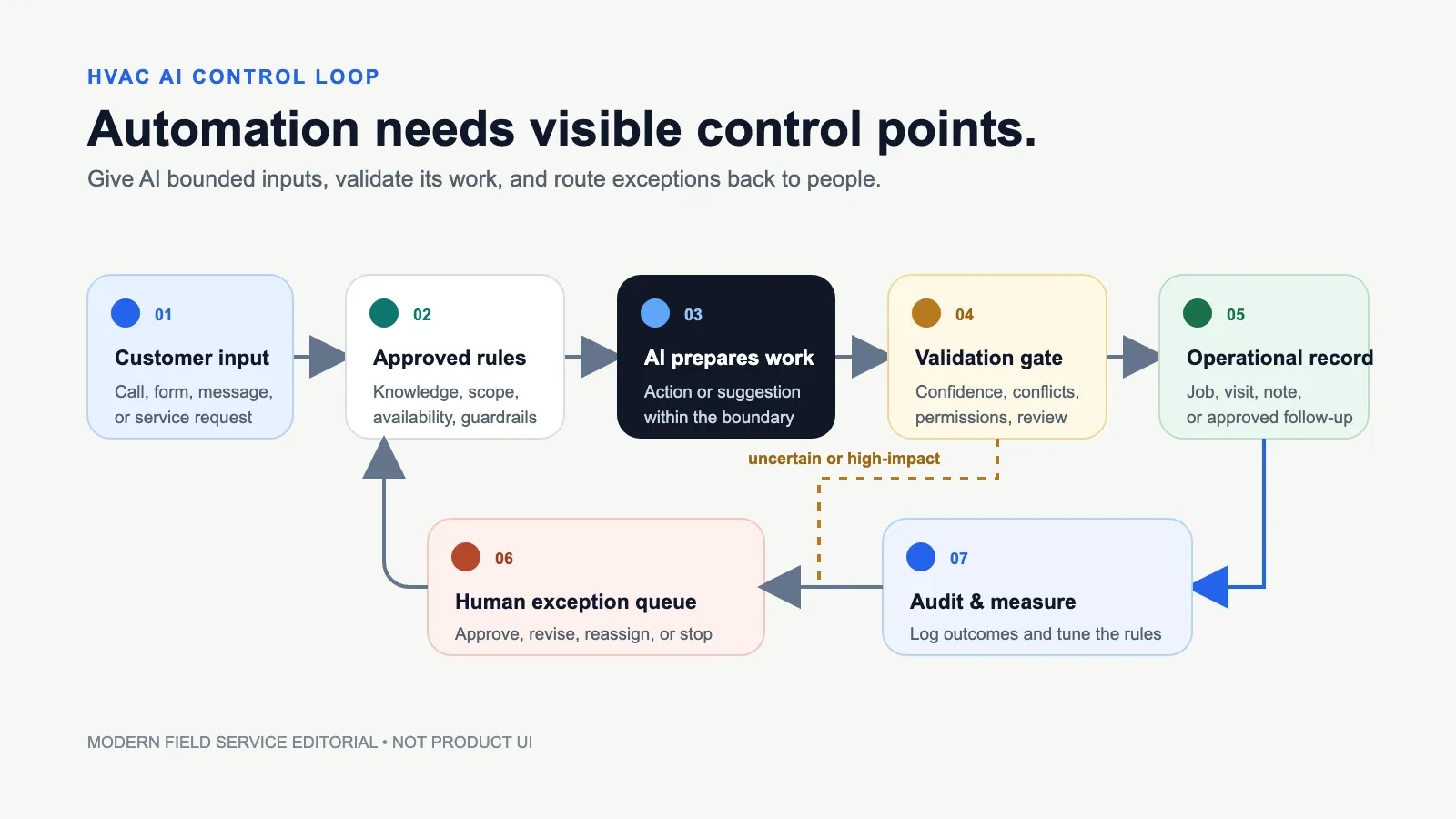
Useful HVAC automation starts with bounded inputs, validates each action, and routes uncertain work back to people. Source: Modern Field Service editorial.
The 7 HVAC AI workflows at a glance
| Workflow | Ready now for | Keep human-owned | Current product examples |
|---|---|---|---|
| 1. Inbound call and message triage | Hours, service area, supported services, caller details, message taking, routine qualification | Emergency judgment, technical diagnosis, angry/vulnerable callers, anything outside approved knowledge | Workiz Genius Answering, Housecall Pro CSR AI, QuoteIQ Virtual Call Team, FieldCamp AI Receptionist, Probook |
| 2. Structured service-request creation | Create a lead/job with required fields and source transcript/summary | Ambiguous job classification, duplicates, unsafe details, records that fail validation | Workiz, Housecall Pro, FieldCamp, Probook |
| 3. Bounded booking | Offer approved slots, apply service-area/job-type rules, book or hold an appointment | Overbooking exceptions, multi-tech/multi-day work, emergency prioritization, promises outside policy | Workiz, Housecall Pro, FieldCamp, QuoteIQ |
| 4. Technician matching and dispatch suggestions | Rank available technicians by skills, location, workload, capacity, route, and configured priorities | Certification ambiguity, customer continuity, unusual equipment, commercial constraints, unresolved conflicts | ServiceTitan Dispatch Pro, FieldCamp AI Dispatcher, Probook |
| 5. Draft estimates and customer communication | Draft scope wording, messages, option descriptions, and pricebook-backed line items for review | Final diagnosis, uncontrolled pricing, warranty/legal language, sending without review until proven | QuoteIQ, Housecall Pro Marketing AI, FieldCamp Command Centre/workflows |
| 6. Call, visit, and job summaries | Transcripts, summaries, action items, missing-field prompts, handoff notes | Treating a summary as the source record; deleting original audio, notes, photos, or readings | FieldCamp, Housecall Pro, Workiz, QuoteIQ |
| 7. Follow-up and operating questions | Unsold-estimate lists, overdue items, routine outbound queues, natural-language reports | Autonomous discounts, collections threats, disputed invoices, sensitive performance decisions | Probook, Housecall Pro Analyst AI, FieldCamp Command Centre, QuoteIQ automations |
“Ready now” means suitable for a controlled pilot—not accurate by default. Every workflow depends on current data, explicit rules, permissions, testing, monitoring, and a recoverable manual path.
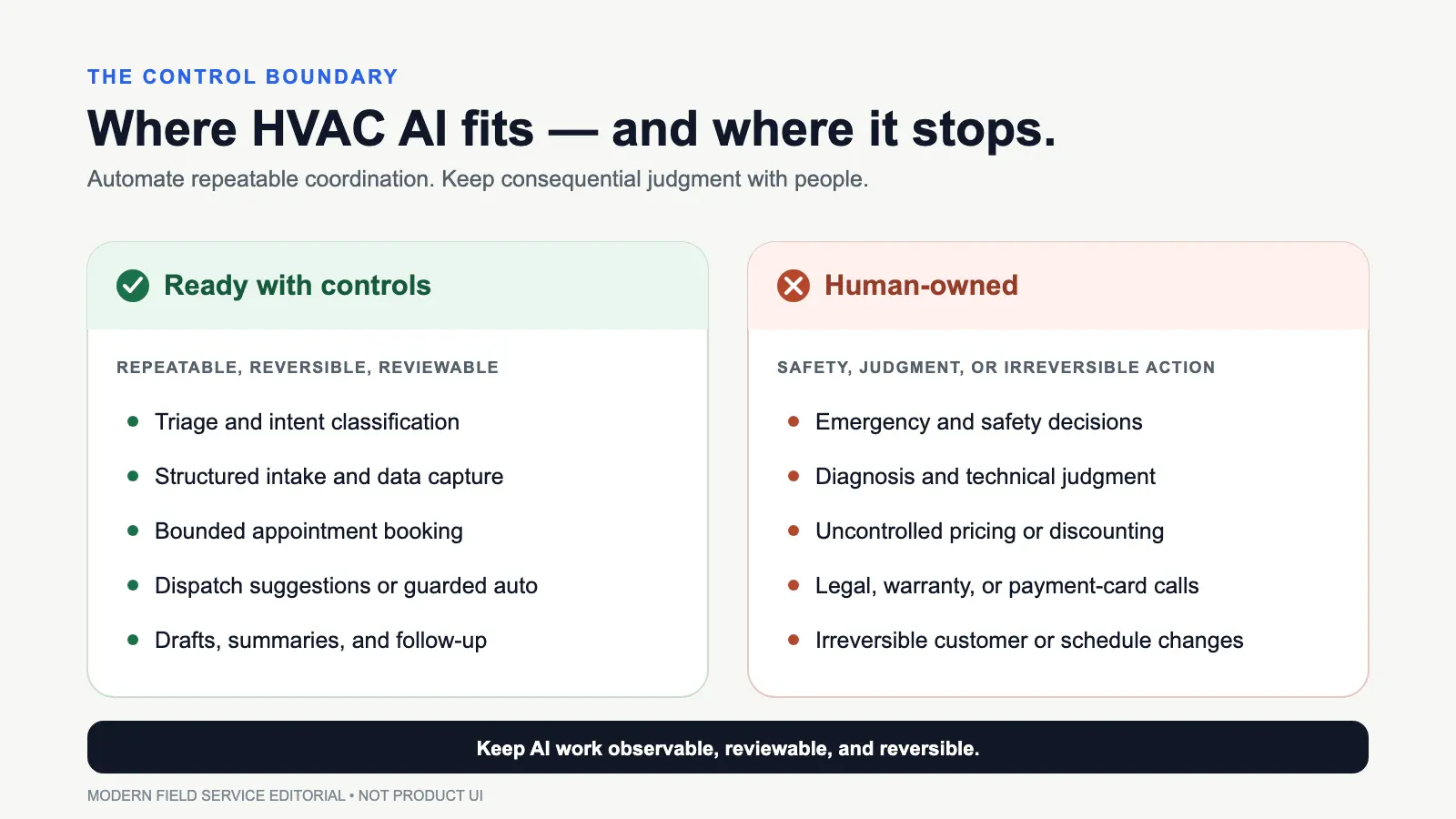
Use AI for repeatable and reviewable coordination; keep safety, technical judgment, uncontrolled pricing, and irreversible actions with people. Source: Modern Field Service editorial.
1. Answer and qualify routine inbound calls and messages
The most mature HVAC AI use case is bounded front-office intake. A configured agent can answer a forwarded call or message, state business hours, collect the caller’s name and address, check whether the requested service is offered, ask approved questions, take a message, and route or escalate the conversation.
Workiz Genius Answering documents calls, texts, and email-originated requests; job or lead creation; rescheduling for verified customers; custom questions mapped into custom fields; and optional job assignment. Housecall Pro CSR AI documents business knowledge, call logs, summaries, urgency, booking permissions, cancellation/rescheduling controls, notifications, and escalation.
QuoteIQ and FieldCamp also publish multi-channel AI receptionist capabilities.
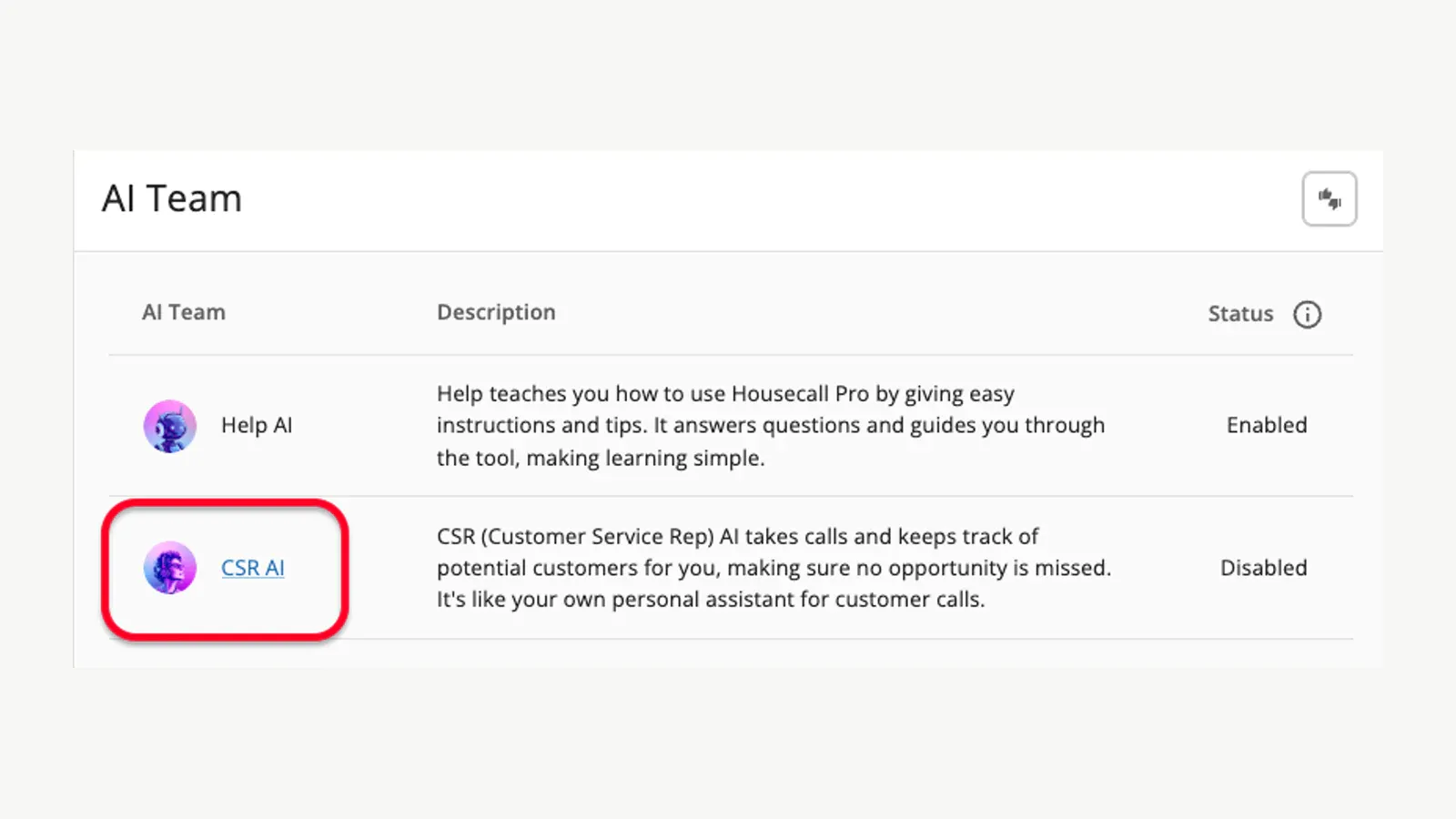
Housecall Pro presents CSR AI as an optional AI Team component; this vendor-supplied screen shows the control in a disabled state. Source: Housecall Pro official Help Center.
The useful boundary is routine intake. Do not authorize the agent to improvise emergency or safety advice, diagnose a no-cool call, promise a final repair price, or decide that a situation can safely wait.
Define the conditions that immediately transfer, page the on-call person, or capture a callback.
Also test the failure path. Workiz states that one agent handles one simultaneous call and excess calls follow the next call-flow step.
It also states that once a monthly conversation limit is reached, AI stops answering and the call moves onward. Concurrency and exhaustion behavior are operational requirements, not billing trivia.
2. Turn the conversation into a clean service request
Answering is not enough if a dispatcher must listen again and rebuild the job. The next useful workflow is structured intake: convert the conversation into a lead or job with validated customer, property, contact, job type, service area, requested window, source, equipment clue, and transcript or summary.
Workiz maps custom questions to custom fields. FieldCamp’s Command Centre documents natural-language job creation and record actions under the user’s existing role and permissions.
Probook’s current site describes voice and web leads, history checks, and booking cleanup before a job reaches the board.
This workflow is only as good as the record rules. Require a possible-duplicate check before creating a new customer.
Mark inferred fields as unverified. Preserve the original transcript or message.
Reject impossible addresses and unsupported job types. Route missing equipment, access, warranty, or commercial-site information to an attention queue rather than silently inventing it.
The quality measure is not “calls handled.” Track the share of AI-created requests that reach dispatch with all required fields, without duplicate customers, incorrect job types, or office re-entry.
3. Book only within approved capacity and policy
AI booking works when the choices are constrained. Give it supported job types, realistic durations, service areas, booking hours, arrival windows, required lead time, capacity rules, and an escalation path.
Then let it offer only the slots the operating system says are available.
Workiz documents three booking modes, including technician availability, jobs per slot, and an explicit double-booking option. Its AI follows the selected settings.
Housecall Pro’s current CSR settings describe permissions to book, reschedule, or cancel. FieldCamp’s AI Receptionist documentation requires each channel to be configured and tested before production, while the Command Centre can create and schedule jobs.
QuoteIQ advertises booking and calendar connections through its Virtual Call Team.
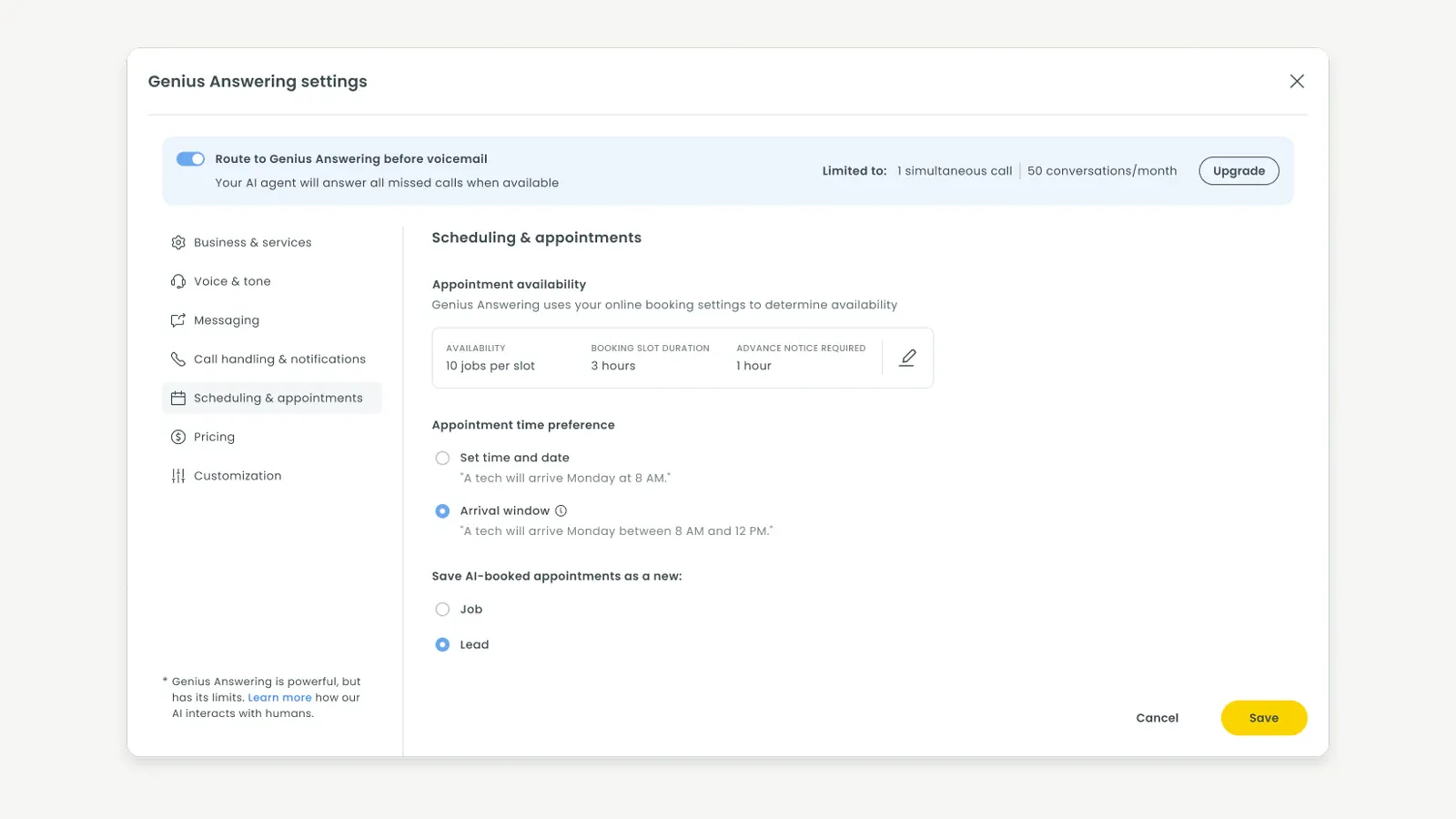
Workiz exposes bounded booking inputs including availability, arrival-window preferences, and whether an AI-booked appointment is saved as a job or lead. Source: Workiz official Help Center.
One Housecall Pro source deserves caution: the current CSR AI page says “booking jobs (coming soon)” near the top, while later sections describe active booking permissions and a demo that books directly to the calendar. Treat that as an unresolved documentation inconsistency.
Confirm availability on your account and record the exact demonstrated behavior before relying on it.
Keep multi-day work, multiple technicians, cranes, permits, customer-specific windows, commercial access rules, and emergency reprioritization out of the first automated booking scope.
4. Recommend or assign the right technician
Dispatch is where AI can create value—and where weak data becomes visible. Current systems can rank or assign technicians using combinations of skills, location, workload, availability, route, capacity, historical performance, job value, and configured constraints.
ServiceTitan Dispatch Pro uses settings, historical data, machine learning, and hard constraints. It offers Assist modes, where a dispatcher reviews suggestions, and Auto modes, where eligible jobs can be assigned or reshuffled.
Official documentation says it is primarily for residential service and replacement, works only with managed technicians, improves with more historical data, and still needs alerts and exceptions managed.
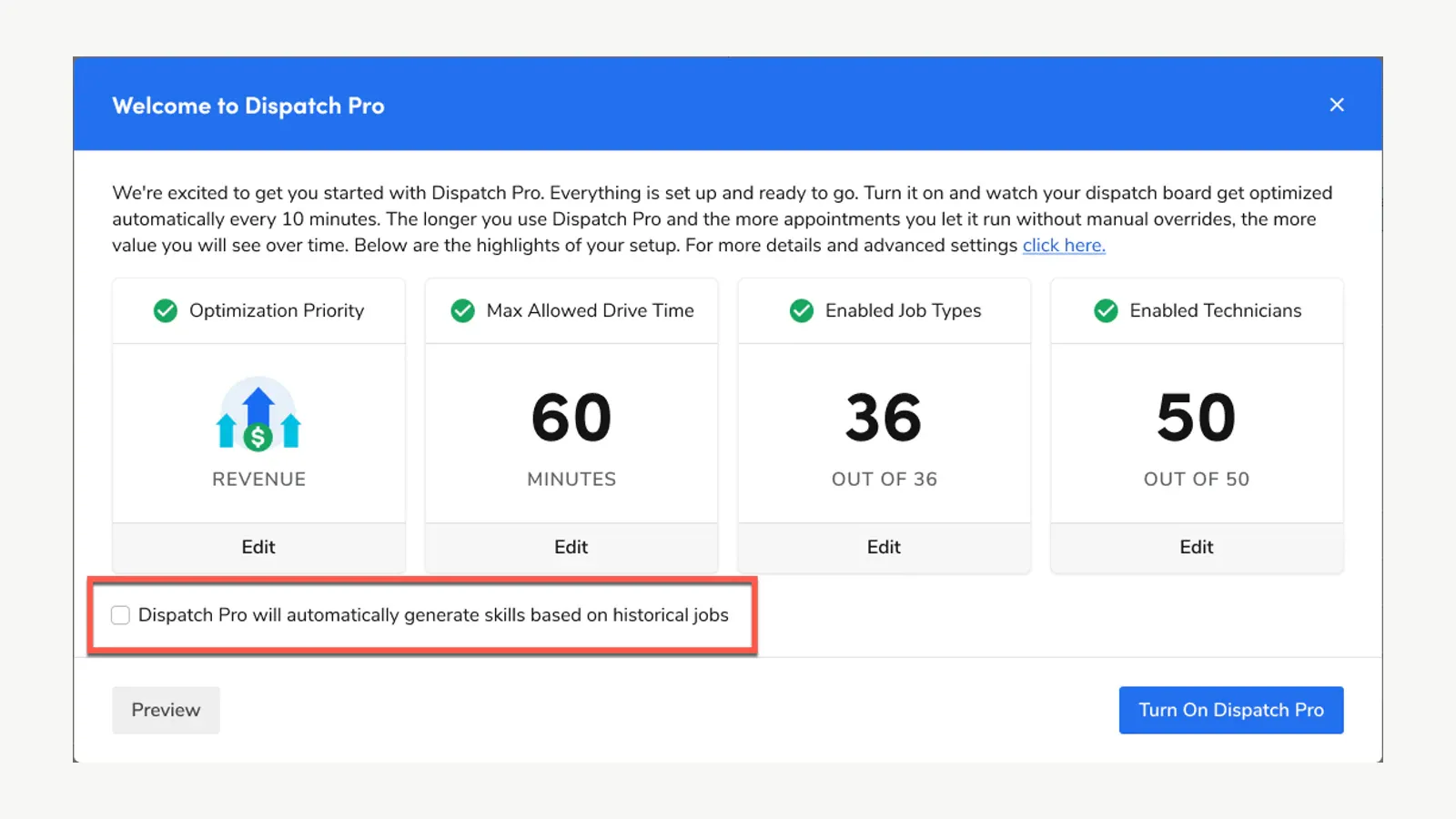
ServiceTitan’s Dispatch Pro setup exposes constraints for optimization priority, drive time, job types, and technicians before the feature is turned on. Source: ServiceTitan official Help Center.
FieldCamp AI Dispatcher documents confidence-scored suggestions based on skills, proximity, availability, workload, and route efficiency. It also documents guarded agents that can auto-accept assignments meeting configured thresholds while escalating conflicts or uncertain cases.
Critical conflicts are not auto-accepted according to its current conflict guide.
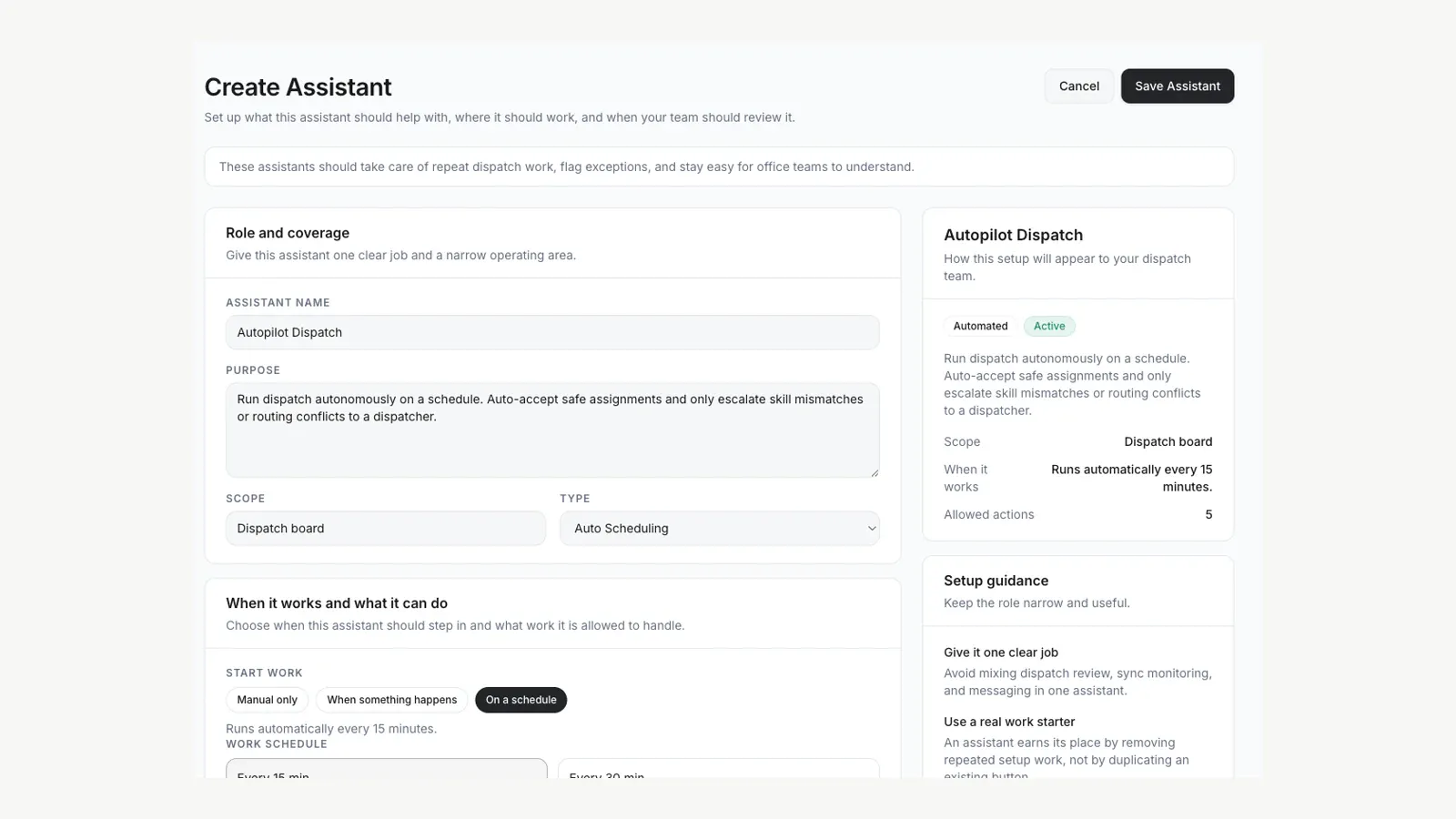
FieldCamp’s official demo UI shows an Autopilot Dispatch assistant configured to auto-accept safe assignments and escalate skill or routing conflicts. Source: FieldCamp official documentation.
Probook publicly frames intake, booking cleanup, board filling, outbound work, and dispatch as one front-office system for larger home-service operators. Its product site, however, exposes less implementation detail than the ServiceTitan and FieldCamp help centers.
Require a live explanation of inputs, constraints, overrides, audit history, data retention, integration direction, and failure recovery.
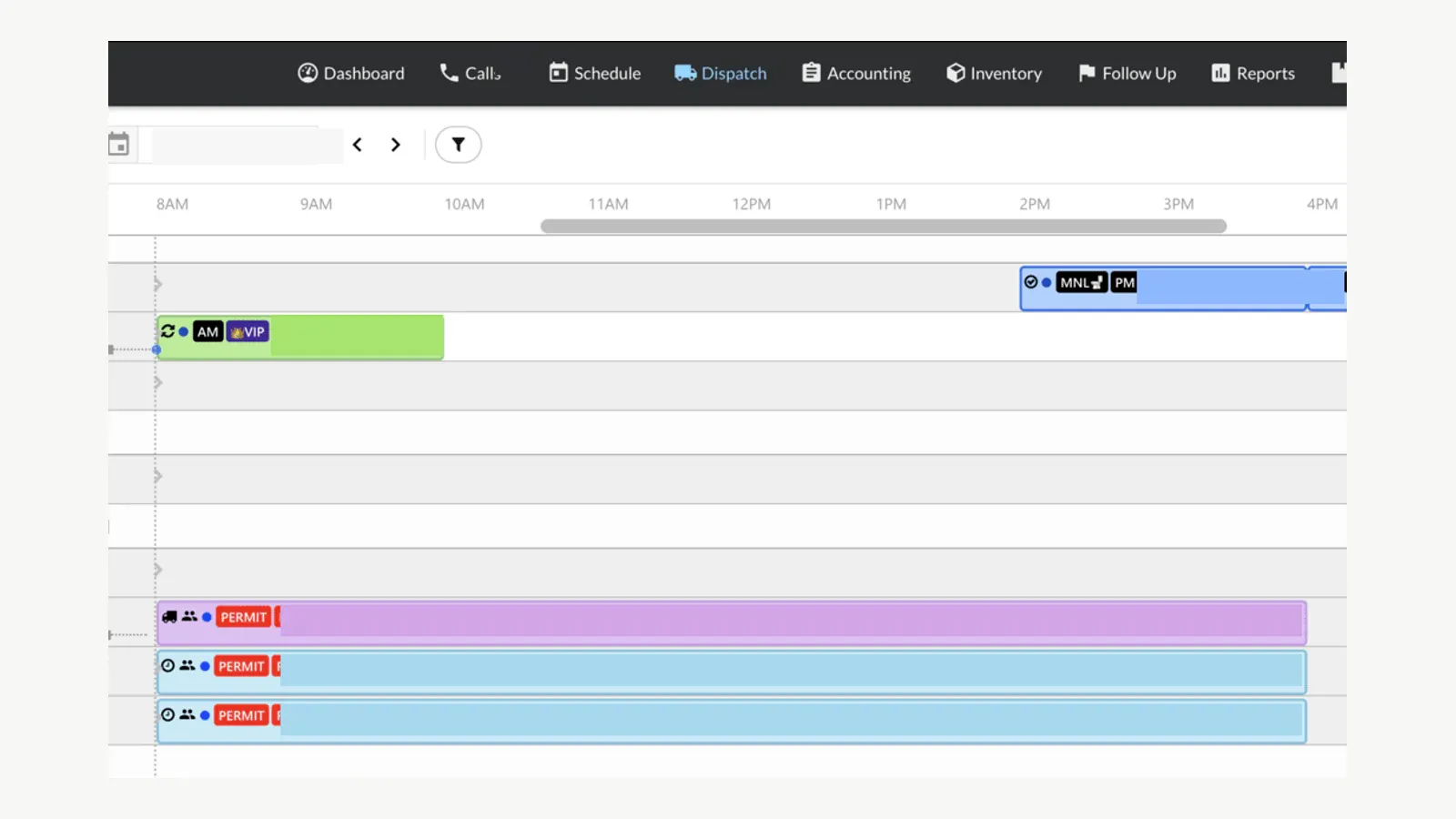
Probook’s official Chrome Web Store listing shows its extension over a ServiceTitan dispatch board; identifiers and schedule details are redacted in this publishable copy. Source: Probook developer listing on Chrome Web Store.
Start in suggestion mode. Compare AI recommendations with dispatcher decisions for two weeks.
Do not turn on automatic assignment until job types, technician skills, addresses, durations, service areas, certifications, lock rules, and exception ownership are trustworthy.
The scheduling board underneath matters as much as the model on top of it. Our HVAC dispatch software comparison reviews these platforms from the board-and-routing side rather than the AI side.
5. Draft estimates and customer communication
Generative AI is useful as a first draft when the facts and prices come from controlled systems. It can turn approved notes and pricebook items into a clearer scope description, propose customer-friendly option names, draft an estimate follow-up, or rewrite a technician note for readability.
QuoteIQ publishes an AI Estimate Generator, an editor copilot, text generation, and plan-based AI credits. Housecall Pro’s AI Team includes Marketing AI for drafting content in the product.
FieldCamp documents natural-language actions, workflow generation, and estimates in its connected operating system.
Keep four controls:
- Line items and totals must come from an approved pricebook or pricing rule, not model memory.
- A qualified person confirms the diagnosis, scope, warranty, exclusions, tax, and final price.
- Customer-facing text is reviewed until measured error and exception rates justify a narrower auto-send rule.
- The source notes, pricebook version, generated draft, editor, and sent version remain auditable.
Do not use AI-generated before-and-after images as evidence that work occurred or equipment had a particular condition. Generated visuals may be acceptable as clearly labeled marketing concepts; job documentation requires real, time-linked field evidence.
6. Summarize calls, visits, and jobs without losing the source
Summaries can reduce reading time across long calls, technician notes, and job histories. Current products document call transcripts, summaries, urgency, actions, and natural-language access to records.
FieldCamp also documents AI summaries and call transcription; Workiz and QuoteIQ store call summaries alongside recordings or transcripts; Housecall Pro surfaces CSR call details and summaries.
The source remains authoritative. A summary can omit a model number, invert a date, merge two symptoms, or overstate a commitment.
Keep the recording, transcript, technician readings, photos, signed documents, and original notes according to policy. Make the summary link back to them.
Use summaries for handoffs and queues, not as a replacement for technical records. A good production template separates: customer request, observed facts, work performed, unresolved issue, promised action, owner, and due time.
It should label anything inferred.
Call recording introduces another boundary. QuoteIQ’s current terms say its Virtual Call Team records, transcribes, and summarizes calls, places compliance responsibility on the user, and explains a retention period.
FieldCamp and Workiz expose recording controls. Review the laws and policies that apply to your callers and locations with qualified advice before activation.
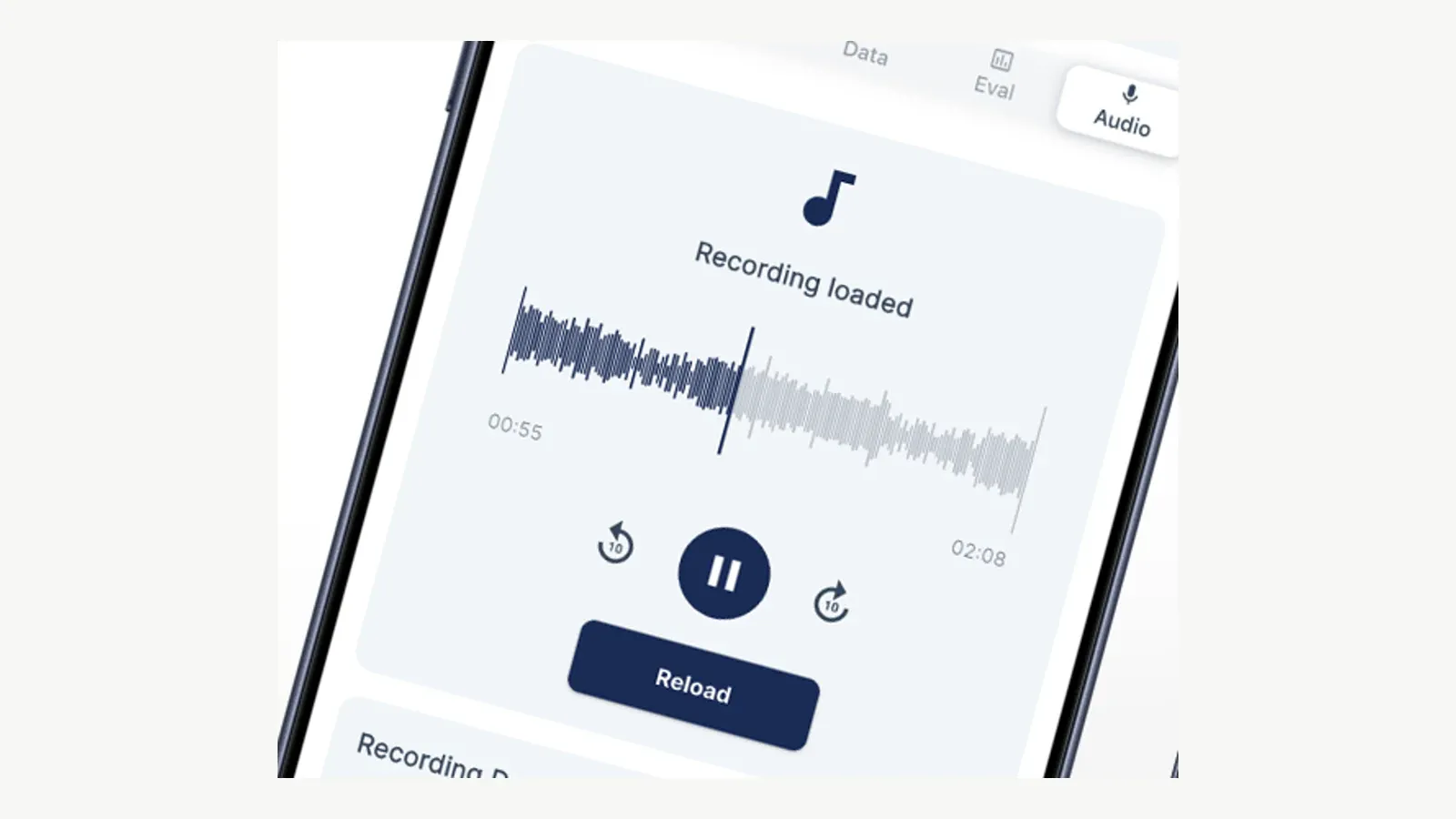
QuoteIQ’s vendor-supplied Virtual Call Team composition shows an operational recording interface; the final excludes caller and contact details. Source: QuoteIQ official Virtual Call Team page.
7. Surface follow-up work and answer operating questions
AI can help an owner or office manager ask: Which unsold estimates need an action? Which invoices are overdue?
Which jobs are missing photos? Which callbacks have no owner?
Which appointment windows are at risk?
FieldCamp’s Command Centre documents dashboard, overdue-invoice, schedule, reporting, and action commands. Housecall Pro Analyst AI generates reports from account data, while its Pipeline supports status-based message and update automations.
Probook describes outbound activity intended to fill the board and close unsold estimates. QuoteIQ lists email/text automation, pipelines, reporting, and AI tools on plan-specific tiers.
The safe first version creates a queue for a person. It does not invent a discount, threaten collection, decide a disputed invoice, or send a high-stakes message without policy.
Define approved templates, quiet hours, frequency caps, stop conditions, and an owner for replies.
Measure completed outcomes, not generated messages: contact made, appointment confirmed, estimate disposition captured, missing evidence resolved, or exception handed to the right person.
Six current HVAC AI product examples
This is not a one-through-six ranking. Each product enters from a different operating model.
This page compares only the AI layer. For the full platform evaluation behind these names, see our HVAC CRM comparison, HVAC dispatch software guide, and commercial HVAC software guide.
| Product | Best reason to shortlist | Current commercial basis | Evidence boundary |
|---|---|---|---|
| Housecall Pro AI Team | AI inside an existing residential FSM; CSR, reporting, writing, coaching, and help roles | Core AI teammates included; CSR AI optional add-on; HCP Basic starts $59/month annually | CSR booking documentation is internally inconsistent; verify on the buyer account |
| Workiz Genius Answering | Call-heavy intake with configurable questions, booking, messages, and optional assignment | Requires Genius Phone; Answering is separately priced or on-demand; Workiz Pro is $325 monthly or $270/month annually for 5 users | One concurrent call per agent, usage limits, and vendor-acknowledged hallucination risk |
| ServiceTitan Dispatch Pro | Dispatch recommendations or automation for an established ServiceTitan operation | Quote/demo; permissions, managed technicians, history, and setup required | Primarily residential service/replacement; exceptions and data quality remain human responsibilities |
| Probook | Larger home-service operator centralizing voice/web intake, booking cleanup, outbound, board-fill, and dispatch | Demo/quote; vendor describes hands-on configuration | Public implementation detail is limited; exclude vendor outcome claims and prove controls in the demo |
| QuoteIQ | Lower published entry price for calling, estimate drafting, and automation using shared AI credits | Essentials $29.99 monthly with 500 credits; call usage consumes 125 credits/minute and terms add per-minute/auto-recharge details | Recording, shared-credit economics, generated content, accuracy, and permissions need explicit review |
| FieldCamp | Connected AI actions across records plus receptionist and confidence-scored dispatch workflows | AI Chat on all plans; AI Dispatcher documented on higher plans and as standalone/add-on; dollar-balance AI usage | First-party documentation only; get written clarity on standalone/add-on price, prerequisites, and usage |
Published prices and packaging were checked on 10 August 2026. They can change.
Ask for the subscription, users, phone plan, AI add-on, minutes or credits, implementation, integrations, data retention, support, and overage terms in writing.
What AI should not own in an HVAC company
Keep these tasks human-owned unless a narrower, qualified system is separately proven and governed:
- emergency or life-safety advice;
- diagnosis from incomplete customer descriptions, photos, or audio;
- refrigerant, combustion, gas, electrical, or lockout instructions;
- final pricing that is not constrained by the approved pricebook and policy;
- warranty, code, financing, legal, or contract commitments;
- customer or technician discipline based only on an AI summary or score;
- payment-card or sensitive credential collection outside an approved system;
- destructive record merges, cancellations, refunds, credits, or deletions without review and recovery;
- synthetic images presented as proof of site conditions or completed work.
The right question is not “Can the model do it?” It is “What happens when it is wrong, and who notices before the mistake reaches a customer, technician, schedule, invoice, or safety decision?”
A 30-day pilot that can be reversed
Choose one workflow and one branch, number, or team. Keep the existing manual path available.
Week 1: define the boundary
- Write the allowed intents, required fields, prohibited topics, escalation rules, hours, service areas, and job types.
- Clean the source data the workflow will use.
- Record current volume, response time, booking completeness, rework, and exception rates.
- Confirm permissions, recording/retention policy, credits or minutes, and the shutoff procedure.
Week 2: shadow mode
- Let AI produce suggestions, drafts, or summaries without taking customer-visible or dispatch action.
- Compare outputs with staff decisions.
- Label every error by cause: missing source data, wrong rule, unsupported intent, model error, integration failure, or user override.
Week 3: narrow live use
- Enable only the intents that passed shadow testing.
- Route uncertainty and prohibited intents to a named person.
- Review the first outputs daily; preserve transcripts, decisions, overrides, and outcomes.
Week 4: decide
- Compare completed-work quality and office re-entry—not vendor dashboard activity alone.
- Calculate the actual subscription, add-on, phone, credit, overage, configuration, and staff-review cost.
- Expand only if error, exception, customer, and operational measures meet the written threshold.
- If not, disable the workflow and retain the learning without forcing adoption.
Frequently asked questions
What is the best AI tool for an HVAC business?
There is no universal best. Workiz or Housecall Pro may be the first call-answering test for teams already using their platforms.
ServiceTitan Dispatch Pro fits established ServiceTitan operations with sufficient history and governance. Probook targets a larger front-office transformation.
QuoteIQ offers a lower published entry price with shared AI credits. FieldCamp connects AI chat, receptionist, dispatch, and operational records but needs the same configured proof and commercial verification as every vendor.
Can AI answer HVAC customer calls and book jobs?
Yes, current products document routine call handling, qualification, and bounded booking. The workflow still needs approved services, hours, pricing responses, service areas, required questions, available slots, escalation, concurrency, recording, and fallback rules.
Verify actual booking availability on the specific plan and account.
Can AI dispatch HVAC technicians automatically?
Some products support suggestions and guarded automatic modes. ServiceTitan and FieldCamp document data and configuration dependencies, multiple modes, alerts, and exceptions.
Start with recommendations, validate technician skills and job rules, then automate only the assignments that consistently meet defined thresholds.
Can AI diagnose an HVAC problem from a call or photo?
Do not treat a general operational AI tool as a qualified diagnosis system. It can collect symptoms and attach real photos for a technician, but incomplete inputs can lead to unsafe or costly conclusions.
Technical diagnosis and safety decisions remain with qualified people and approved procedures.
How much do HVAC AI tools cost?
The commercial models vary. Some AI features are included in a base platform, while phone agents, dispatch products, or usage are separate add-ons, credits, minutes, or quotes.
QuoteIQ publishes a $29.99 monthly entry plan with 500 shared AI credits. FieldCamp quotes per business and uses a dollar-balance AI usage model.
Housecall Pro includes several AI teammates but sells CSR AI separately. Workiz requires a phone plan for Genius Answering.
ServiceTitan and Probook require a quote or demo.
Final verdict
The practical AI opportunity in HVAC is not autonomous technical judgment. It is a controlled handoff: turn a routine inquiry into clean work, propose a valid slot or technician, draft the next communication, preserve the source evidence, and put exceptions in front of a person.
Start with one workflow where the rules already exist. Make the AI operate inside those rules, prove the fallback, and measure rework as closely as speed.
That is how an HVAC company gets useful automation without letting a confident answer become an operational fact.
Sources
Sponsored
Ready to upgrade your dispatch?
FieldCamp uses AI to optimize routes, auto-assign jobs, and eliminate scheduling chaos — so you can run more jobs with fewer headaches.

Written by
Azaz Vepari
Editor, Modern Field Service
Tool profiles
Pricing, best fit and limitations for each tool in this review, one page each.