Azaz Vepari10 Mins read
7 Best Commercial HVAC Software Platforms in 2026
Compare commercial HVAC software for sites, equipment, agreements, inspections, deficiencies, projects, inventory, dispatch, and billing.
Source-based assessment. Read our evidence standard.
In this article9 sections
The best commercial HVAC software is the platform that keeps the customer, every service location, the equipment at each site, the agreement, promised visits, inspections, deficiencies, quotes, work orders, projects, inventory, invoices, and customer documents connected. ServiceTrade is the strongest fit for commercial service and inspection workflows, while BuildOps is stronger when service and construction projects must run in one system.
FieldCamp is the most configurable option in this comparison for companies that want to model properties, equipment, contracts, and specialized workflows without moving immediately into a large enterprise implementation. ServiceTitan is a serious choice for larger mixed residential and commercial organizations, Simpro combines service, projects, assets, and inventory, FIELDBOSS brings deep Microsoft Dynamics 365 and ERP scope, and Dataforma offers a commercial-contractor platform with service agreements, projects, mobile work, and a client portal.
There is no universal winner. A service-only contractor with thousands of maintained assets needs a different record model from a mechanical contractor running projects, procurement, service agreements, and multiple business entities.
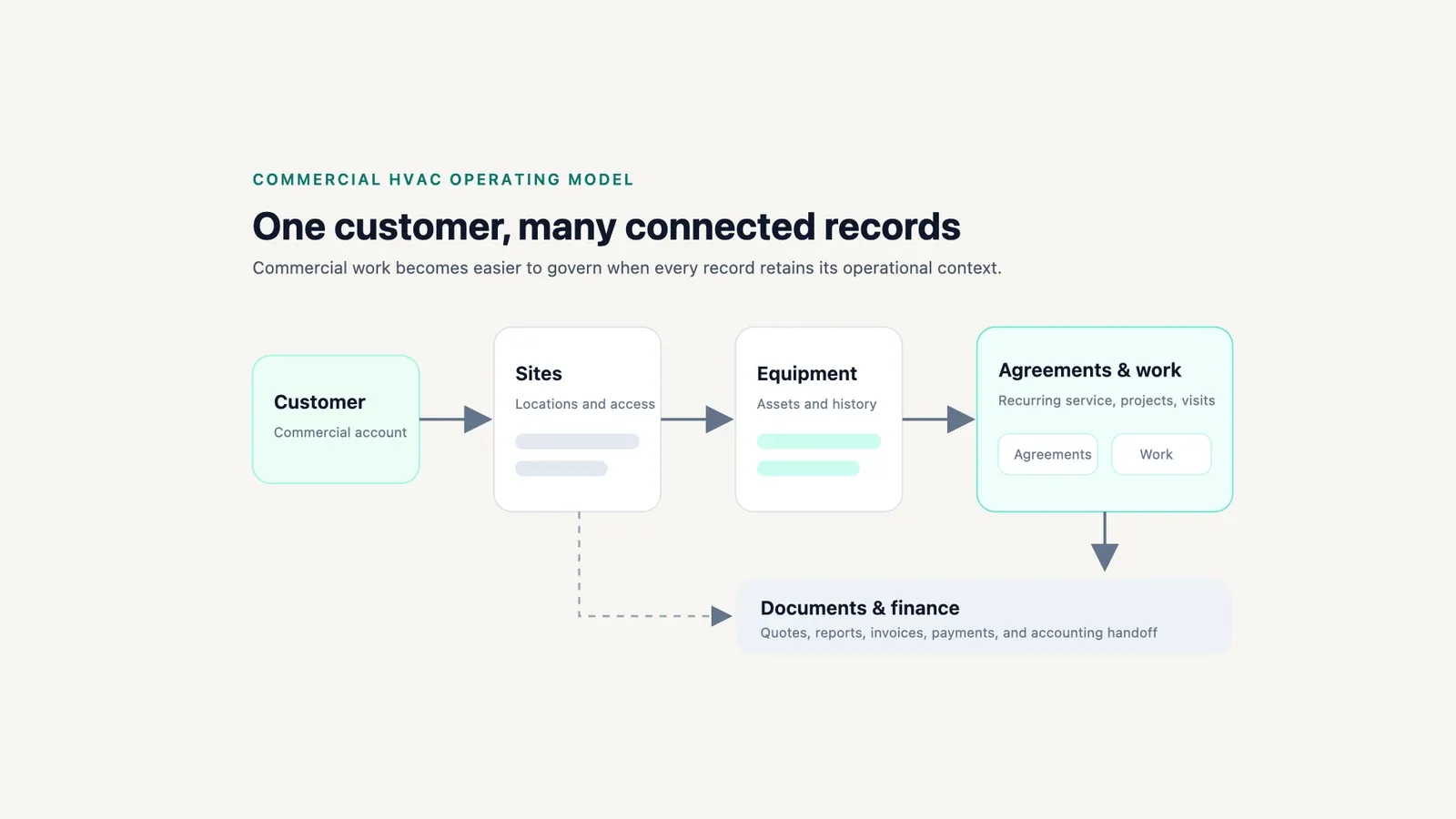
Commercial HVAC software is most useful when customer, site, equipment, work, and financial records remain connected. Source: Modern Field Service editorial.
Best commercial HVAC software at a glance
| Platform | Best for | Commercial strengths | Published pricing checked 3 August 2026 | Main limitation |
|---|---|---|---|---|
| ServiceTrade | Commercial service, inspections, and customer reporting | Sites, equipment history, deficiencies, inspections, quotes, dispatch, customer experience | Quote only; driven mainly by technicians and suite | Commercial-first and more system than a residential shop needs |
| BuildOps | Commercial service plus projects | Assets, agreements, dispatch, field data, project financials, procurement, invoicing | Custom quote by users, trades, modules, and integrations | Public configuration detail is thinner than a full implementation specification |
| FieldCamp | Configurable commercial operating model | Custom properties, equipment, contracts, relationships, pipelines, forms, invoices, workflows | Quote on request; custom objects are not on the entry plan | Commercial model requires configuration; no bulk custom-object import currently |
| ServiceTitan | Large mixed residential/commercial operations | Agreements, installed equipment, projects, client-specific pricing, inventory, finance | Quote only; per-technician pricing | Complex rollout and no public dollar price |
| Simpro | Mid-market service, maintenance, projects, and inventory | Asset maintenance, contract profitability, projects, job costing, purchasing, recurring invoices | Quote only | Add-ons and regional configuration require a written scope |
| FIELDBOSS | Microsoft-centered commercial HVAC and ERP | Dynamics 365, work orders, projects, equipment, contracts, compliance, financials, inventory | Mobile from $90/user/month, back office from $185, implementation from $50,000 | High implementation floor and Microsoft-centric operating model |
| Dataforma | Commercial service departments and client visibility | Agreements, work orders, projects, field photos, mobile inspections, invoicing, portal | Quote only | Public pricing and deeper asset/ERP boundaries are not documented clearly |
Published prices are current snapshots from vendor-controlled pages. Confirm the regular subscription, licenses, implementation, migration, integrations, payments, forms, storage, support, environments, and add-ons in writing.
What makes commercial HVAC software different?
Residential software often starts with one customer, one address, one appointment, and one invoice. Commercial HVAC operations may serve one customer across dozens or hundreds of sites, each with its own access rules, equipment, warranties, contracts, technicians, price schedules, purchase orders, inspections, and documentation requirements.
The software should represent at least these relationships:
Customer
  -> Service locations
      -> Equipment and systems
          -> Service history, warranties, inspections, deficiencies
  -> Agreements and contracted scope
      -> Planned visits and recurring billing
  -> Reactive work orders and quoted repairs
  -> Projects, change orders, procurement, job costing
  -> Invoices, payments, reports, and customer portal
If a platform stores all of that as notes on a customer or work order, the office will eventually rebuild the missing structure in spreadsheets. A useful demo must prove the relationship between records, not only show a polished dispatch board.
How we evaluated the platforms
This is a documentation-led comparison based on official product, help, and pricing pages reviewed on 3 August 2026. We did not run a production implementation or measure customer outcomes.
The criteria are site and equipment structure, agreements, planned and reactive service, inspections and deficiencies, projects, inventory and procurement, field documentation, billing, accounting, customer access, configuration, pricing transparency, and implementation risk. FieldCamp is evaluated under the same criteria and is not automatically ranked first.
The 7 best commercial HVAC platforms
1. ServiceTrade — best for commercial service and inspection delivery
ServiceTrade is built around commercial service rather than adapting a residential membership workflow. Its current pricing page documents equipment history, deficiency capture, online quotes, dispatch, a technician app, QuickBooks integration, digital inspections, compliance reporting, recurring contract pricing, and parts and inventory across its suites.
That combination is strong when the contractor sells planned maintenance, performs inspections, finds deficiencies, quotes corrective work, and must return understandable documentation to property managers. Unlimited office users also changes the licensing conversation, although technician count and suite still drive the quote.
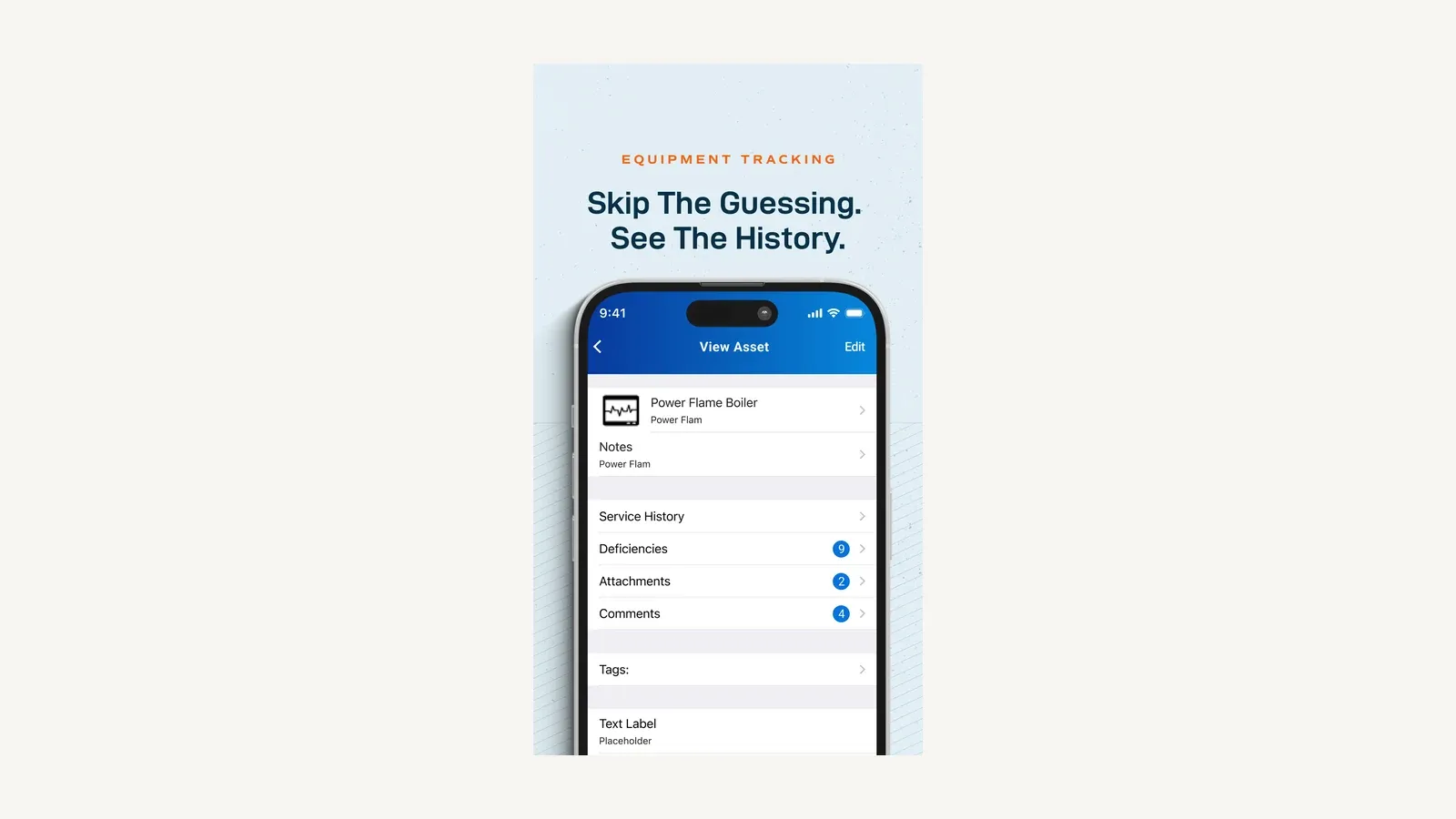
ServiceTrade connects an equipment record to its service history, deficiencies, and supporting records. Source: ServiceTrade official Apple App Store listing.
Best fit: commercial service contractors where agreements, inspection quality, deficiencies, and customer-facing service history are central.
Important limitation: pricing is not published in dollars and deeper capabilities are suite-specific. Ask for a written matrix covering asset hierarchy, agreement generation, forms, deficiency-to-quote flow, accounting, portals, APIs, data export, and multi-region operations.
2. BuildOps — best for commercial service and project coordination
BuildOps commercial HVAC software connects recurring maintenance, assets, service work, field time and materials, project management, procurement, job costing, invoicing, and financial integrations. The vendor also documents project-specific functions such as RFIs, submittals, change orders, daily reports, and WIP visibility.
This makes BuildOps a stronger candidate than service-only tools when one contractor maintains equipment and also completes replacements, retrofits, controls work, or larger construction projects. Its pricing page confirms separate service and project scope, with custom proposals based on field and office users, modules, trades, and integrations.
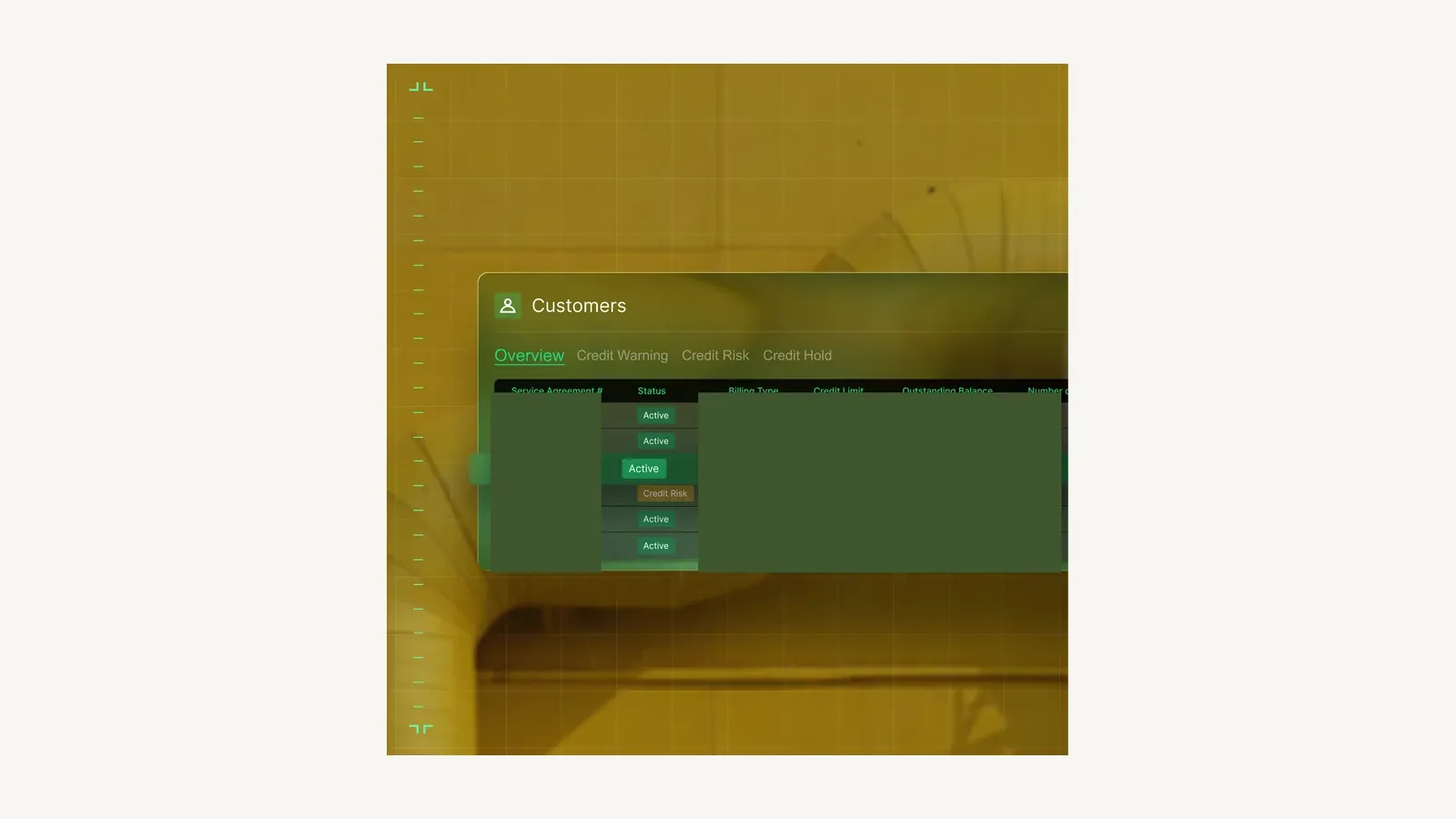
BuildOps places service-agreement status inside a commercial customer view. Source: BuildOps official product page.
Best fit: commercial mechanical contractors that need service and projects to share customers, sites, labor, materials, and financial context.
Important limitation: BuildOps marketing includes customer outcome statistics that are not guaranteed results. Require a sample-data demonstration from agreement and dispatch through project procurement, invoice, accounting sync, document export, and failure recovery.
3. FieldCamp — best configurable commercial HVAC data model
FieldCamp’s HVAC data model documents customers, locations, equipment, jobs, visits, service agreements, pricebook records, invoices, and payments as connected records. The broader custom-object platform lets an admin define objects such as properties, assets, contracts, projects, or deficiencies with typed fields, relationships, pipeline stages, views, and rules.
That configurability is valuable when a commercial contractor has a distinct equipment hierarchy, inspection workflow, renewal process, approval path, or customer documentation model. Custom objects are not on the entry plan, and enterprise integrations sit at the top tier, so name the tier you need in writing.
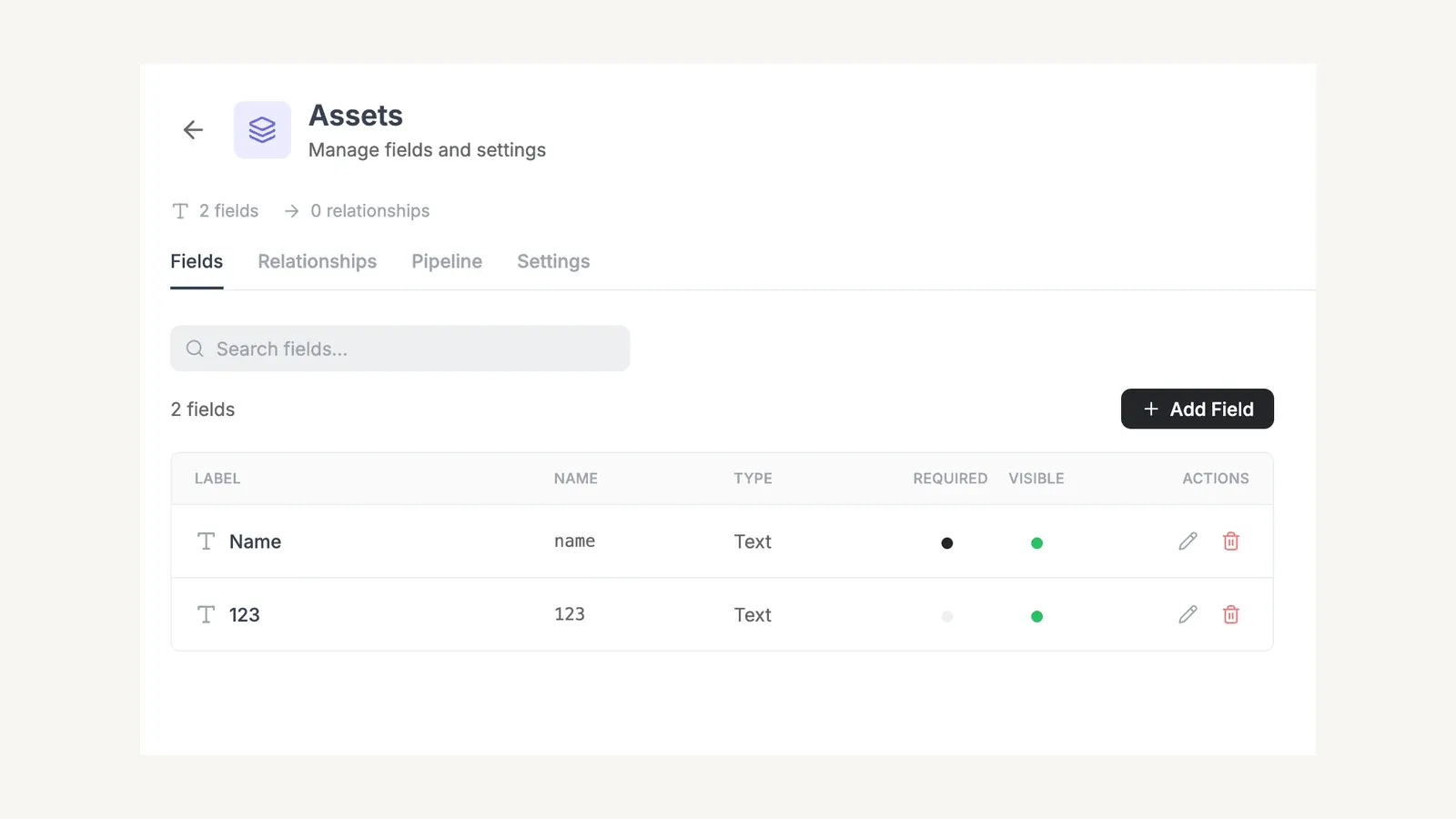
FieldCamp’s custom-object settings expose fields, relationships, pipelines, and record visibility for an asset type. Source: FieldCamp official documentation.
Best fit: commercial HVAC companies that want a configurable operating layer and are prepared to design the record model deliberately.
Important limitation: custom objects currently lack bulk import or export and are created record by record, according to the current docs. Buyers should verify migration tooling, large account/site/equipment volumes, permissions, offline behavior, inspections, inventory depth, project controls, reporting, and accounting in a trial or scoped implementation.
4. ServiceTitan — best for large mixed residential and commercial organizations
ServiceTitan’s commercial documentation covers contracted service, agreements, installed equipment, equipment history, recurring billing, service projects, construction projects, procurement, invoicing, and compliance. Current help pages also document client-specific pricing at the customer, location, estimate, invoice, or project level.
That breadth suits a larger organization with multiple business units, finance controls, dedicated dispatch, inventory, construction, and both residential and commercial divisions. The same breadth also means implementation scope, data migration, permissions, integrations, and process governance matter as much as feature availability.
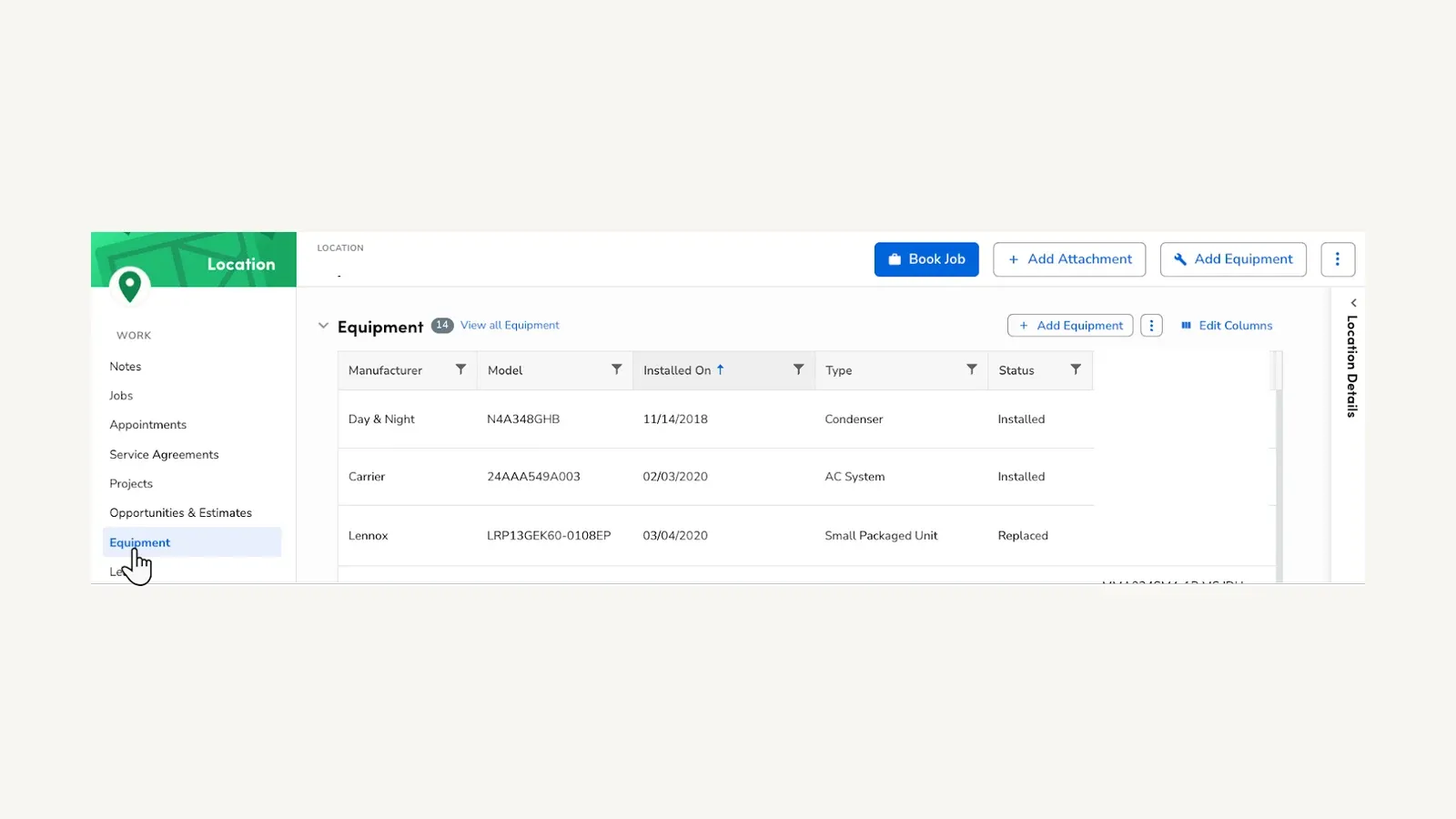
ServiceTitan’s commercial location record links installed equipment to service agreements, projects, jobs, and appointments. Source: ServiceTitan official commercial documentation.
Best fit: larger mixed operations that want one platform across residential service, commercial service, and some construction workflows.
Important limitation: ServiceTitan publishes per-technician pricing but no dollar amount. Obtain a full commercial proposal covering products, environment, implementation, accounting, payments, data migration, support, and every planned business unit.
5. Simpro — best for mid-market maintenance, projects, and inventory
Simpro’s HVAC product connects estimating, jobs, recurring maintenance, asset management, inventory, projects, invoicing, and reporting. It also documents contract-level profitability, planned asset servicing, recurring invoicing, supplier and stock workflows, and project progress.
Simpro is a credible shortlist choice for a contractor whose commercial operating model includes both maintained assets and project work. Its pricing page is quote-only and identifies Digital Forms and other capabilities as add-ons, so the final scope matters.
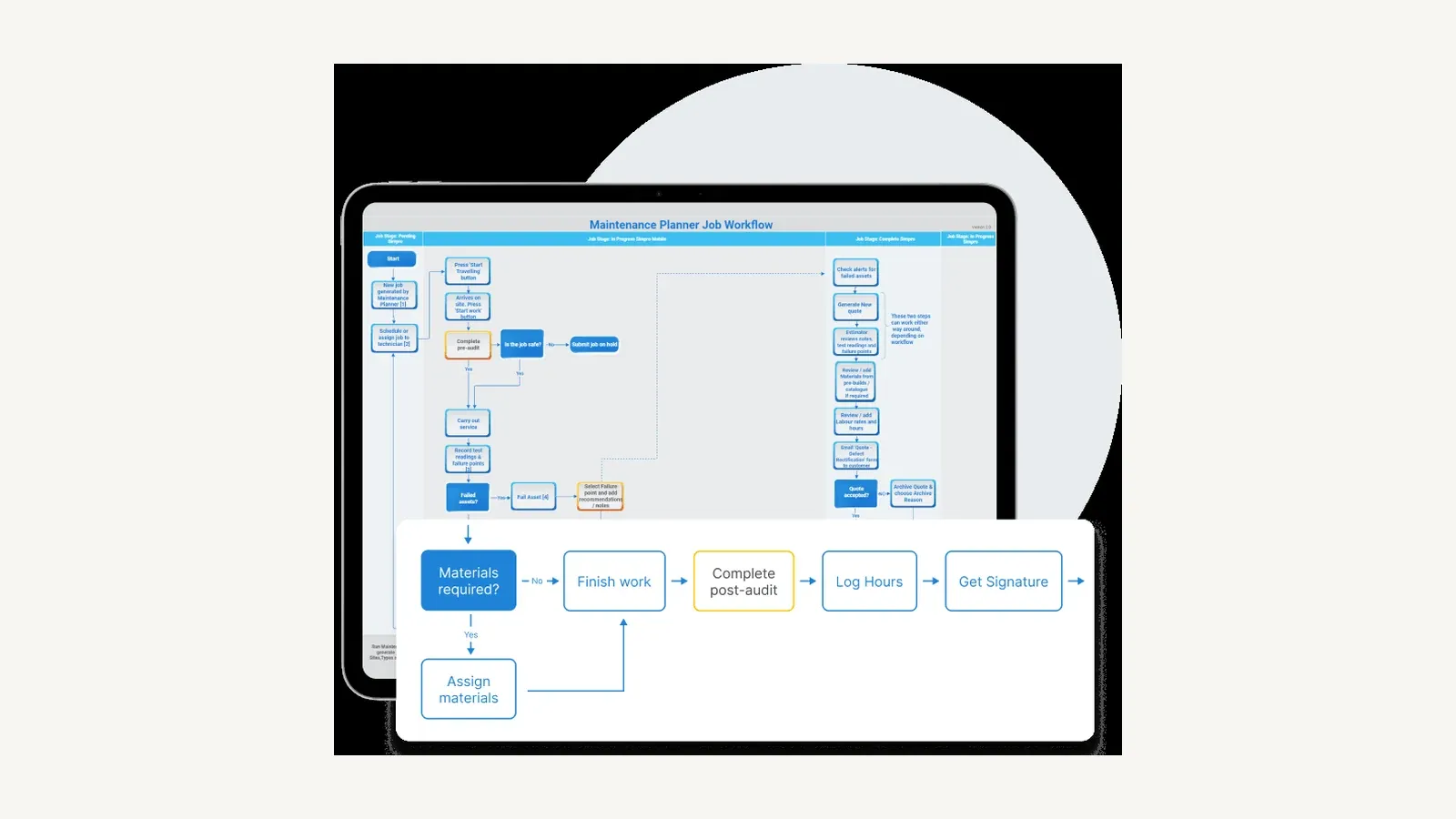
Simpro’s maintenance-planner view maps asset checks, materials, completion, labor, and signature steps. Source: Simpro official product page.
Best fit: mid-market contractors with complex maintenance, asset, inventory, and project requirements across field and office teams.
Important limitation: feature availability, add-ons, implementation, and regional accounting options need written confirmation. Do not rely on vendor comparison articles or customer outcome claims as proof that the same results will occur in your operation.
6. FIELDBOSS — best Microsoft-based HVAC ERP
FIELDBOSS is built on Microsoft Dynamics 365 and connects service, equipment history, maintenance contracts, projects, scheduling, field work, purchasing, inventory, financials, compliance, and reporting. Its work-order documentation describes the lifecycle from creation through dispatch, delivery, review, approval, billing, and job costing.
FIELDBOSS also publishes unusually clear pricing: mobile licenses start at $90 per user per month, back-office licenses at $185, and implementation starts at $50,000. That makes it easier to identify the intended buyer and budget before entering a sales process.
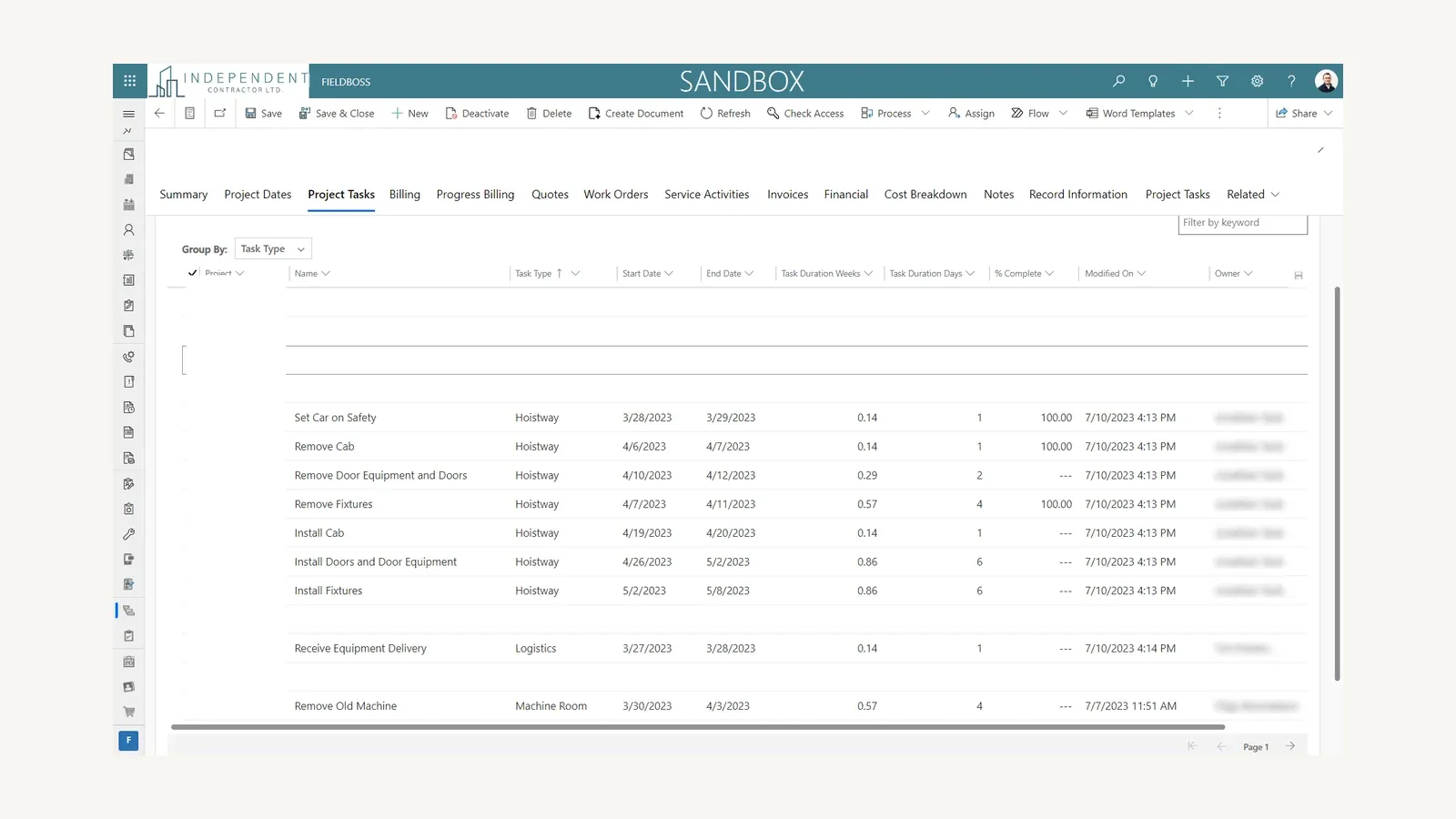
FIELDBOSS places project tasks alongside work orders, billing, invoices, financials, and service activities in its Dynamics-based workspace. Source: FIELDBOSS official product page.
Best fit: established commercial HVAC contractors committed to Microsoft and seeking a combined field-service and ERP platform.
Important limitation: the implementation floor is materially higher than the other published-price options here. Buyers should scope Dynamics licensing, environments, implementation phases, customization ownership, upgrades, integrations, data migration, and internal administration.
7. Dataforma — best for a commercial service department and customer portal
Dataforma’s HVAC product documents service agreements, work orders, scheduling, dispatch, CRM, GPS, mobile inspections, photos, labor, projects, materials, and same-day invoicing. Its broader product also includes a client portal for invoices, work orders, project information, documents, and communication.
This is a relevant fit for commercial contractors that prioritize a connected service department and visible customer documentation. Dataforma also documents QuickBooks Online, Stripe, Outlook, Gmail, and API connections, although detailed implementation boundaries are not public.
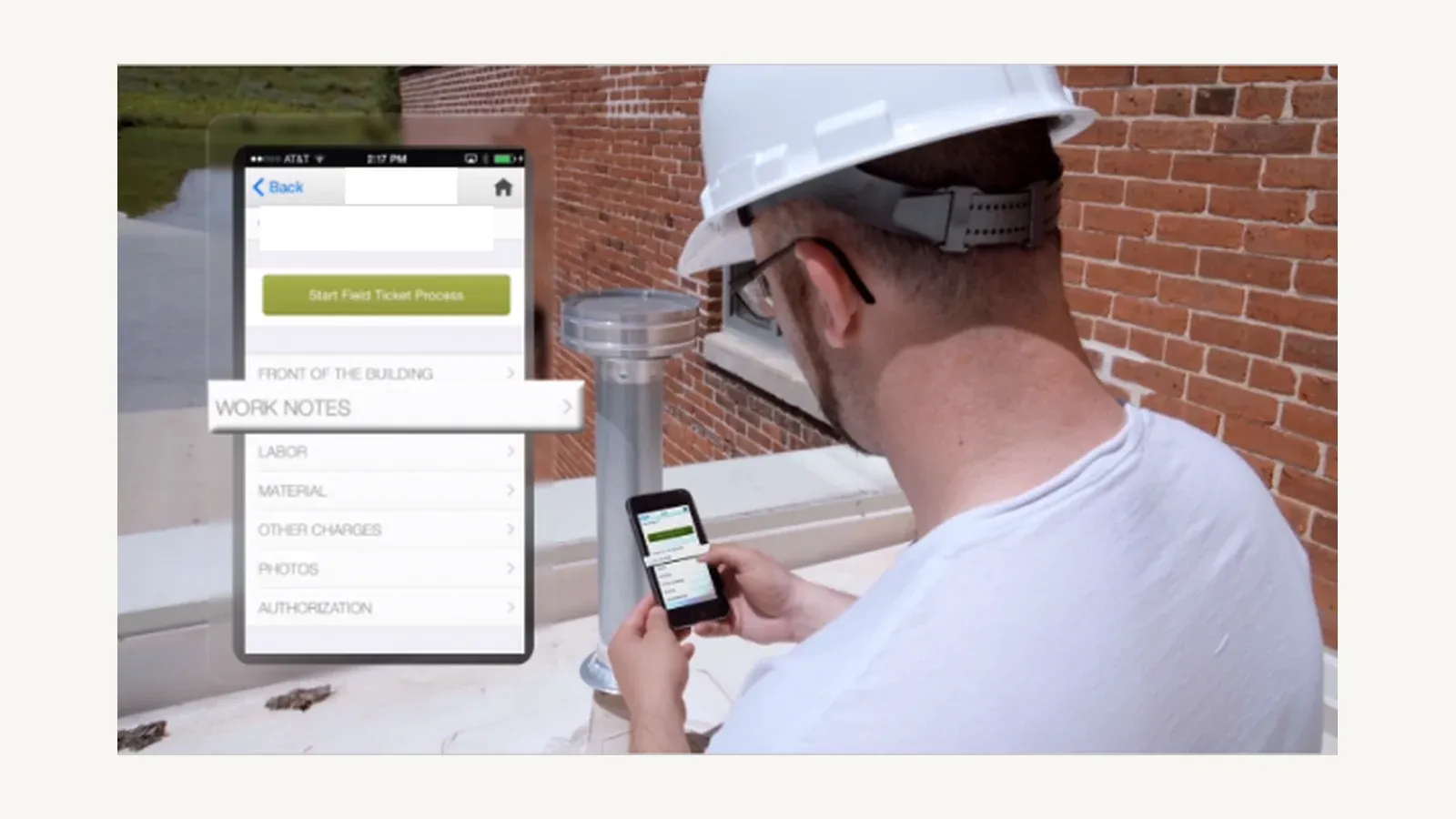
Dataforma’s vendor-supplied field-ticket image shows mobile access to work notes, labor, materials, photos, and authorization. Source: Dataforma official video page.
Best fit: commercial service organizations that want agreements, mobile work, project information, and customer access in one contractor-focused platform.
Important limitation: pricing is quote-only and the public site is less explicit about complex equipment hierarchies, offline behavior, procurement, multi-entity finance, and large-scale implementation. Those items should be demonstrated and written into the proposal.
Best commercial HVAC software by operating model
- Inspection- and deficiency-led service: start with ServiceTrade.
- Service plus construction projects: compare BuildOps, Simpro, ServiceTitan, and FIELDBOSS.
- Configurable properties, equipment, contracts, and workflows: evaluate FieldCamp with a real migration sample.
- Large mixed residential and commercial company: shortlist ServiceTitan and test business-unit separation.
- Microsoft ERP strategy: FIELDBOSS is the most direct fit.
- Commercial service with strong client visibility: include Dataforma.
A commercial HVAC software demo script
Give each vendor one realistic account: a property-management customer with twelve sites, multiple equipment types, a maintenance agreement, one overdue planned visit, one failed inspection item, one reactive call, one quoted replacement project, truck and warehouse stock, customer-specific rates, and a purchase-order requirement.
Ask the vendor to demonstrate:
- The customer-to-site-to-equipment hierarchy and complete service history.
- Agreement scope, renewal, billing cadence, promised visits, and margin.
- Planned maintenance generation and schedule exceptions.
- A technician completing an inspection and recording a deficiency offline or under poor connectivity.
- The deficiency becoming a quote, approved work order, and invoice without retyping.
- A replacement project with labor, materials, procurement, change orders, WIP, and progress billing.
- Customer-specific pricing and purchase-order validation.
- Inventory movement from warehouse or truck to the job and invoice.
- The customer portal or final service report.
- Accounting sync, error recovery, audit log, export, and data ownership.
Frequently asked questions
What is commercial HVAC software?
Commercial HVAC software manages service and project work across business customers, multiple locations, equipment, agreements, technicians, inspections, deficiencies, inventory, billing, and customer documentation. It should preserve these records as connected entities rather than loose notes on a work order.
How is commercial HVAC software different from residential HVAC software?
Residential systems often optimize high-volume calls, homeowner communication, memberships, and on-site sales. Commercial operations add multi-site accounts, asset histories, contract pricing, planned maintenance scope, purchase orders, inspections, deficiencies, project controls, and more complex billing.
What is the best commercial HVAC software for service agreements?
ServiceTrade is the strongest service-first option in this comparison, while BuildOps and Simpro connect agreements to broader service and project operations. ServiceTitan, FIELDBOSS, Dataforma, and a configured FieldCamp workspace can also support agreement-centered workflows with different implementation tradeoffs.
Can commercial HVAC software manage projects and service together?
BuildOps, ServiceTitan, Simpro, FIELDBOSS, and Dataforma all document both service and project capabilities. Buyers should test whether the two workflows genuinely share labor, materials, equipment, customers, financials, and reporting rather than existing as separate modules.
Does FieldCamp support commercial HVAC?
FieldCamp documents an HVAC record model and a customization system that can represent locations, equipment, agreements, projects, and other commercial records. It is a configurable candidate rather than a preconfigured commercial specialist, and its current lack of bulk custom-object import is an important migration limitation.
What is the best commercial HVAC service software?
ServiceTrade and BuildOps are the strongest commercial-first choices, because both treat sites, assets and service agreements as primary records rather than add-ons.
FieldCamp is the option if you want that same asset and agreement structure to be configurable rather than fixed.
Final verdict
Start with the operating model, not the brand list. ServiceTrade is the strongest first demo for commercial service and inspections, BuildOps for service plus projects, FieldCamp for a configurable record model, ServiceTitan for a large mixed organization, Simpro for maintenance and inventory depth, FIELDBOSS for Microsoft-centered ERP, and Dataforma for commercial service with a client portal.
The deciding proof should be one end-to-end account in sample data. If a vendor cannot connect sites, equipment, agreements, field evidence, deficiencies, projects, inventory, invoices, and customer records in the demo, its feature checklist does not solve the commercial HVAC problem.
Sources
- ServiceTrade pricing and suites
- BuildOps commercial HVAC, invoicing, and pricing
- FieldCamp HVAC data model, custom objects, and pricing
- ServiceTitan commercial documentation, client-specific pricing, and pricing
- Simpro HVAC software and pricing
- FIELDBOSS HVAC software, work orders, and pricing
- Dataforma HVAC software and platform overview
Sponsored
Ready to upgrade your dispatch?
FieldCamp uses AI to optimize routes, auto-assign jobs, and eliminate scheduling chaos — so you can run more jobs with fewer headaches.

Written by
Azaz Vepari
Editor, Modern Field Service
Tool profiles
Pricing, best fit and limitations for each tool in this review, one page each.