Azaz Vepari20 Mins read
Best Roofing Takeoff Software in 2026: 4 Tools, 3 Pricing Units
Roofr, Hover, EagleView and STACK compared on the thing that actually decides it — how the roof gets into the software. With every published price verified, including the three vendors you cannot compare on a monthly fee.
Source-based assessment. Read our evidence standard.
In this article14 sections
Every comparison of roofing takeoff software argues about accuracy. The four tools here are separated by something far more decisive and much easier to check: how the roof gets into the software in the first place.
Roofr orders a report from aerial imagery. Hover has someone photograph the house with a phone.
EagleView sells a standardised report your suppliers and carriers already read. STACK measures a construction drawing you upload.
Those are four different acts, performed by four different people, at four different moments in a job. Pick the wrong one and the software works perfectly while fitting nobody in your company.
There is a second thing nobody tells you, and it makes most price comparisons in this category worthless. These four are not priced in the same unit — two charge per report, one charges per project by roof complexity, and one charges per user per month with unlimited projects.
Every price and capability below comes from each vendor’s own pricing or product page, checked on 18 August 2026.
Quick answer: which roofing takeoff software wins what
| The question you are actually asking | Winner | Why it wins |
|---|---|---|
| Best overall for residential retail roofing | Roofr | $13 a report on any paid plan, two hours or less, and the geometry lands in a proposal it also produces |
| Cheapest way to measure one roof, no subscription | EagleView Bid Perfect | $18 a report, published, no plan required — squares, facet count and pitch distribution |
| Most accurate published entry price for full facet detail | EagleView Premium Roof Report | From $24.25, with valleys, rakes, eaves, ridges/hips and a pitch diagram |
| Roofs plus siding, windows, gutters in one capture | Hover | One phone scan produces a 3D model measuring roof and exterior, from $39 a project on Pro |
| The homeowner needs to see it before signing | Hover | Photo-realistic 3D preview with real products, included on every plan |
| Commercial, multi-building and plan-set work | STACK | Digital takeoff from PDF, TIFF or aerial imagery, with an estimating worksheet for labor, overhead, waste, tax and markup |
| Unlimited volume for a fixed cost | STACK | Unlimited plans and projects from $249 per user per month — the only flat-cost model here |
| Your partners already expect the format | EagleView | Ordered inside AccuLynx, JobNimbus and SumoQuote, and accepted by carriers and suppliers as-is |
| Xactimate-ready files | Hover, narrowly | ESX export on every plan including Starter, plus documented Verisk, Xactimate and Cotality links |
| Price transparency | EagleView | Five residential and three commercial report prices published on its own site — more than any of the four |
Roofr is the overall pick for most residential roofing companies, and the reason is not the measurement. It is that Roofr is the only one of the four that also owns the proposal the measurement turns into.
The four tools in one line each
| Tool | What it actually is | How the roof gets in | Priced by |
|---|---|---|---|
| Roofr | A measurement service with a sales platform bolted on the front | Order from satellite or aerial imagery, or trace it yourself from imagery or a blueprint | Per report — $13 paid, $19 free plan |
| Hover | A phone-camera capture product that builds a measurable 3D model | Someone at the property takes photos; blueprints also accepted | Per project, by facet count |
| EagleView | The aerial report incumbent everyone else resells | Order the report; you never visit the property | Per report, by report type |
| STACK | A construction estimating platform whose takeoff happens to cover roofing | Upload the plan set as PDF or TIFF, or pull an aerial image | Per user, per month |
Three of those four never require anyone to be at the house. Hover is the one that does, and that is a scheduling decision as much as a software decision.
What does roofing takeoff software actually do?
Roofing takeoff software converts imagery or drawings into usable roof quantities. That means roof area in squares, facet count, pitch, and the linear feet of ridges, hips, valleys, eaves and rakes — plus penetrations, flashing and a waste assumption.
But the report is only half the job, and this is where buyers lose money. Your estimator still has to turn those quantities into labor, materials, a price, a proposal, a material order and eventually a real cost comparison — without creating three versions of the same roof.
A tool that produces a beautiful report and hands it to a human to retype has not removed the work. It has moved it into your office.
That is why this comparison scores the handoff as well as the measurement.
The real decision is the input method
Ignore the feature lists for a moment. Answer one question instead: at the moment you need the number, who is available and where are they standing?
If nobody is at the property and you want the number before you drive out — Roofr or EagleView. Both are ordered remotely from imagery, and neither requires a site visit.
If a rep is already at the door and the job includes siding or gutters — Hover. A single scan measures the whole exterior, and the rep leaves with something to show the homeowner.
If the roof does not exist yet, or it is one of six buildings on a plan set — STACK. Aerial imagery cannot measure a warehouse that is still a drawing.
Everything else in this comparison is a consequence of that choice. Turnaround, price, export format and revision handling all follow from how the roof entered the system.
Roofr: best for retail residential sales
Roofr wins residential retail roofing, and the reason is what happens after the measurement arrives. Its reports feed proposals, e-signatures, supplier pricing, material orders, invoices and job costing inside one product family.
A Roofr report is not just a diagram either. It arrives with material calculations already applied from pitch, squares and your chosen waste factor.
That matters more than it sounds. Every other tool here hands the quantities to a different system, and every boundary crossing is a place a revision gets lost.
Roofr’s published pricing
| Plan | Monthly | Report price | Delivery |
|---|---|---|---|
| Starter | $0 | $19 | 24 hours or less |
| Measure+ | $109 – $169 | $13 | 2 or 6 hours, by tier |
| Essentials | $249 ($209/mo yearly) | $13 | 2 hours or less |
| Scale | $349 ($299/mo yearly) | $13 | 2 hours or less |
Every tier includes unlimited users, which is unusual enough in field service software to be worth naming. Expedited delivery is published as an add-on at +$5 for 12 hours, +$15 for 6 hours and +$30 for 2 hours.
Xactimate-ready ESX files are priced separately, and Roofr publishes two routes to them. An ESX file is $12 a report on Starter and $10 on paid plans, or a Roofr Report and ESX bundle runs $31 on Starter and $23 on paid plans.
Roofr also offers DIY reports you trace yourself from satellite, aerial, drone or blueprint imagery. These are included on Essentials and Scale, which makes a new-build blueprint or a drone flyover a no-marginal-cost measurement on those plans.
One gap to name. Measure+ is the only tier whose annual price Roofr’s own pricing page renders inconsistently, so treat the $109–$169 monthly band as the reliable figure and get the annual number in writing.
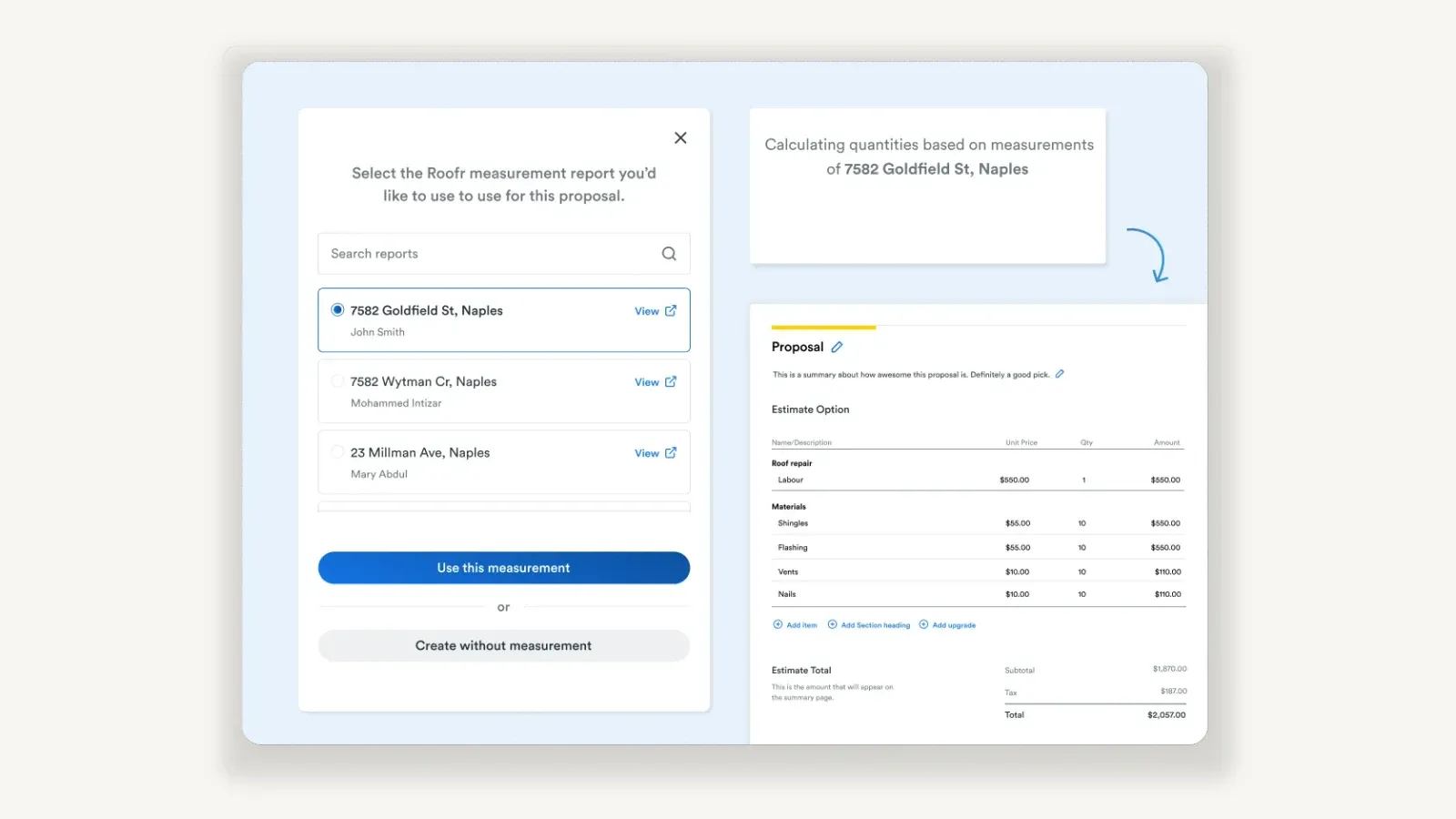
This is the part no other tool here does: the saved measurement is picked from a list and the quantities arrive already priced, without the number crossing into a second product. Publisher capture of Roofr, also in use on our roofing CRM review.
The Roofr demo test
A clean first proposal proves nothing. Ask for one simple gable roof and one cut-up roof with valleys, dormers and penetrations, then change the shingle system after the proposal is already built.
Follow that revision into the material order and the job cost view. If the revised production quantity does not arrive in both, the workflow has a hole in it that a demo roof will never show you.
Hover: best when the job is the whole exterior
Hover wins detailed exterior capture, and it wins it on scope rather than on roof accuracy. One phone scan produces a 3D model with measurements for roof, siding, gutters, windows, soffit and fascia.
That makes Hover the only tool here that fits a company selling roofs and siding off the same appointment. It is also the only one that shows the homeowner a photo-realistic 3D preview with real products before they sign.
Hover’s published pricing, which is per project
Hover charges per project, banded by how complicated the roof is. The bands are defined by facet count on its own pricing page.
| Structure | Facets | Roof-only (Starter / Pro) | Full exterior (Starter / Pro) |
|---|---|---|---|
| Simple | Up to 4 | $29 / $9 | $59 / $39 |
| Average | 5 – 8 | $49 / $29 | $99 / $79 |
| Complex | 9+ | $69 / $49 | $139 / $119 |
Pro costs $99 a month or $999 a year, and Starter is pay-as-you-go with your first three projects free. Expedited delivery is a flat $39 a project on Starter and $19 on Pro.
Do the Pro arithmetic yourself before you buy it. The membership discount is $20 a project, so on the discount alone $999 takes about 50 projects a year to recover — Hover’s own FAQ claims payback at roughly four projects, which values the bundled premium features rather than the per-project saving.
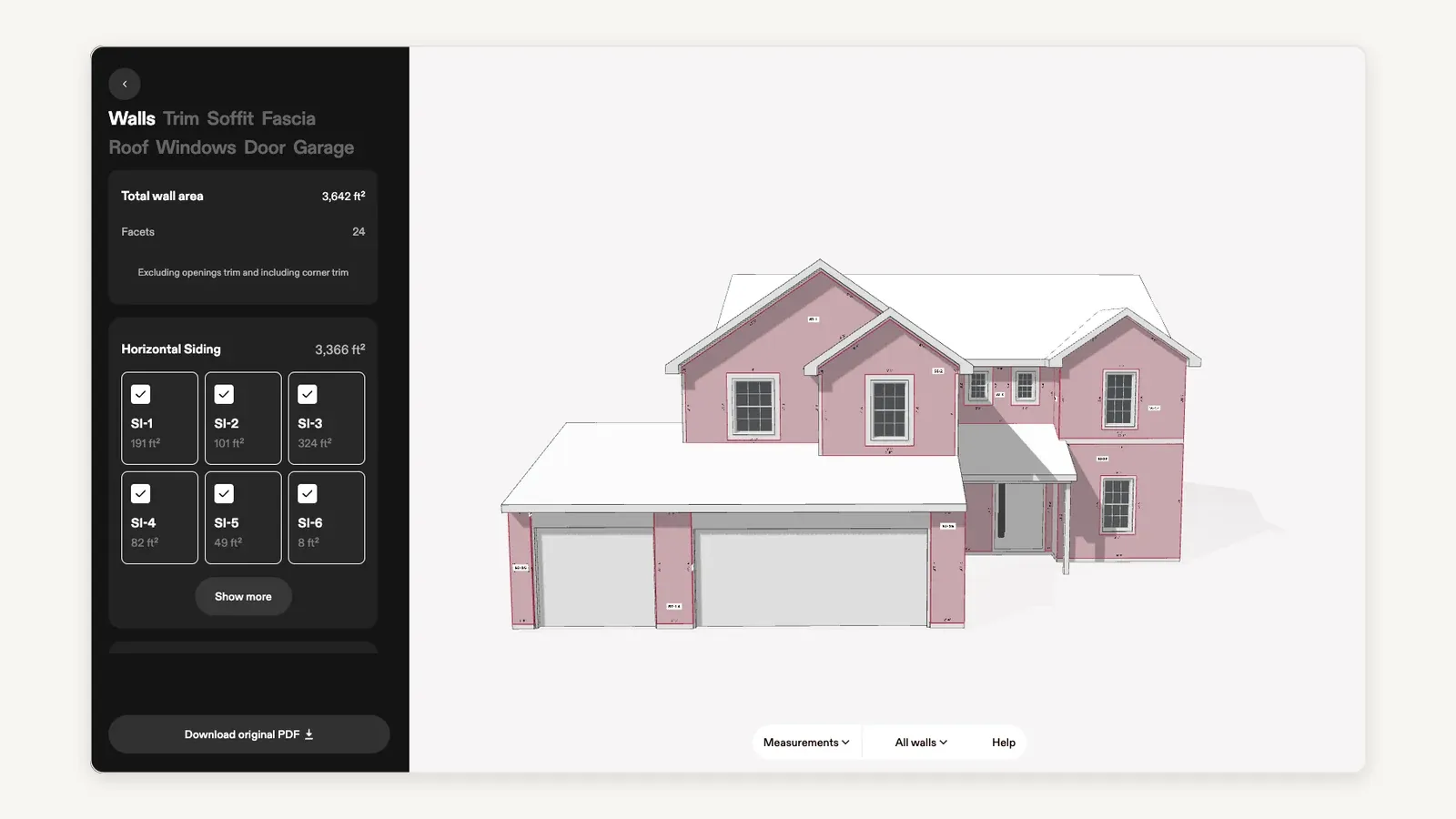
One phone capture, one model, eight measurable surfaces — the switcher runs Walls, Trim, Soffit, Fascia, Roof, Windows, Door and Garage, and the wall total is itemised down to individual siding faces. Source: Hover help centre, “3D measurements for construction pros”, retrieved 18 August 2026.
The export-format detail the spec sheets skip
Hover’s export list is genuinely the widest here: PDF, XLS, XML, JSON, ESX, SKP, DWG and DXF. SKP, DWG and DXF make it the only tool of the four that hands a 3D model to a CAD or design workflow.
But that full list is a Pro and Enterprise feature. On the Starter plan Hover’s own comparison table reads “PDF, ESX only.”
If you are buying Hover specifically for XML into an estimating system, or DXF into CAD, you are buying Pro — the pay-as-you-go plan will not produce those files. That is a $999 line item hiding inside a per-project price.
Turnaround is a plan feature too
| Plan | Typical turnaround | Expedited 1 hour |
|---|---|---|
| Starter | 12 hours | Add-on |
| Pro | 8 hours | Add-on |
| Enterprise | 4 hours | Add-on |
Hover states expedited roof measurements typically arrive within an hour and full exteriors within 90 minutes, excluding blueprint uploads. Standard Starter delivery at 12 hours is slower than a $13 Roofr report on a paid plan, which is the trade you are making for the 3D model.
The Hover demo test
The nicest 3D model is not the test. The test is whether your estimator can find every production quantity, export it in the format your downstream tool actually accepts, revise the design, and leave the crew in no doubt which version was approved.
Run the same property through your current process and through Hover, then compare the two takeoffs line by line. Do not accept an accuracy or waste claim from any marketing page, including this one.
EagleView: best when others read the report
EagleView wins standardised reporting, and that is a workflow property rather than a feature. When a supplier, carrier, manufacturer or estimating process already expects the EagleView format, that acceptance is worth more than a newer interface.
Its distribution proves the point. EagleView reports are ordered from inside AccuLynx, JobNimbus and SumoQuote, and every other platform in our roofing estimating comparison resells them rather than competing with them.
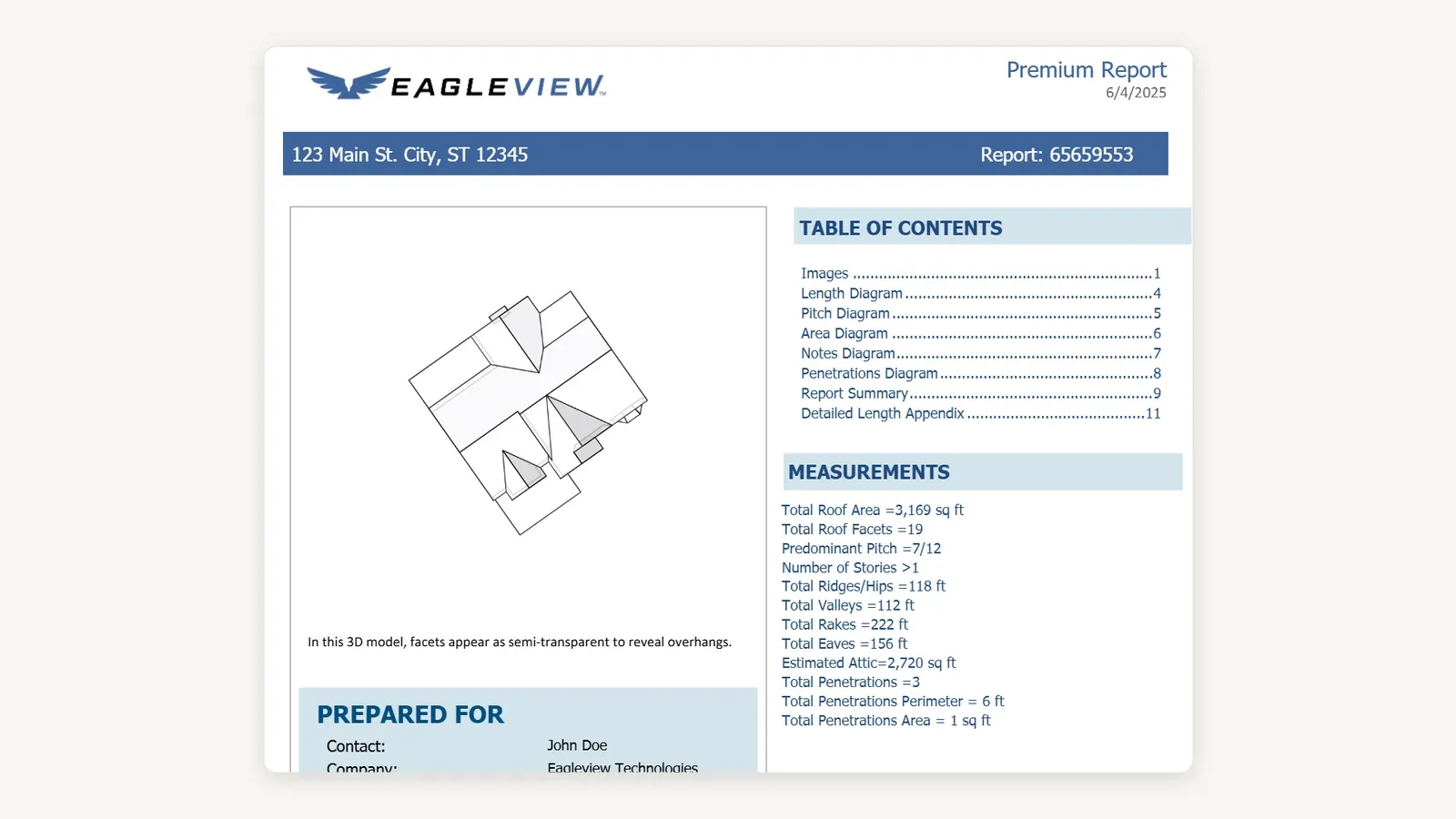
This is the whole EagleView argument in one page: every figure a supplier, carrier or estimator needs sits in a fixed place, in the same document, every time. Source: EagleView’s own Premium residential sample report, retrieved 18 August 2026.
EagleView publishes more prices than anyone else here — and they are lower than the internet says
This is the finding that surprised us most. A great deal of third-party content asserts that EagleView will not publish report pricing and that reports cost $40 to $75 each.
Both claims are wrong. EagleView publishes eight report prices on its own product pages.
| Report | Published price | What it contains |
|---|---|---|
| Bid Perfect (residential) | From $18 | Orthogonal and oblique imagery, pitch distribution, facet count, total squares, waste factor (steep-slope only) |
| Premium Roof Report (residential) | From $24.25 | Total roof area and facets, total valleys, pitch diagram, total rakes and eaves, total ridges and hips |
| Walls | From $40 | Aerial images, 3D wall diagram, elevation diagrams |
| Walls, Windows & Doors | From $67.50 | Siding and masonry, fascia, wall facets, window and door measurements |
| Full House | From $91 | Aerial imagery, 3D wall area diagram, length/pitch/area diagrams, window, door and penetration diagrams |
| Bid Perfect (commercial) | From $49 | Multi-family and low-slope, accuracy guaranteed |
| Premium Commercial Roof Report | From $80 | Roof length and area, rakes, eaves, pitch, flashing, hips, ridges, valleys |
| EagleView Assess | From $30 | Autonomous drone capture, AI damage detection, roof digital twin, annotated reports |
The two-tier structure is the part to actually use. Bid Perfect at $18 is a bid-stage report — squares, facets and pitch distribution, enough to quote — and EagleView’s own page says you upgrade the same report to a discounted Premium for the full facet dimensions when you win the job.
That is a materially cheaper path than ordering a Premium report on every roof you bid. Closing one bid in three means three Bid Perfect reports at $54 plus one discounted upgrade, against $72.75 for three Premium reports — EagleView does not publish the upgrade price, so ask for it.
Two honest gaps. EagleView publishes no turnaround time we could verify on its own product pages, and “from” pricing means larger or more complex roofs cost more than the figures above — get your own volume pricing in writing.
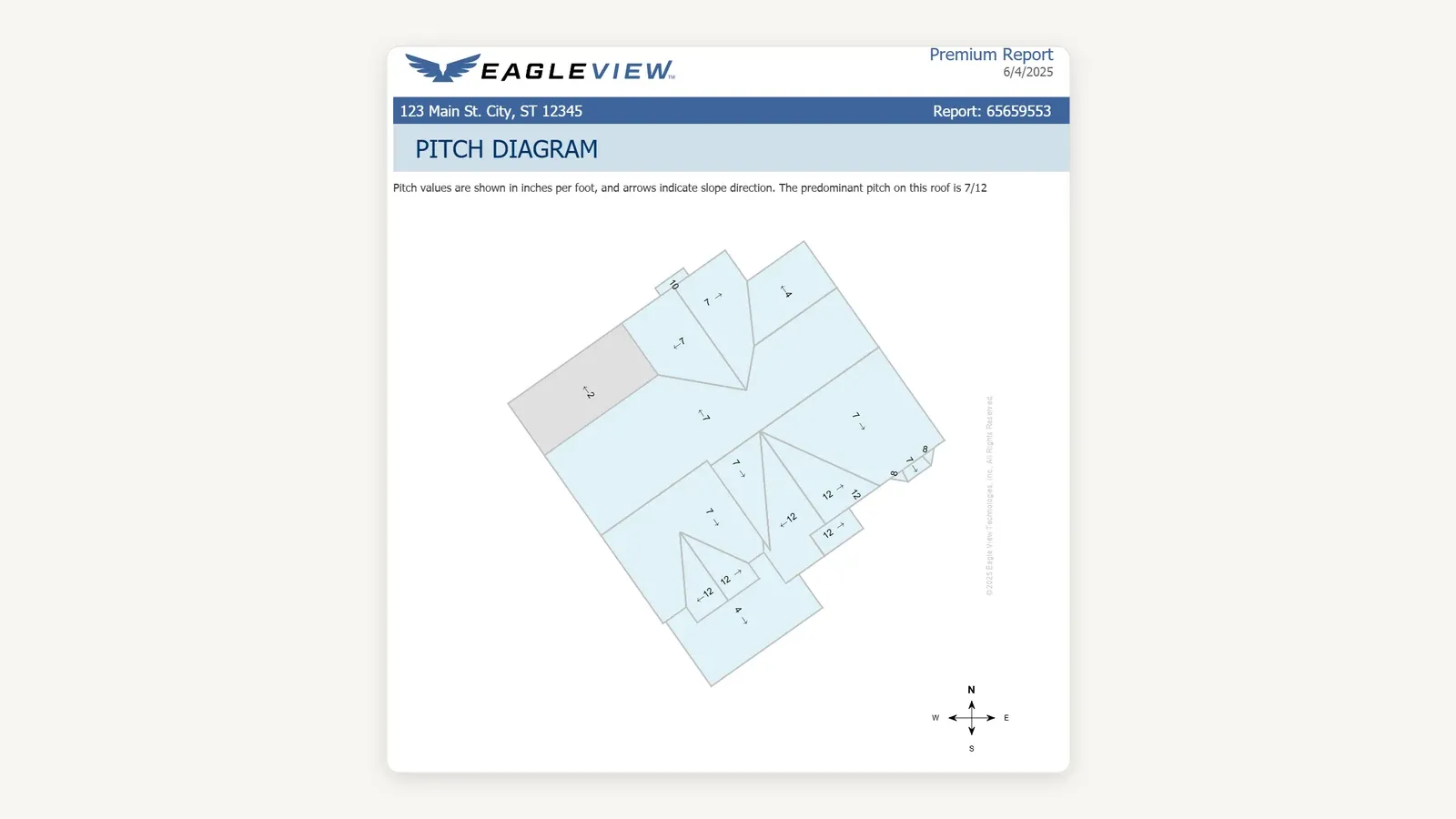
The pitch diagram from the same report, carrying a pitch value and a slope arrow on every facet rather than the single predominant figure. Source: EagleView’s own Premium residential sample report, retrieved 18 August 2026.
The EagleView demo test
The report is not the risk. The handoff is.
Order one, receive it, map the quantities into your estimating process, preserve the original document, then issue one controlled revision. If your team still retypes every number, or cannot say which version production approved, the report has not fixed the workflow it was bought to fix.
STACK: best for blueprint commercial takeoff
STACK wins plan-based commercial takeoff, and it is solving a different problem from the other three. Its roofing page describes digital takeoff for pitched or flat roofs from PDF, TIFF or aerial imagery, with an estimating worksheet that adjusts for labor, overhead, waste, tax and markup.
That is a school, a warehouse, an apartment complex or a multi-building project measured from construction documents. A residential salesperson measuring one existing house is doing something else entirely.
STACK also ships pre-built roofing material libraries and lets you add custom materials, which is what makes the takeoff produce a bid rather than a quantity list.
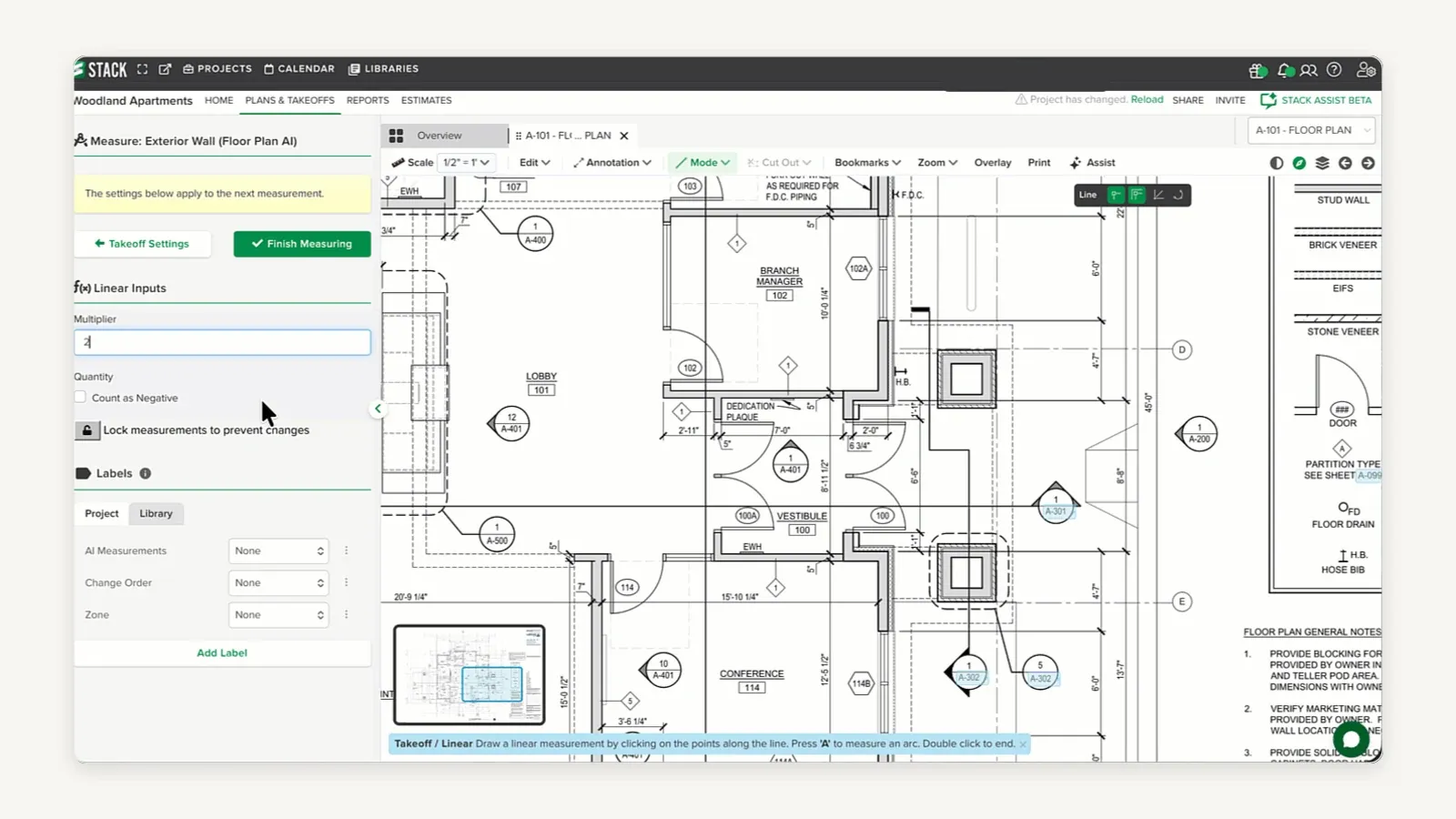
The input is a sheet from a plan set rather than an aerial photograph of a house that already exists, which is the whole reason STACK is not a residential substitute. STACK publishes no roof-sheet capture, so this is a floor plan and the measurement an exterior wall — the mechanism is the one a roof area is measured with. Source: STACK help centre, “Create Takeoffs (TE)”, still frame from the vendor’s own screen recording, retrieved 18 August 2026.
STACK’s published pricing, which is per user
| Plan | Published price | Includes |
|---|---|---|
| Takeoff & Estimate | As low as $249 per user / month | Quantity, labor and material takeoff; flexible estimates and proposals; unlimited plans and projects |
| Build & Operate | As low as $49 per user / month | Plan viewing and markup, issues, punch lists, daily reports, customisable workflows |
| Full STACK Platform | As low as $298 per user / month | Plan measurement and markup, integrated estimating, field and project management |
“Unlimited plans and projects” is the whole argument for STACK’s pricing model. A per-report tool costs more every time you bid; STACK costs the same whether your estimator does 40 takeoffs a month or 400.
STACK also offers a free account, and “as low as” means these are floor prices that vary with the licences and options you need.
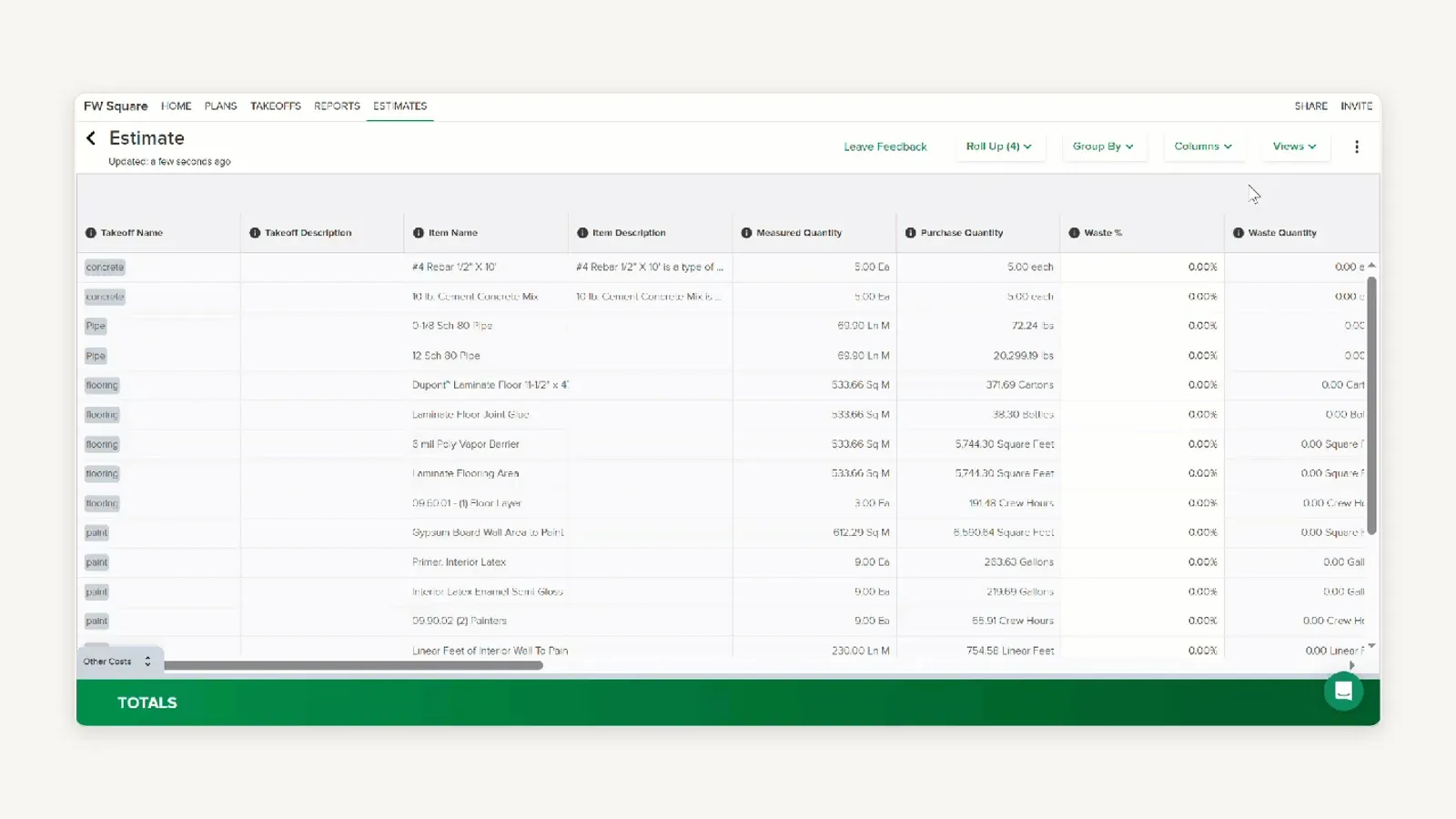
This is where quantities become a bid: measured quantity on one side, purchase quantity on the other, and waste applied between them. The sample shown is general construction rather than roofing and waste reads zero on every row — source: STACK help centre, “Estimate Worksheet Overview (TE)”, still frame from the vendor’s own screen recording, retrieved 18 August 2026.
The STACK demo test
Bring a real plan set — several roof areas, alternates, addenda and at least one drawing revision. A clean single-drawing takeoff tells you nothing about a project.
Then ask STACK to show how the estimator separates assemblies, tracks changed quantities, applies waste and preserves an audit trail. On plan-based commercial work the audit trail is the deliverable, not the number.
Where the companion video and the evidence disagree
The companion video reaches the same four verdicts this article does, and source research supported the recommendations. Three claims did not survive checking, and they are all in the pricing and export sections.
1. The video says EagleView and STACK costs “depend on the report, package, subscription or sales quote.” STACK’s tiers are quote-shaped, but EagleView publishes eight report prices on its own site — including Bid Perfect at $18, which undercuts every other published per-roof price in this comparison.
2. The video lists Hover’s export formats without qualification. The full PDF/XLS/XML/JSON/ESX/SKP/DWG/DXF list is gated to Pro and Enterprise, and Hover’s Starter plan is limited to PDF and ESX.
That gate changes the real cost of buying Hover for an integration.
3. The video says “Roofr has the clearest entry point in this comparison.” On subscription pricing that is true, but on cost per roof with no subscription at all, EagleView’s $18 Bid Perfect beats Roofr’s $19 Starter report — and EagleView needs no plan to get it.
Where the evidence and the video disagree, the evidence wins.
How much roofing takeoff software costs in 2026
Here is the comparison the pricing pages will not do for you. One hundred average residential roofs a year, geometry only, cheapest published path in each product.
| Tool and cheapest published path | Annual total | Per roof | Plan cost |
|---|---|---|---|
| EagleView — Bid Perfect, no plan | $1,800 | $18 | $0 |
| Roofr — free Starter, 24-hour reports | $1,900 | $19 | $0 |
| EagleView — Premium Roof Report, no plan | $2,425 | $24.25 | $0 |
| Roofr — Measure+ at $109/mo, 6-hour reports | $2,608 | $13 | $1,308 |
| STACK — Takeoff & Estimate, one user | $2,988 | $0 | $2,988 |
| Hover — Pro, roof-only, average structure | $3,899 | $29 | $999 |
| Hover — Starter, roof-only, average structure | $4,900 | $49 | $0 |
Read that table twice, because the ranking inverts as volume changes. At 100 roofs STACK is mid-table; at 400 roofs STACK is unchanged at $2,988 while EagleView Bid Perfect becomes $7,200 and Hover Pro becomes $12,599.
Three caveats, because a tidy table can mislead. STACK measures plan sets rather than existing houses, so it is not a substitute for the other three on residential retail — the flat cost only helps if your work arrives as drawings.
Hover looks expensive here because roof-only pricing understates what it produces. Compare it on a job that also needs siding, windows and a homeowner-facing 3D preview, and the alternative is buying two products.
And none of these totals include the tool that turns quantities into a priced proposal. Roofr is the only one of the four where that is already in the subscription.
What happens after the report: the handoff nobody prices
A takeoff tool’s real cost includes the labor of moving its numbers into the next system. That labor is invisible on every pricing page in this comparison.
Only Roofr closes the loop by itself. For the other three, the destination matters as much as the report:
- AccuLynx orders from EagleView, Hover, Geospan and GAF QuickMeasure, and the measurements auto-populate the estimate — the widest bench in roofing.
- ServiceTitan pulls EagleView, GAF QuickMeasure and Hover measurements directly into its estimating tools.
- JobNimbus imports EagleView, Hover and RoofScope reports, and material information comes across automatically.
- FieldCamp, which we cover in our roofing platform comparison, does neither. Its own documentation states it “stores the numbers from an aerial report and lets you attach the report file” but “does not order or auto-import the report from the measurement provider.”
That last one is a limitation worth stating plainly rather than burying. If you are pairing a takeoff tool with FieldCamp, a human retypes squares, pitch and five linear-foot measurements on every job — budget the minutes or budget a custom integration.
None of these four takeoff tools is disqualified by its destination. But a $13 report that costs eight minutes of retyping is not a $13 report.
The test property: a spec to run on your own finalists
Feature tables cannot settle this and neither can this page. What settles it is one property run through every finalist, so hand each vendor the same spec.
Use your own worst roof, not the vendor’s perfect sample.
- One residential property — ideally a cut-up roof with valleys, dormers and penetrations, not a simple gable.
- One commercial plan set if you bid commercial, with several roof areas, an alternate and one drawing revision.
- One waste factor — yours, applied by them, not their default.
- One material system change made after the first estimate exists.
- One export into the exact downstream tool you actually use.
Then score all four on the same ten things, and compare the scores rather than the interfaces:
| What to score | The question that reveals it |
|---|---|
| Input method | Who has to be where, and when? |
| Turnaround | Guaranteed, or typical? Get the word in writing |
| Line detail | Are valleys, rakes, eaves, ridges and hips itemised, or just squares? |
| Waste controls | Can you set the factor, or only accept it? |
| Revision handling | Change the material system — which version reaches production? |
| Export formats | Is your format on your plan, or on the plan above yours? |
| Estimate mapping | Do quantities land in the estimate, or get retyped? |
| Proposal creation | In this tool, or a second purchase? |
| Supplier handoff | Does the material order carry the revised quantity? |
| Cost feedback | Where does an overrun appear, and how many days late? |
AI labels and automated measurements are useful, and none of them remove the approval step. A person still signs off on the scope and quantities before anything is priced or ordered, and the tool that makes that approval fastest to audit is the tool to buy.
Which roofing takeoff software should you buy?
By the shape of your work, since there is no single answer:
- Residential retail, competing on turnaround — Roofr. $13 reports in two hours or less, material calculations included, and the proposal in the same subscription.
- One roof at a time, no subscription — EagleView Bid Perfect at $18, upgraded to Premium at a discount only on the jobs you win.
- Roofing plus siding, gutters or windows — Hover, on Pro. Budget the $999 for the export formats, not just the per-project discount.
- Standardised reports for carriers, suppliers or partners — EagleView. Format acceptance is the product.
- Commercial and plan-based estimating — STACK. Unlimited projects from $249 per user per month, and the only sensible model at high bid volume.
- A CAD or design workflow downstream — Hover. SKP, DWG and DXF exist nowhere else in this comparison.
For the wider question of which platform turns those quantities into a price, a proposal, a material order and a margin, see our roofing estimating software comparison, which scores five platforms one estimating step at a time. For the whole operating stack rather than the estimate, start with the five best roofing platforms, and if you are choosing the customer system first, the roofing CRM comparison covers that decision.
Frequently asked questions
What is the best roofing takeoff software in 2026?
Roofr is the best overall choice for most residential roofing companies, because $13 reports arrive in two hours or less and the measurements flow straight into proposals, e-signatures, material orders and job costing in the same product. It is the only one of these four that does not hand the numbers to a second system.
Hover wins detailed exterior capture and homeowner visualisation, EagleView wins standardised reporting and the lowest published per-roof price, and STACK wins blueprint-based commercial estimating.
How much does roofing takeoff software cost?
It depends on the pricing unit, and the four are not comparable. EagleView Bid Perfect starts at $18 a report and Premium Roof Reports at $24.25, both with no subscription; Roofr reports are $19 on the free Starter plan and $13 on any paid plan from $109 a month.
Hover charges per project by facet count — roof-only runs $29 to $69 on Starter and $9 to $49 on Pro, with Pro at $99 a month or $999 a year. STACK charges per user, from $249 a month for Takeoff & Estimate, with unlimited plans and projects.
At 100 roofs a year, geometry only, the cheapest published paths are EagleView Bid Perfect at about $1,800 and Roofr’s free Starter plan at about $1,900. All prices verified on each vendor’s own site on 18 August 2026.
Does EagleView publish its report pricing?
Yes, and this contradicts a lot of what is written about it. EagleView lists five residential report prices and three commercial ones on its own product pages, starting at $18 for a residential Bid Perfect report and $49 for the commercial version.
These are “from” prices, so larger and more complex roofs cost more. But the widely repeated claim that EagleView hides all pricing is not accurate as of August 2026.
What is the difference between roof measurement software and roofing takeoff software?
In practice the two phrases are used interchangeably, and all four tools here answer to both. If a distinction is drawn, “measurement” tends to mean the geometry alone and “takeoff” tends to mean the geometry converted into itemised material quantities.
STACK is the clearest example of the second meaning: its takeoff produces a priced estimating worksheet with labor, overhead, waste, tax and markup, not just a set of dimensions.
Which roofing takeoff software works for commercial and flat roofs?
STACK is the strongest choice, because it measures pitched and flat roofs from PDF, TIFF or aerial imagery and is built for plan-set work across multiple buildings. Aerial reports cannot measure a building that only exists as a drawing.
If the commercial building already stands, EagleView’s commercial line is the alternative — Bid Perfect from $49 for multi-family and low-slope, and Premium Commercial Roof Reports from $80 with flashing, hips, ridges and valleys.
Which takeoff software produces Xactimate-ready ESX files?
Hover exports ESX on every plan, including the free-to-start Starter plan, and its insurance product documents integrations with Verisk, Xactimate and Cotality. That makes it the most accessible ESX route of the four.
Roofr prices ESX separately: $12 a file on Starter and $10 on paid plans, or a report-plus-ESX bundle at $31 and $23. Neither EagleView nor STACK publishes an ESX export in the report and plan tiers listed on their own pages.
Can I do roofing takeoffs without a monthly subscription?
Yes, and two of these four support it properly. EagleView requires no plan at all — order a Bid Perfect report at $18 or a Premium report at $24.25 and pay nothing else.
Roofr’s Starter plan is free with unlimited users and $19 reports on a 24-hour estimate, and Hover’s Starter plan is pay-as-you-go with your first three projects free. Only STACK requires a per-user subscription to do the takeoff.
Do I need a takeoff tool if my roofing CRM already orders reports?
Usually not a separate one, no. AccuLynx, JobNimbus and ServiceTitan all order third-party reports from inside the platform, and AccuLynx auto-populates the estimate from four providers — so the takeoff is already in your stack.
Buy a standalone takeoff tool when you need something your platform cannot order: Hover’s 3D exterior capture, STACK’s plan-set measurement, or Roofr’s own reports at $13.
How accurate is roofing takeoff software?
We are not going to give you a number, and you should distrust any comparison that does. This is a documentation-led comparison of published capability and published pricing, not a hands-on accuracy test — no live accounts were run and no roof was measured for this article.
EagleView publishes an accuracy guarantee backed by a five-step quality control process, and the others make their own claims. The only accuracy figure worth acting on is the one you produce by measuring a roof you already know the answer to.
What is takeoff software?
Takeoff software turns a roof into a measured quantity list — squares, ridge, hip, valley, eave and rake — so an estimate can be priced from real numbers rather than a guess.
In roofing it usually works from aerial imagery, a drone flight or a blueprint, depending on the tool.
Sponsored
Ready to upgrade your dispatch?
FieldCamp uses AI to optimize routes, auto-assign jobs, and eliminate scheduling chaos — so you can run more jobs with fewer headaches.

Written by
Azaz Vepari
Editor, Modern Field Service
Listen to this review
The same comparison as a podcast episode, for the drive between jobs.
Tool profiles
Pricing, best fit and limitations for each tool in this review, one page each.