Azaz Vepari13 Mins read
Best Roofing Project Management Software in 2026: 4 Systems, 1 Handoff
AccuLynx, JobNimbus, Dataforma and Procore compared on what happens after the customer signs — and on the tier, permission and import rules that decide whether production control actually works.
Source-based assessment. Read our evidence standard.
In this article12 sections
Roofing project management starts at the moment the customer signs. Everything before that is sales, and everything after it is either a controlled handoff or a spreadsheet nobody trusts.
This comparison is about the second half. AccuLynx, JobNimbus, Dataforma and Procore all claim it, and they lose it in four different places.
One thing changed while we were writing this, and it changes the whole pricing question. AccuLynx withdrew its only published price on 18 August 2026, which means every system on this page is now quote-only.
Quick answer: what wins what
| System | Wins on | The catch we verified |
|---|---|---|
| AccuLynx | Roofing-native production control | The production calendar is Elite-tier only, and neither tier has a published price |
| JobNimbus | Configurable boards and subcontractor permissions | Job costing runs on manual document imports, not a live feed |
| Dataforma | Commercial service, inspections and roof history | Thinnest public feature documentation of the four |
| Procore | Formal construction project controls | Priced on annual construction volume, not seats |
If you run retail and insurance replacement work, the real contest is AccuLynx against JobNimbus. It turns on whether you want a roofing process supplied to you or a process you build yourself.
If you hold commercial roof portfolios, Dataforma is a different category of product. If a general contractor controls your paperwork, Procore is not optional and the others will not substitute for it.
What happens after the customer signs
Production should receive a complete job, not a starting point. The scope, measurement, chosen option, signed contract, deposit, photos, permits, material plan, crew requirement, schedule, customer commitments and margin target should all arrive without anyone rebuilding the sale.
Then the software has to hold the job while it moves. That means labour, materials, deliveries, change orders, field proof, actual cost, close-out documents and final billing — plus the variance between what the estimator assumed and what the roof actually needed.
Most of these platforms do the first part well. The differences show up in the second part.
Specifically, they show up in three mechanics that no vendor puts on a feature list: which tier a capability sits in, who is allowed to see money, and whether cost data arrives automatically or by hand. All three cost real money and none of them appear in a demo unless you ask.
The handoff test
Run one signed job through every demo and break it deliberately. We used three failures, because they are the three that actually happen on roofs.
A delivery delay on the material order, and a crew re-assignment after the calendar is already set. Then hidden decking, discovered once the tear-off starts.
For each one, make the vendor update the schedule, notify the right people, document the change, revise the material order, capture field proof, update actual cost and produce a final invoice that reflects all of it. Then ask the question the demo will not volunteer: which plan is this on, and who can see the margin.
1. AccuLynx — best for roofing production control
AccuLynx is the most roofing-shaped of the four. Its plan options page names a live activity feed, a job milestone tracker, labour management and work orders, aerial measurement ordering, supplier direct ordering, job costs and A/R tracking, and job profit forecasting.
That set matters because it is built around a roof rather than around a generic project. A signed job, its measurement, its material order and its crew all live on the same record.
The finding the video missed: production is an Elite feature
We read the full Pro and Elite feature table on 20 August 2026, and the split is not where a buyer would assume. The production calendar is not included in Pro — it is Elite only.
Pro is missing 12 of the 40 capabilities AccuLynx lists across its four plan blocks. These are the eight that decide project management:
| Capability | Pro | Elite |
|---|---|---|
| Production calendar | Not included | Included |
| Production status and trade reports | Not included | Included |
| Custom workflow manager | Not included | Included |
| Permits tracking | Not included | Included |
| Supplement tracking | Not included | Included |
| Commissions | Not included | Included |
| Advances and paybacks tracking | Not included | Included |
| Multiple company location set-up | Not included | Included |
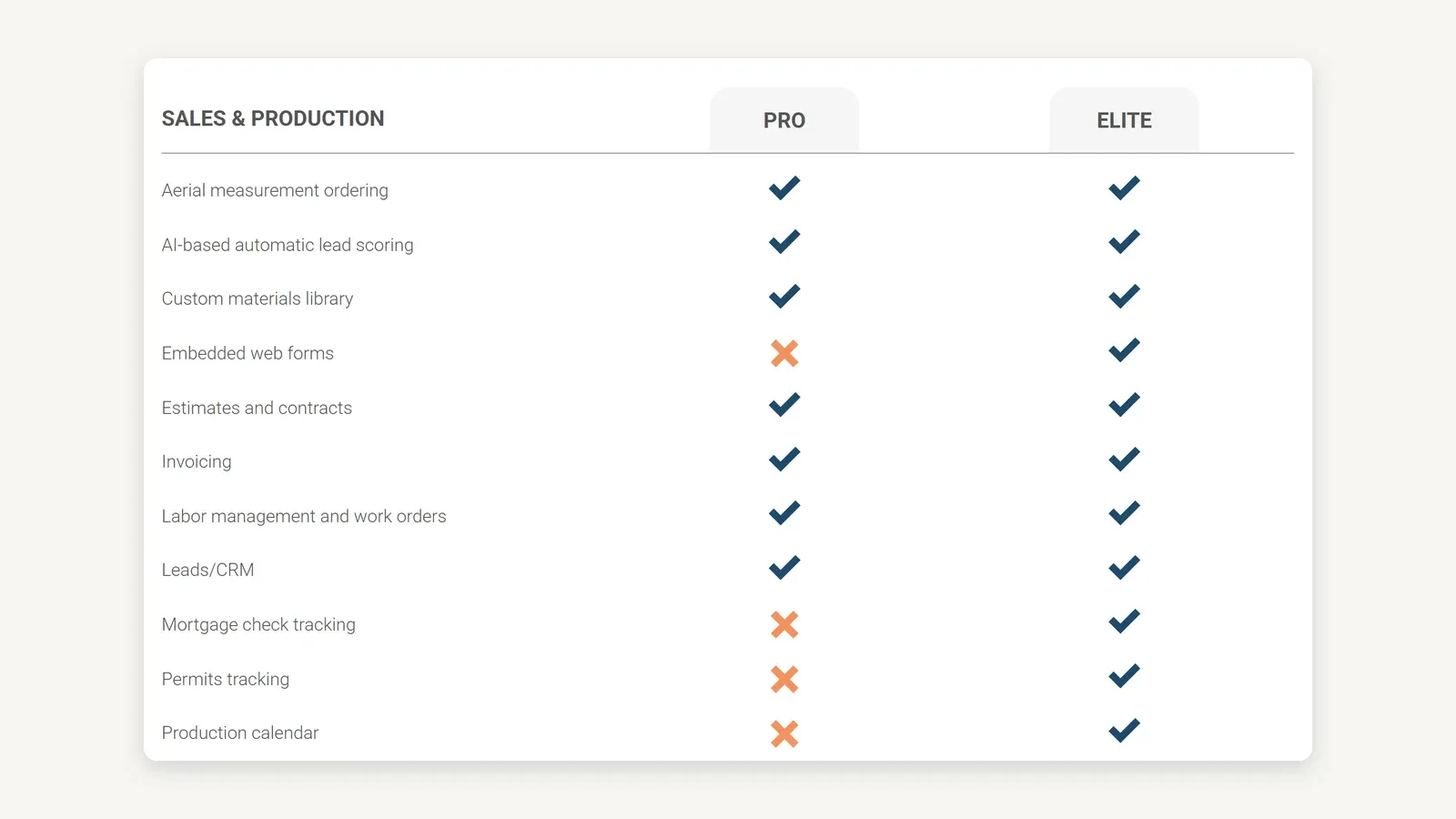
AccuLynx’s own plan comparison, the top of the Sales & Production block, captured 20 August 2026 from acculynx.com/plan-options/. The production calendar is Elite only, and the page publishes no dollar figure for either tier.
Pro does include the pieces that carry a job day to day — work orders, labour management, the milestone tracker, the activity feed, supplier direct ordering, job costs and A/R, and profit forecasting. But if project management means a production calendar and production reporting to you, then AccuLynx’s project management is the upper tier.
Ask which tier every capability in your demo sat on, in writing, before you compare any quote. A demo shows you Elite.
AccuLynx pricing
There is no published price, on either tier. The plan options page states that AccuLynx offers “two different plans” and directs you to a custom quote, and acculynx.com/pricing/ now redirects to a pricing-request form with no dollar figure on it.
This is a recent change and it is worth stating plainly, because older reviews have not caught up. Until 18 August 2026 AccuLynx published an Essential plan at $250 a month; that tier is gone, and any $250 figure you find for AccuLynx today is a historical price rather than a current one.
The AccuLynx test
Use the delivery delay and the crew re-assignment. Make AccuLynx move the calendar, notify the correct people, preserve the material order status, and show exactly what a subcontractor sees on mobile.
2. JobNimbus — best for boards and subcontractor control
JobNimbus is the configurable one. Its public help centre documents jobs, contacts and boards as the core model, with a job workflow and boards builder, work orders, material orders, automations, tasks and access profiles on top.
The reason roofers pick it is that the stages are yours. You are not adopting a vendor’s idea of a roofing process, which is an advantage if your process is already stable and a liability if it is not.
Subcontractor access is two different products
This is the part worth reading carefully, because the two options are not variations of each other. JobNimbus documents a subcontractor as either a team member or a contact, and the gap between them is large.
As a team member, a subcontractor uses the same mobile app as your staff, with access to photos, forms, calendar view, assigned tasks and work orders including work order comments, the job name and address, shared documents and real-time updates. JobNimbus states directly that “Subcontractors do not have access to financial data or other sensitive information.”
As a contact, the subcontractor has no access to the app or website at all. Documents and work orders reach them through the share feature or by email as static files, which means, in JobNimbus’s own words, that “real-time updates will not be visible on the sent documents.”
That is the answer to the hidden-decking scenario, and it costs a subscription seat. If you want crews to see a revised work order rather than a stale PDF, your subcontractors are team members — so price the plan on that headcount.
Job costing is an import, not a feed
JobNimbus’s Budgets feature is being replaced by Profit Tracker, and the older budgets documentation is now filed under Legacy. Profit Tracker is the current answer to job costing, and its mechanics constrain the workflow more than a feature list suggests.
Planned revenue comes from an imported estimate, and the estimate must be fully signed before it can be imported — and once fully signed, JobNimbus states it cannot be edited. Costs arrive the same way: you import estimates, material orders and work orders document by document from a settings panel, and each imported document lands as its own section.
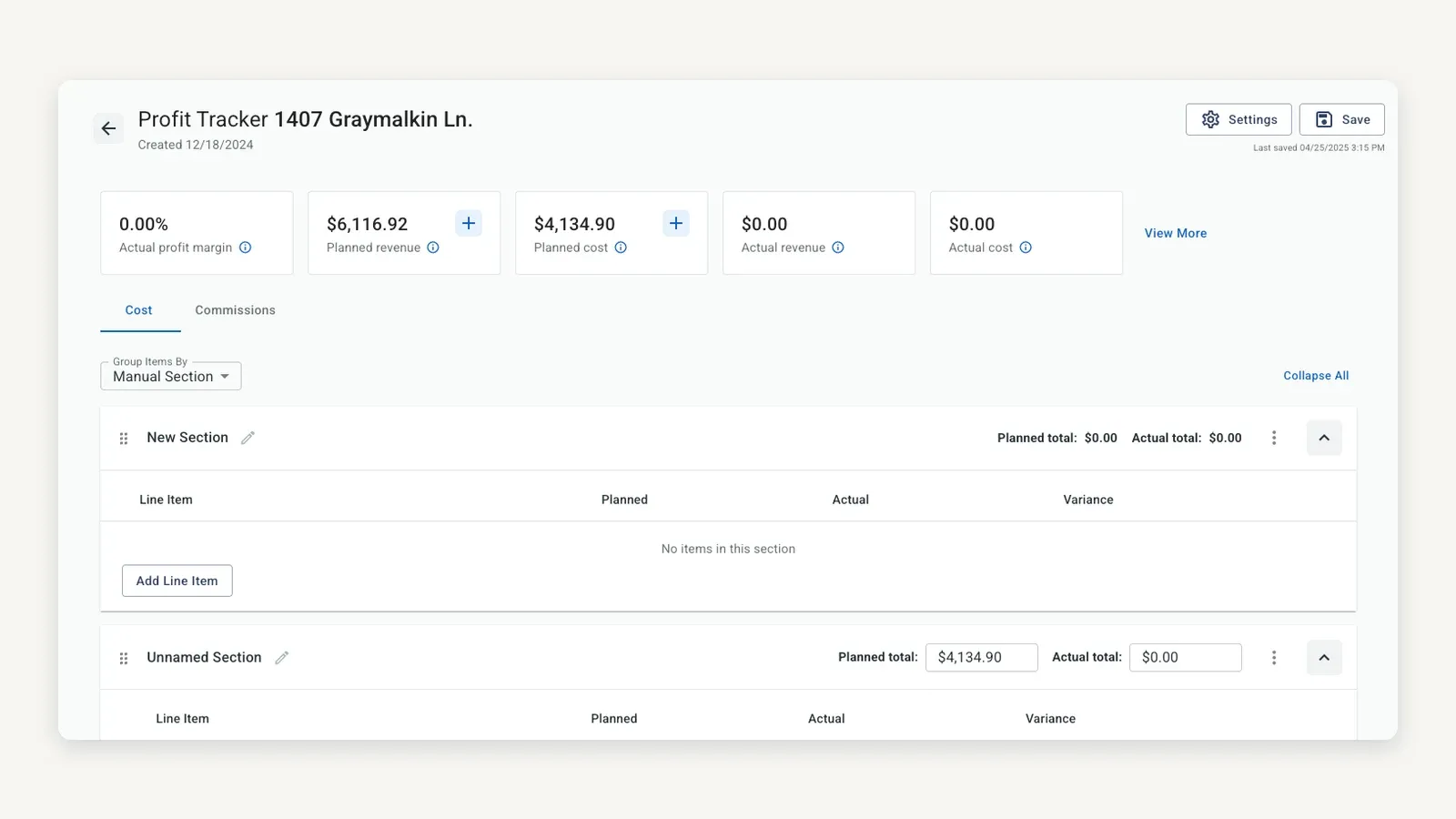
JobNimbus’s own Profit Tracker, captured 20 August 2026 from support.jobnimbus.com. Planned and actual are separate columns and each imported document lands as its own section — this is a vendor demonstration job, so the $0.00 actuals are an example rather than a real result.
Three limits are documented and worth knowing before you buy. Only documents created after 1 January 2024 appear in the import lists, you cannot combine an imported estimate with a manually entered price on the same Profit Tracker record, and access runs through Access Profiles where a “Limited Access” user is capped by their assignment to the relevant contact or job.
None of that makes Profit Tracker bad. It does mean job cost in JobNimbus is something a person maintains rather than a number that updates itself, so name that person during the demo.
JobNimbus pricing
We could not verify a JobNimbus price, and we will not repeat one. jobnimbus.com returns HTTP 403 to our network — including through a real browser — so we could not read its pricing page today, and third-party figures for JobNimbus contradict each other badly enough that quoting any of them would be inventing a fact.
Everything above comes from support.jobnimbus.com, which we could read. Ask for a written quote naming the plan, the user band, the per-seat cost and whether subcontractor seats are priced differently.
3. Dataforma — best for commercial service and roof history
Dataforma is the one that is not really competing with the other three. It is built for a commercial roofer holding a portfolio of buildings over years, rather than for a company pushing replacements through a production board.
Its site names project management, field service management, client management, job site coordination, a client portal, a mobile app, and integrations with an API. On the money side it names contract and invoice management for tracking bids and monitoring budgets, a purchase order system, accounts payable and accounts receivable, and a client portal giving customers access to project information, invoices and work orders.
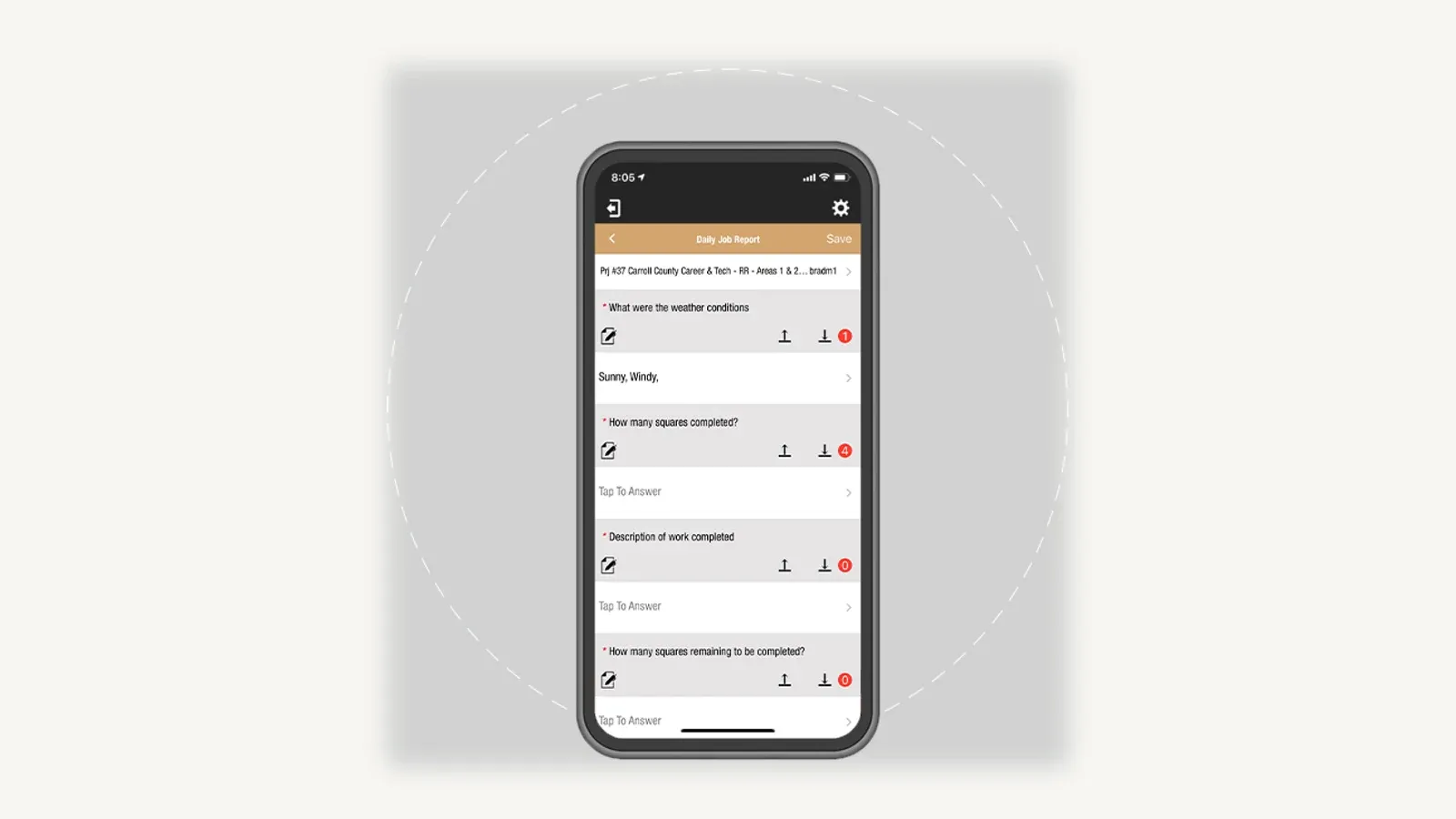
Dataforma’s mobile Daily Job Report, from its job site coordination page and captured 20 August 2026. It is a vendor marketing asset carrying real product UI, and it does not show deficiency plotting or rooftop maintenance mapping — the two capabilities we could not verify.
The buying case is history. When one property has five buildings and the next project comes out of an inspection you did eight months ago, a service and asset record is worth more than a faster production board.
We have to be straight about the evidence here, though. Dataforma’s public feature documentation is the thinnest of the four, and we could not independently verify deficiency plotting or rooftop maintenance mapping as named capabilities on any page we could read today.
Put both on your demo list rather than taking them as given. Its commercial buying case, including AIA progress billing, is covered in more depth in our commercial roofing software comparison.
Pricing is quote-only, with nothing published.
4. Procore — best for large construction controls
Procore belongs in the evaluation when the general contractor controls the process, not you. Its product list names submittals, daily log, inspections, observations, punch list, forms, bid management, schedule, budget, contract management, invoice management, subcontractor invoicing, prequalification and analytics.
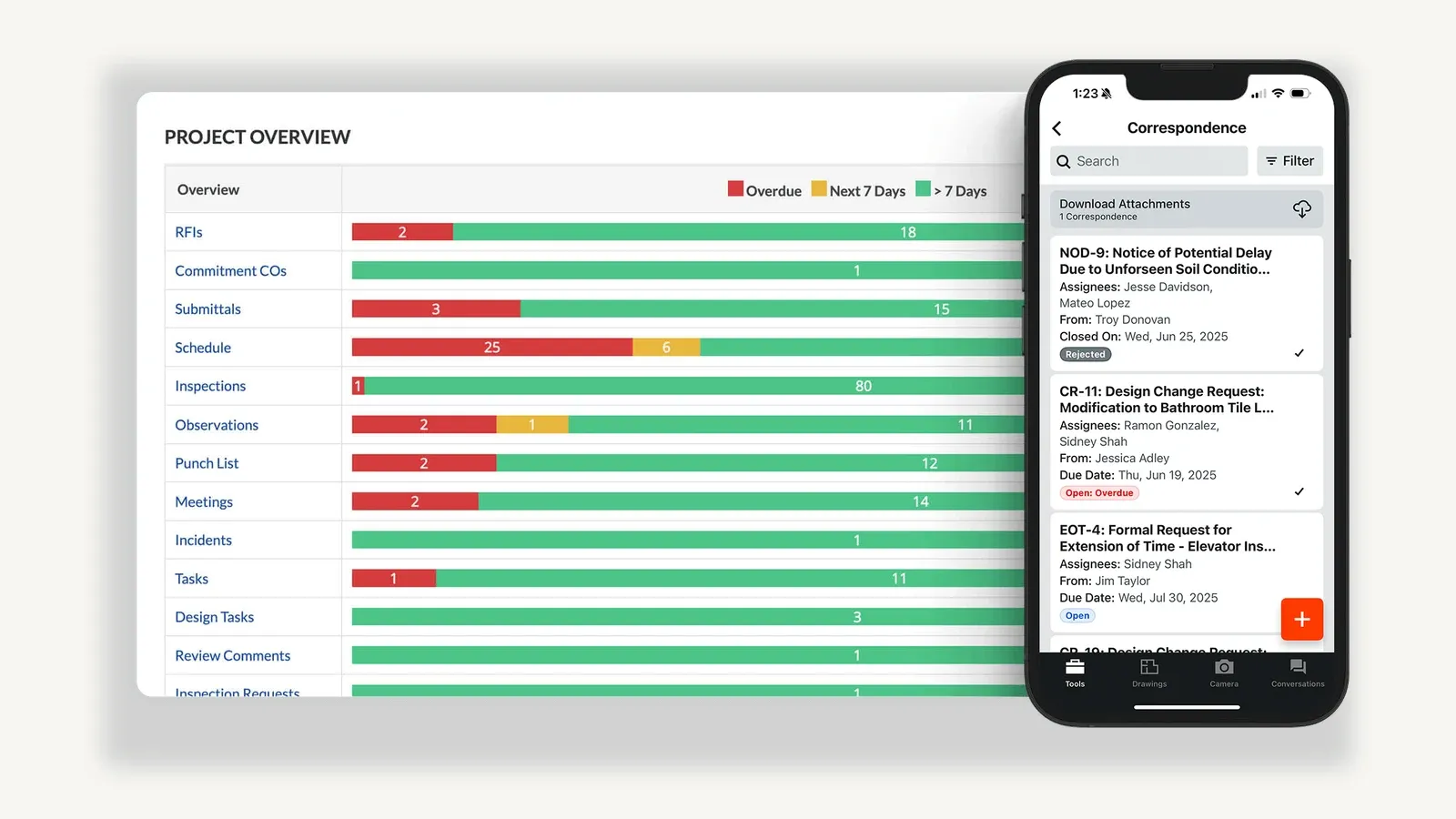
A Procore composite from its project management page, captured 20 August 2026 — a desktop overview beside a phone, not a single screenshot. Every row is a record type with an overdue count against it, which is what formal document control looks like in practice.
Those are the records a hospital, school, distribution centre or large new-build actually runs on. If your roofing package sits inside that kind of project, formal drawing control and change management stop being overhead and start being the job.
For a residential roofer, Procore is more system than the work requires. The honest framing is that it is a different category, not a better or worse version of the same thing.
Procore pricing is not per user
Procore’s pricing model is worth understanding even if you never buy it. It charges an upfront annual fee per product based on your Annual Construction Volume — the aggregate dollar value of construction work across your projects — with unlimited users, unlimited data and 24/7 support included, and no per-seat charge.
That inverts the calculation every other system on this page uses. Growing your headcount costs nothing; growing your revenue costs money.
Where FieldCamp fits
FieldCamp was not mentioned in the companion video, and we are not going to manufacture a win for it here. On this specific question it does not take a numbered slot beside the four, and the reason is concrete.
FieldCamp’s roofing pages name property and roof system tracking with material, install date and warranty details, recurring inspection plans, a flat-rate pricebook, good-better-best estimates with photos, storm damage and insurance claim documentation, manufacturer warranty registration, and skill-based dispatching down to shingle certifications and flat-roof experience. That is a real roofing service product.
But roofing production has a supply chain in the middle of it, and that is the link FieldCamp does not document. We found no supplier catalogue or direct material ordering of the kind AccuLynx and JobNimbus publish with ABC Supply, SRS Distribution and QXO, no aerial measurement ordering from EagleView or Hover, and no production calendar as a named feature.
So the honest recommendation is a bounded one. Look at FieldCamp when roofing service, inspections and maintenance are the work and roofing sits beside other trades you run — and compare it on commercial roofing or roofing CRM rather than on replacement production control.
Job costing while the job is moving
Every one of these systems can tell you what a job made after it closed. The difference is whether it can tell you while there is still time to act.
AccuLynx documents job costs and A/R tracking plus job profit forecasting on both tiers, with commissions and advances and paybacks reserved for Elite. JobNimbus documents Profit Tracker, which compares planned against actual — but only for documents you import by hand, starting from a signed and therefore frozen estimate.
Dataforma connects estimates, invoices, purchase orders and payables across a commercial workflow. Procore runs formal budget and change management built for contract-level cost control rather than for a retail re-roof.
For a typical roofing production company, AccuLynx has the strongest cost story of the four, because the number moves without anyone maintaining it. Confirm which tier your reporting lives on before you treat that as settled.
How to compare them in one demo
Bring one signed job and refuse to be shown a dashboard. Create the delivery delay, the crew re-assignment and the hidden decking, and make every vendor carry all three through to a final invoice.
Then ask the four questions that actually decide it, in writing:
- Which plan is each capability you just showed me on?
- Who can see margin — and can a subcontractor open a live work order without seeing money?
- How does actual cost arrive — automatically, or does somebody import it?
- What is the all-in annual cost for our users, modules, onboarding, data migration, supplier connections and support?
A polished dashboard is irrelevant if the handoff breaks in the field. Two of those four answers are not on any vendor’s pricing page.
Final verdict: which system fits your roofing company
AccuLynx for the strongest roofing-native production workflow, if you confirm the tier. The production calendar and production reporting are Elite, and no tier has a published price.
JobNimbus for boards shaped to your own process and the clearest documented subcontractor permission model. That comes with job cost maintained by hand, and subcontractor app access consuming seats.
Dataforma for commercial service, inspections and multi-building roof history. Its public documentation is the thinnest here, so more of your evaluation has to happen in the demo.
Procore for formal construction controls when someone else owns the process, priced on construction volume rather than seats.
For most roofing contractors doing replacement work, AccuLynx is the pick. For a commercial service contractor, Dataforma is a genuinely different and often better answer.
Make the handoff visible, measurable and repeatable. And get the tier in writing.
Frequently asked questions
What is the best roofing project management software in 2026?
AccuLynx, for most roofing contractors, because its production tools are shaped around roofing rather than adapted to it. JobNimbus is the better answer if you want to design your own stages, and Dataforma is the better answer for commercial service and roof portfolio history.
How much does roofing project management software cost?
Nothing in this comparison publishes a price as of 20 August 2026. AccuLynx quotes both Pro and Elite, JobNimbus quotes every plan, Dataforma is quote-only, and Procore charges an annual fee per product based on your annual construction volume.
Does AccuLynx still publish a $250 plan?
No. AccuLynx published an Essential plan at $250 a month until 18 August 2026, and its plan options page now lists only Pro and Elite with no published price on either.
Is the AccuLynx production calendar on every plan?
No — it is Elite only, along with production status and trade reports, the custom workflow manager, permits tracking, supplement tracking and commissions. Pro includes work orders, labour management, the job milestone tracker, the live activity feed, supplier direct ordering, job costs and A/R, and profit forecasting.
Can a subcontractor use JobNimbus without seeing job finances?
Yes. JobNimbus documents that subcontractors added as team members get photos, forms, calendar view, assigned tasks and work orders, the job name and address and shared documents, and states they do not have access to financial data or other sensitive information — but that requires a subscription seat.
What replaced Budgets in JobNimbus?
Profit Tracker. The Budgets documentation is now filed under Legacy, and Profit Tracker is the current tool for comparing planned against actual cost by importing signed estimates, material orders and work orders onto a job.
Do I need Procore for roofing?
Only when a general contractor controls the process and requires formal drawing control, RFIs, submittals and change management. For retail and insurance replacement work it is more system than the job needs, and a roofing-native platform will serve you better.
Is roofing project management software the same as a roofing CRM?
No. A CRM owns the work before the signature and a project management system owns it after — see our roofing CRM comparison for the pre-sale half, and our roofing software overview for platforms that attempt both.
What software do roofers use?
It depends which half of the job you are managing.
Roofing CRMs such as AccuLynx and JobNimbus run the sale and the production schedule, Dataforma is built for commercial service work, and Procore is a construction platform roofers meet as a subcontractor.
Sponsored
Ready to upgrade your dispatch?
FieldCamp uses AI to optimize routes, auto-assign jobs, and eliminate scheduling chaos — so you can run more jobs with fewer headaches.

Written by
Azaz Vepari
Editor, Modern Field Service
Tool profiles
Pricing, best fit and limitations for each tool in this review, one page each.