Azaz Vepari18 Mins read
Aspire vs LMN vs Service Autopilot in 2026
Three landscaping platforms run through the same three workflows — a 40-stop maintenance route, a $30,000 install, and the estimated-versus-actual review. Different winner each time, with every published price verified.
Source-based assessment. Read our evidence standard.
In this article12 sections
All three of these can run parts of a landscaping business. That is exactly why the comparison is hard — and why reading three feature lists side by side will not settle it. Service Autopilot is built around recurring route service and automation. LMN — now branded LMN by Granum — is built around the budget, the estimate and the job cost model. Aspire is built as a connected commercial operating system. Those are three different answers to three different questions, and the one you should buy depends entirely on which question is costing you money.
So instead of counting features, we ran the same three workflows through all three products: a 40-stop weekly maintenance route, a $30,000 landscape install, and the estimated-versus-actual review on a job that ran over. Each test has a different winner. That is not a hedge — it is the finding.
Quick answer: which of the three fits your landscaping business?
| Workflow under test | Winner | Why |
|---|---|---|
| 40-stop weekly maintenance route, two crews, mid-week changes | Service Autopilot | Recurring service is the centre of the product, not a mode it supports — one-click routing, route optimisation, automatic invoicing and automation for follow-up and billing |
| $30,000 install: pricing it so the margin survives | LMN | Labour burden is calculated for you, production rates are yours to set, and overhead recovery is built into every estimate — on the entry tier |
| $30,000 install: turning the approved estimate into production | Aspire | Kits carry production factors, approved margins apply automatically, and won work flows into a purchasing assistant, work tickets and crew schedules |
| “Why did the bid miss?” — estimated versus actual | LMN, on price. Aspire, at scale | LMN Professional adds real-time job costing and estimated-versus-actual hours at a published $648/mo. Aspire does the same inside branch, property, work-ticket and division reporting |
| Cheapest way to run two crews | Service Autopilot Pro, narrowly | $199/mo covers 1 office and 2 mobile users — which is exactly two crews and no spare. LMN Starter is $297/mo but includes 5 crew licences |
| Accounting handoff you can hand an accountant | Service Autopilot | A genuine two-way QuickBooks sync, Online and Desktop. LMN pushes to QuickBooks; Aspire deliberately sends deposits only |
| Unlimited users without tier maths | Aspire | Every client gets unlimited user licences, implementation, training and support inside one monthly licence fee — but no published price |
Pricing verified against each vendor’s own pricing pages on 14 August 2026. Check the vendor page on the day you buy. Pricing in this category moves, and that includes the figures on this page.
The three platforms at a glance
The table above answers “which workflow.” This one answers “which product,” one row each, so you can take a single line to the person who has to sign for it.
| Platform | Best for | Strength that matters in landscaping | Published pricing basis | Main limitation |
|---|---|---|---|---|
| Service Autopilot | Recurring maintenance routes and automated billing | Recurring service is the centre of the product rather than a supported mode — one-click routing, route optimisation, automatic invoicing and follow-up automation | Startup $49/mo, Pro $199/mo, Pro Plus $499/mo, Elite quote only — quoted at annual rates, plus an unpublished signup fee | Pro includes 1 office and 2 mobile users, so a third crew forces Pro Plus at $499/mo; the production-rate and overhead logic is undocumented and its job-costing page 404s |
| LMN | Companies whose recurring problem is jobs priced wrong | Budget-first estimating with labour burden calculated automatically, your own production rates, and overhead recovery built into every estimate — on the entry tier | Starter $297/mo, Professional $648/mo, Enterprise quote only, plus an unpublished one-time onboarding fee | Real-time job costing, estimated-versus-actual hours and QuickBooks Desktop are all Professional-and-up, so Starter answers only half the question at $297/mo |
| Aspire | Connected commercial operations running branches and divisions | Kits carry your production factors and approved margins into every estimate, and won work flows on into purchasing, work tickets and crew schedules | No published dollar price — a single licence fee quoted by company size and complexity, unlimited users included, protected through the contract term | Transfers deposits only to QuickBooks and expects to be your accounts receivable system; heavier implementation, and you buy without a published price |
FieldCamp is not in that table because it is not one of the three under test. Where it fits, and where it does not, is its own section below.
How we compared them
The evaluation method is stated so you can check it against our editorial policy.
- Pricing was verified against the live Service Autopilot, LMN and Aspire pricing pages on 14 August 2026. Where a vendor publishes a table, we quote it. Where a price is not published — Aspire’s licence fee, Service Autopilot’s signup fee and LMN’s onboarding fee are all in this category — we say “not published” rather than printing a third-party reconstruction as fact.
- Capability claims come from each vendor’s own feature pages, plan comparison matrix and FAQ, not from marketing copy or review aggregators. Where a tier gate exists we name the tier, because “the software does X” and “the plan you were quoted does X” are different sentences.
- This is a documentation-led comparison of three platforms against three landscaping workflows, not a hands-on trial of all three. The workflow judgements are ours, formed from the documented object models and from conversations with landscaping companies running these products. We label them as opinion rather than dressing them as test results.
- Where a capability could not be established from vendor documentation, this page says so. That applies specifically to Service Autopilot’s production-rate, labour-burden and overhead-recovery logic, below.
Two things this page adds to the companion video. The video says you need to ask Service Autopilot’s sales team to confirm the tier and add-on cost of the two-way QuickBooks sync. We since verified both: it requires a Pro or Pro Plus membership and costs $29 per month. The video also says Service Autopilot’s included office and mobile users are “limited” without naming the numbers; they are in the pricing table below, and on the Pro tier they are tighter than most buyers expect. Where the article and the video disagree, the article is the corrected version.
Test 1 — the 40-stop maintenance route
The setup: 40 weekly mowing and edging properties, two crews, one callout mid-week, six stops that have to move, and a batch invoice at the end. This is the week a route-based lawn care company actually has.
Service Autopilot documents weekly, biweekly and monthly scheduling, one-click routing, route optimisation, automatic invoicing, mobile GPS, and automation for follow-up and billing. Note the tier gates: dispatch is available from Startup, but route optimisation and multi-day jobs first appear on Pro, and the automation workflows first appear on Pro Plus. If routing is the reason you are buying, Startup at $49/mo is not the plan.
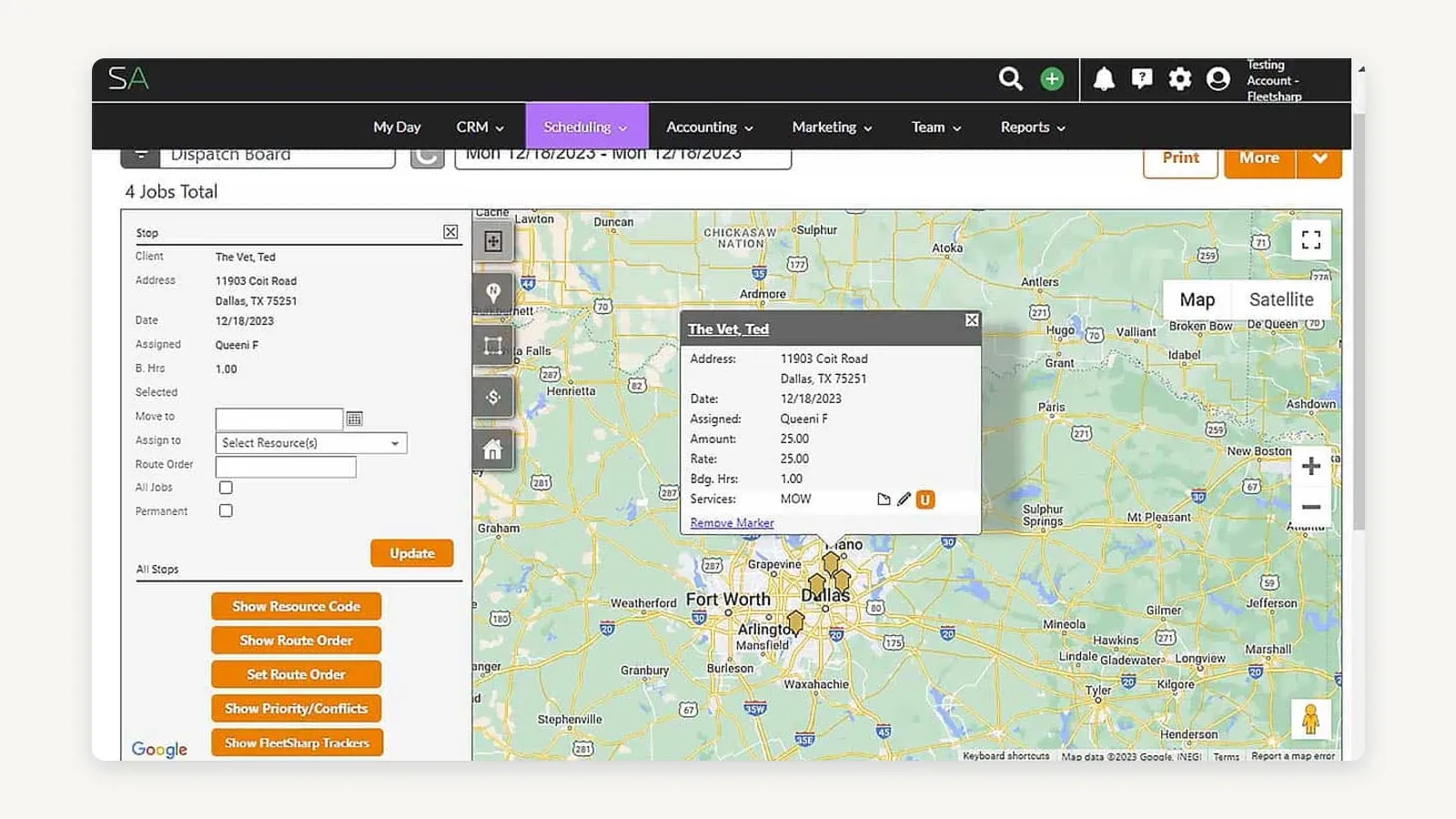
Service Autopilot’s Dispatch Board with Smart Maps — four stops on one day, not the 40-stop week this test describes. Routing and the Route Order controls are on screen; the weekly, biweekly and monthly recurrence settings are not. Image supplied by Service Autopilot; cropped, not otherwise edited; observed 14 August 2026.
LMN documents route optimisation, drag-and-drop scheduling, calendars and a whiteboard, GPS location verification, offline access and efficiency scores — and unusually, all of that is on LMN Starter, not held back for a higher tier. Instant adjustment for weather, delays or call-backs is documented explicitly, which is the mid-week callout in this test.
Aspire supports recurring work tickets, and its recurrence model is the most granular of the three: day of the week, week of the month, month of the year, or a custom number of days between visits, with a full year’s contract scheduled in a few clicks. Optimisation runs by day, by route or by workload, and Aspire states plainly that “the algorithm seamlessly integrates last minute jobs into existing routes.” Moving the six stops is drag-and-drop — move a ticket to a new day, split it between days, extend it, reassign it, or split it between several techs, teams or crews — and changes push to the Crew Mobile app immediately.
All three enter this test and all three finish it. Service Autopilot wins because recurring service is the centre of gravity rather than a supported mode: the automatic invoicing and the follow-up automation close the loop at the end of the week without anyone touching it.
But there is a cost wrinkle the feature comparison hides, and it is the sharpest practical finding in this whole article. Service Autopilot Pro at $199/mo includes one office user and two mobile users. Two crews is exactly two mobile users. Add a third crew, or a working owner who also needs the app, and you are on Pro Plus at $499/mo — where the included mobile count goes to five. LMN Starter, at $297/mo, includes five crew licences out of the box. Somewhere between two and three crews, the cheaper product stops being the cheaper product.
Test 2 — the $30,000 landscape install
The setup: labour, materials, equipment, a subcontractor, overhead, a target margin, an approved proposal, and then a crew that has to build the same plan the estimate assumed.
This test splits in two, and the two halves have different winners.
Pricing it so the margin survives — LMN wins. LMN’s estimating model is genuinely different from the other two, and it is the reason LMN has the reputation it does with owners who have been burned by underpricing. The budget comes first and every estimate fits inside it: “Every estimate in LMN fits into your budget — and your planned profit.” Production rates and price lists are yours to customise. Overhead recovery is built into each estimate rather than paid out of profit at year end. And labour burden is calculated automatically — wages, taxes and benefits — which is the single most commonly underpriced input in landscape work. Automated proposals and job plans are included on every tier, Starter upward.
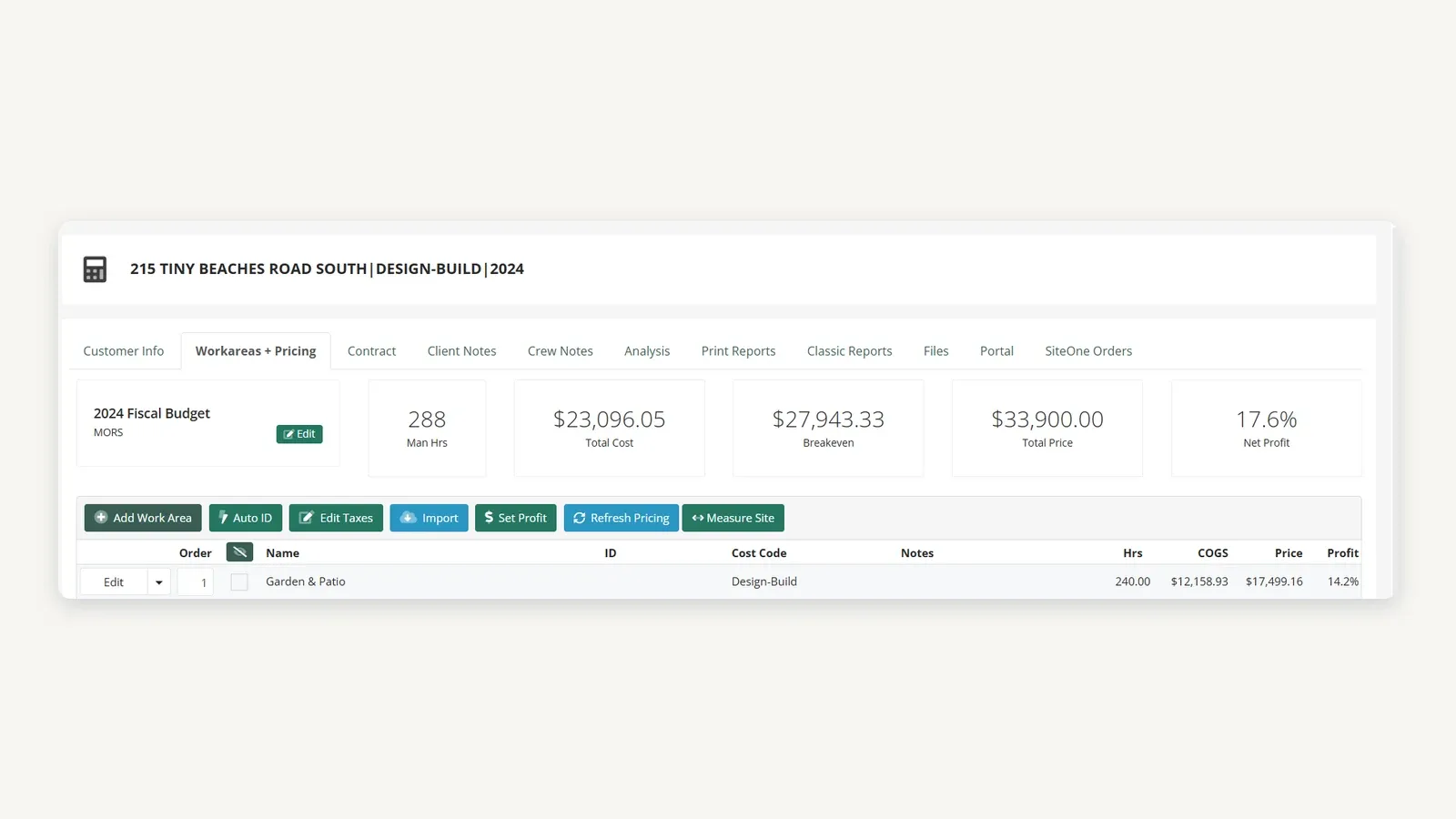
An LMN design-build estimate, priced against the fiscal budget named in its own header — $23,096.05 cost, $27,943.33 breakeven, $33,900.00 price, 17.6% net profit. The budget above the estimate is the distinction this test turns on. Image from LMN’s own support documentation; cropped, not otherwise edited; observed 14 August 2026.
Turning the approved estimate into production — Aspire wins. Aspire’s estimating centre is the kit: an item that combines your company’s production factors with labour and material or supply cost. The margins and markups you have established for labour, materials and supplies, subcontractors and other direct costs are applied to estimates automatically rather than being remembered by whoever is quoting. Clients approve with a digital signature, by email or in a customer portal. Then won work moves downstream: the purchasing assistant collects all uncommitted materials tied to won work, viewable by category, by job or across everything, so a buyer builds one grocery list rather than chasing jobs. Purchases go directly to a job or to inventory and are allocated to a job or work order by PO number. Catalogue prices can be refreshed from your own historical spend.
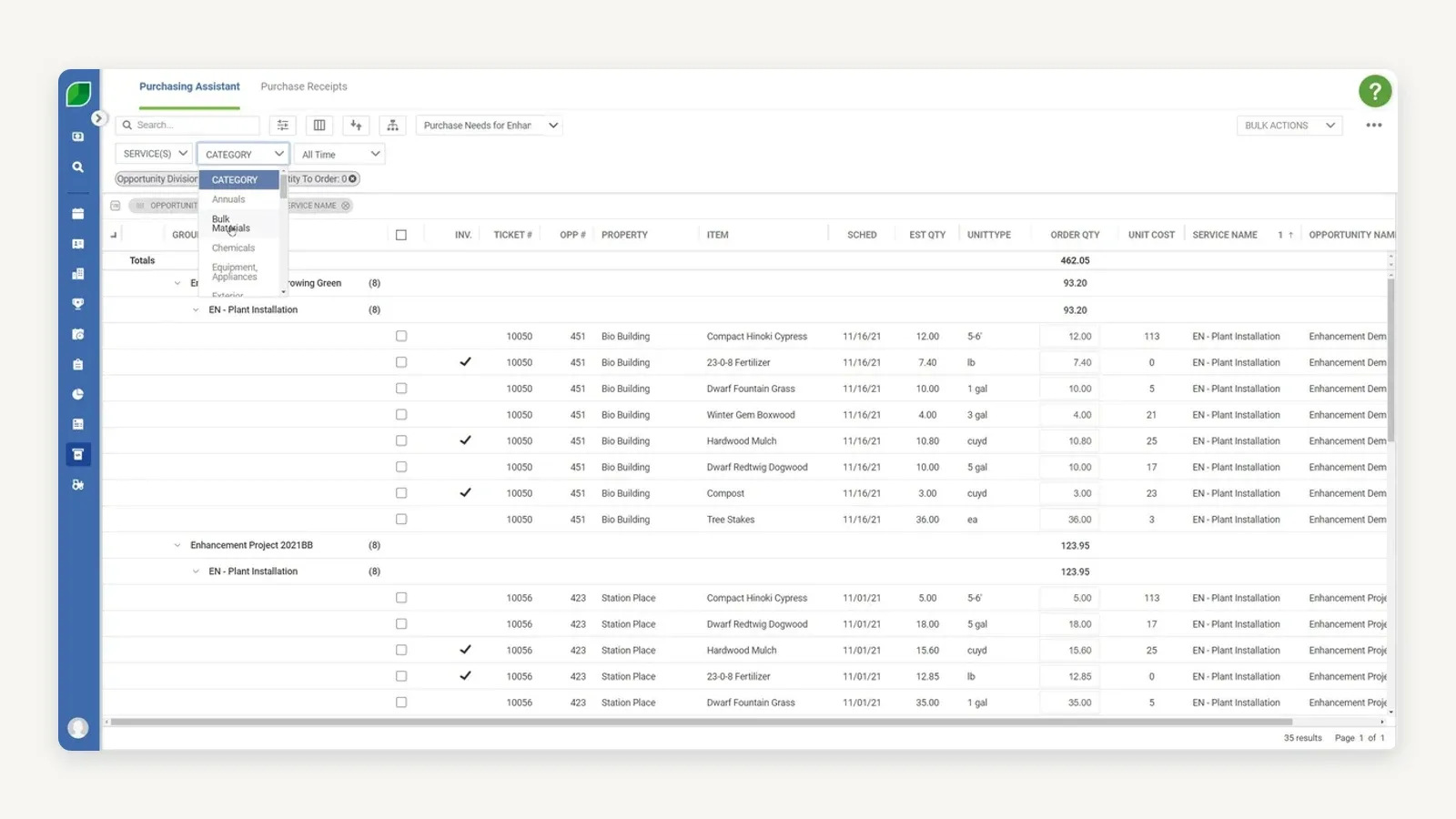
Aspire’s Purchasing Assistant, collecting uncommitted material for won work into one list grouped by opportunity and service, with the category filter open, showing Annuals, Bulk Materials, Chemicals and a combined Equipment, Appliances entry among its categories. This is the buyer’s grocery list described above. Image supplied by Aspire; observed 14 August 2026.
Service Autopilot can enter this test but not win it. Multi-day jobs and job costing appear on Pro, so the mechanics exist. What we could not establish from its public documentation is the layer this test is actually about: the production-rate, labour-burden and overhead-recovery logic that LMN and Aspire both spell out. Its dedicated job-costing feature page returns a 404 as of 14 August 2026. That is an absence of published evidence, not proof of an absent feature — but for a $30,000 install we would not buy on an assumption, and neither should you.
Winner: LMN for estimate discipline, Aspire for estimate-to-production continuity. If your problem is that jobs get priced wrong, buy LMN. If your problem is that correctly priced jobs fall apart between approval and the crew, buy Aspire.
Test 3 — why did the bid miss?
The setup: 160 crew hours planned, 184 used, plus $700 of unbudgeted material. The only question that matters afterwards is why, and whether the system can tell you before the next twelve jobs make the same mistake.
LMN wins this section on published price. LMN Professional at $648/mo explicitly adds real-time job costing, tracked estimated-versus-actual hours, equipment costing, material tracking, vendor bill management and subcontractor tracking, plus advanced dashboards and time-efficiency scoreboards. Note the gate carefully, because it is the most important tier boundary in this article: none of that is on LMN Starter. Starter gives you the budget and the estimate; Professional is where you find out whether the estimate was right. An owner who buys Starter to save $351 a month has bought the half of LMN that does not answer this question.
Aspire tracks the same thing and reports it wider. Real-time labour and material cost is tracked against the job, and historical results feed forward into future estimates — the catalogue price refresh from actual spend is one visible instance of that loop. For a commercial operator who also needs the answer broken out by branch, property, work ticket, purchasing and division, Aspire is the better operating fit even where LMN answers the narrow question just as well.
Service Autopilot is the honest gap. Its Pro tier lists “Job Costing & Analysis,” and its own guidance material describes comparing estimated against actual costs and charting budgeted hours against actual staff hours. What its public pages do not show is enough detail for us to call it a winner against two products that document the mechanics line by line. We are not calling it weak. We are declining to call it.
Winner: LMN. For a commercial operation with branches and divisions, Aspire.
Pricing and users: three completely different shapes
These three products are not priced on the same axis, which is why “which is cheapest” has no answer until you count seats.
| Plan | Published price | Users included | What this tier unlocks |
|---|---|---|---|
| Service Autopilot — Startup | $49/mo | 1 office, 1 mobile | Dispatch. No route optimisation, no multi-day jobs, no job costing |
| Service Autopilot — Pro | $199/mo | 1 office, 2 mobile | Multi-day jobs, route optimisation, job costing and analysis. Minimum tier for the 2-way QuickBooks sync |
| Service Autopilot — Pro Plus | $499/mo | 1 office, 5 mobile | Adds automation workflows |
| Service Autopilot — Elite | Contact for pricing | 2 office, 8 mobile | Highest published user allowance |
| LMN — Starter | $297/mo | 1 office or crew-lead, 5 crew | Overhead recovery, production rates, labour burden, automated proposals and job plans, route optimisation, GPS verification, offline access, QuickBooks Online |
| LMN — Professional | $648/mo | 3 office or crew-lead, 15 crew | Real-time job costing, equipment and material costing, vendor and subcontractor tracking, estimated-vs-actual hours, QuickBooks Desktop, Zapier |
| LMN — Enterprise | Contact sales | Scales to 100+ users | Everything in Professional at scale |
| Aspire — single licence fee | Not published | Unlimited | All contracted functionality, plus implementation, training, post-implementation support and all future upgrades |
Three unpublished numbers sit inside that table and you should treat all three as real line items:
- Service Autopilot charges a signup fee on Startup, Pro and Pro Plus. The amount is not published. All three monthly rates are also quoted “based on annual subscription rates,” so a monthly commitment may not be those numbers.
- LMN charges a one-time onboarding fee on every tier, described on the pricing page as a prerequisite — “after a one-time onboarding fee.” The amount is not published.
- Aspire publishes no dollar figure at all. Pricing varies by company size and complexity, a single licence fee is billed monthly, and the price is protected through the contract term. What you get for it is unusually clearly stated: unlimited user licences, a complete implementation and training programme, post-implementation support, problem-solving services, and all future enhancements, upgrades and new versions. That is a genuinely different commercial model, not a coy version of the other two.
The practical consequence: at one or two crews Service Autopilot is cheapest, at three or more crews LMN Starter is competitive on a per-seat basis, and Aspire only becomes comparable once your user count is high enough that unlimited licences beat tier maths. If you are a five-person company, Aspire’s model is not built for you and its implementation weight will tell you so.
Accounting handoffs: three genuinely different stories
This is the section buyers skip and accountants regret. All three “integrate with QuickBooks.” None of them mean the same thing by it.
Service Autopilot has the real two-way sync, and it is the strongest accounting story of the three. Change something in QuickBooks and it updates in Service Autopilot; change it in Service Autopilot and QuickBooks reflects the change. Customers, invoices, payments, credits, vendors, sales reps and the chart of accounts are all in scope, and QuickBooks Desktop is supported alongside Online — Pro, Premier and Enterprise. Two conditions apply, and both were unpublished in the video: it requires a Pro or Pro Plus membership, and the 2-way sync is a $29/month add-on, not an included feature.
LMN pushes to QuickBooks, and the tier decides which QuickBooks. Every tier including Starter supports QuickBooks Online. QuickBooks Desktop support starts at Professional, and Professional is also where Zapier appears — 6,000-plus apps, which is the escape hatch for anything LMN does not integrate with natively. If you run QuickBooks Desktop, LMN Starter is not an option and the entry price for you is $648/mo, not $297.
Aspire deliberately sends less, and says so. This is the one people misread as a limitation when it is a design decision, so it is worth quoting: “All invoicing and payment application information, including account aging, happens in Aspire. No invoice or payment information is transferred to QuickBooks as this creates unnecessary duplication of data. Aspire transfers only deposit information to QuickBooks to true-up cash and account receivable balances.” Aspire integrates with QuickBooks and Acumatica, and enterprise-tier clients can request an open API and a data-warehouse option for Tableau or Power BI. Read that carefully before you buy: Aspire expects to be your accounts receivable system, with the general ledger downstream. If your controller wants invoices in QuickBooks, that is a workflow change, not a settings change.
Have your accountant read those three paragraphs before you sign anything. Mapping the handoff after go-live is how a month-end gets lost.
The verdict for landscaping companies in 2026
Choose Service Autopilot if recurring routes are the engine
Recurring lawn routes, automated customer communication and automated billing are what this product is for, and it is the cheapest of the three to start. Buy Pro, not Startup — route optimisation, multi-day jobs and job costing all begin there, and it is the minimum tier for the QuickBooks sync. Then count your mobile users honestly: two crews fit Pro exactly, three do not.
Choose LMN if the company lives or dies by the estimate
If your recurring problem is jobs priced wrong — labour burden underestimated, overhead not recovered, production rates guessed — LMN’s model is the one built around that problem, and the budget-first approach is not something the other two replicate. Buy Professional if you want to know whether the estimate was right. Real-time job costing, estimated-versus-actual hours and equipment costing are all Professional-and-up, and Starter without them answers only half the question.
Choose Aspire if you run a connected commercial operation
Maintenance and construction, work tickets, purchasing, crews, branches and divisions living in one operating chain — that is Aspire’s shape, and nothing here does it as completely. Two honest conditions. You have to be able to own a heavier implementation, and you have to be comfortable buying without a published price. In exchange you get unlimited users, which changes the arithmetic completely once you are past a dozen or so people.
Run the same three workflows in all three demos
Do not ask which one has the longest feature list. Put the same route, the same estimate and the same completed job into all three demos, then compare what came out.
- Build the 40-stop route, then move six stops mid-week and add one callout. Time it.
- Estimate one real install you have already built, using your own labour burden, production rates and overhead. Compare the price the software produces to the price you actually charged.
- Close a job that went over — 184 hours against 160 planned, plus $700 of material — and ask each product to tell you why. If the answer arrives as an export you have to pivot yourself, that is your answer.
- Get the commercial terms in writing: subscription, included office and field users, signup or onboarding fee, add-on costs including the QuickBooks sync, accounting flow direction, contract length and support scope.
The winner is the one that fits how your company actually makes and loses money — not the one that demos best.
Where FieldCamp fits — and where it does not
We publish reviews on a site that also links to FieldCamp, so the honest thing is to state where it belongs in this comparison and where it does not.
FieldCamp documents a landscaping data model: visits auto-generate from a weekly, biweekly, monthly or seasonal pattern so a maintenance route schedules itself, and each visit is staffed by team members matched on skill and service area, through a Request → Estimate → Job → Visit → Invoice → Payment chain. For a route-based maintenance company that also wants skill-based crew assignment, it is a reasonable thing to look at alongside Service Autopilot.
It is not an answer to tests 2 and 3, and its own documentation is the reason we say so: “The continuous budget-vs-actual reporting Aspire centers its product on is lighter in FieldCamp.” Cost and price are separated in the price book and actual labour and materials are captured against the job, but per-ticket real-time margin tracking is explicitly lighter than what LMN Professional and Aspire do. If the question you opened this article with was “why did the bid miss,” FieldCamp is not the tool that answers it, and we are not going to pretend otherwise. FieldCamp pricing is quoted per business. Disclosure: our FieldCamp links carry a referral parameter identifying this site as the source of the visit.
Frequently asked questions
1. Is Aspire, LMN or Service Autopilot best for a landscaping business?
None of the three wins outright, because they are built around different problems. Service Autopilot is best for recurring route-based lawn care where automated scheduling, communication and billing drive the business. LMN is best where budget-based estimating, production rates, labour burden and learning from actual costs decide profitability. Aspire is best for larger commercial operations that need maintenance, construction, work tickets, purchasing, crews and reporting in one chain, and can absorb a heavier implementation.
2. How much does Service Autopilot cost in 2026?
Service Autopilot publishes Startup at $49/mo, Pro at $199/mo and Pro Plus at $499/mo, with Elite quoted on request. All three published rates are based on annual subscription rates, and every tier carries a signup fee whose amount is not published. Included users are tight: Startup covers 1 office and 1 mobile user, Pro covers 1 office and 2 mobile, Pro Plus covers 1 office and 5 mobile, and Elite covers 2 office and 8 mobile. Verified 14 August 2026.
3. How much does LMN cost, and what is the difference between Starter and Professional?
LMN Starter is $297/mo with 1 office or crew-lead licence and 5 crew licences. LMN Professional is $648/mo with 3 office or crew-lead licences and 15 crew licences. Enterprise is quoted and scales past 100 users. Every tier carries a one-time onboarding fee whose amount is not published. The difference that matters is job costing: real-time job costing, equipment and material costing, vendor bill management, subcontractor tracking, estimated-versus-actual hours, QuickBooks Desktop and Zapier are all Professional-and-up. Verified 14 August 2026.
4. How much does Aspire cost?
Aspire publishes no price. It prices by company size and complexity, bills a single monthly licence fee for all contracted functionality, and includes unlimited user licences, implementation, training, post-implementation support and all future upgrades. The price is protected through the contract term. Anything you read quoting a confident per-user figure for Aspire is quoting a sales conversation, not a price list.
5. Which one is cheapest for a small landscaping company?
Service Autopilot, at one or two crews — but the margin is narrower than the headline suggests. Pro at $199/mo includes only two mobile users, so a third crew forces Pro Plus at $499/mo. LMN Starter at $297/mo includes five crew licences, which makes it competitive from roughly three crews upward. Add the unpublished signup and onboarding fees to both before you compare, and add $29/mo if you need Service Autopilot’s two-way QuickBooks sync.
6. Does Service Autopilot sync with QuickBooks two ways?
Yes, and it is the strongest accounting integration of the three. Changes flow in both directions across customers, invoices, payments, credits, vendors, sales reps and the chart of accounts, and QuickBooks Desktop is supported as well as Online. Two conditions: it requires a Pro or Pro Plus membership, and the 2-way sync is a $29/month add-on rather than an included feature.
7. Does Aspire integrate with QuickBooks?
Yes, but not in the way most buyers expect, and the difference is deliberate. Aspire integrates with QuickBooks and Acumatica but transfers only deposit information, to true up cash and accounts receivable. Invoicing, payment application and account aging all stay in Aspire, which Aspire states is to avoid duplicating data. Enterprise-tier clients can request an open API and a data-warehouse option for Tableau or Power BI. Practically, this means Aspire expects to be your accounts receivable system.
8. Which landscaping software is best for job costing?
LMN Professional, on published price — it adds real-time job costing, tracked estimated-versus-actual hours, equipment and material costing, and vendor and subcontractor tracking at $648/mo. Aspire tracks real-time labour and material cost too and reports it across branches, properties, work tickets, purchasing and divisions, which suits a larger commercial operator. Service Autopilot lists job costing and analysis from its Pro tier, but its public documentation does not detail the production-rate, labour-burden and overhead-recovery logic the other two spell out.
9. Which one has the best route optimisation for lawn maintenance?
All three optimise routes, and the differences are about where the feature sits. Service Autopilot’s route optimisation begins on Pro, not Startup. LMN includes route optimisation on every tier including Starter, alongside GPS location verification and offline access. Aspire optimises by day, route or workload and states that its algorithm integrates last-minute jobs into existing routes, with drag-and-drop moving, splitting and reassignment of tickets. For a purely route-first business, Service Autopilot’s automation around the route is the stronger overall package.
10. Is LMN the same as LMN by Granum?
Yes. LMN now trades as LMN by Granum, and the old golmn.com domain redirects to granum.com/lmn/. It is a rebrand of the same product, not a different platform, and pricing and plan structure are published on the Granum site.
Sources and check dates
All pricing and plan detail verified 14 August 2026 against vendor-published pages.
- Service Autopilot pricing and plan user limits — https://www.serviceautopilot.com/pricing/
- Service Autopilot two-way QuickBooks sync, tier requirement and $29/mo add-on price — https://www.serviceautopilot.com/quickbooks-online/
- LMN plans, pricing and full feature matrix — https://granum.com/lmn/pricing/
- LMN estimating, production rates, labour burden and overhead recovery — https://granum.com/lmn/estimating/
- LMN product overview — https://granum.com/lmn/
- Aspire plans, licence model and price protection — https://www.youraspire.com/aspire-plans
- Aspire FAQ, including the QuickBooks and Acumatica data flow — https://www.youraspire.com/faqs
- Aspire scheduling, recurrence and route optimisation — https://www.youraspire.com/features/scheduling
- Aspire estimating, kits and margins — https://www.youraspire.com/features/estimating
- Aspire purchasing and the purchasing assistant — https://www.youraspire.com/features/purchasing
- FieldCamp landscaping data model and its stated job-costing limitation — https://docs.fieldcamp.ai/data-model/landscaping
Service Autopilot’s dedicated job-costing feature page returned HTTP 404 on 14 August 2026, which is why this article declines to score it on test 3 rather than scoring it low.
Sponsored
Ready to upgrade your dispatch?
FieldCamp uses AI to optimize routes, auto-assign jobs, and eliminate scheduling chaos — so you can run more jobs with fewer headaches.

Written by
Azaz Vepari
Editor, Modern Field Service
Tool profiles
Pricing, best fit and limitations for each tool in this review, one page each.